Appointment Booking System: Book Mover Jobs 24/7
June hits, the trucks are out, your dispatcher is juggling crew ETAs, and the office line keeps ringing. One caller wants a local move quote. Another wants to know if you can squeeze in a last-minute pack job. A third calls after dinner, when nobody's in the office. If those calls don't turn into booked jobs, your marketing dollars did their job and your front office didn't.
That's why an appointment booking system matters for movers. Not because you need a prettier calendar. Because you need a way to capture demand, quote accurately, and lock jobs into the schedule without relying on whoever happens to be free to answer the phone.
Table of Contents
- The Real Cost of a Ringing Phone That Goes Unanswered
- What Is an Appointment Booking System for Movers
- Core Features That Actually Book Moving Jobs
- The Business Case Recovering Revenue and Boosting Efficiency
- How to Evaluate Vendors A Mover's Checklist
- Your Four-Week Implementation Rollout Plan
- Frequently Asked Questions for Moving Company Owners
The Real Cost of a Ringing Phone That Goes Unanswered
Tuesday, 10:07 a.m. in June. One truck is late to its unload window, another crew is waiting on elevator access, and the office line lights up while your dispatcher is fixing a same-day change. Nobody answers. That caller does what moving customers usually do. They try the next company on the list.
For a mover, that missed call is not a small service hiccup. It is a shot at a quote, a deposit, and a booked truck that just slipped out of reach.
Customers shopping for a move rarely contact one company and wait patiently. They call around. The first mover who can answer basic questions, qualify the job, and move the customer toward a price usually gets the strongest chance to close. If your process starts with voicemail, you are already behind.
A Common Scenario
A caller wants a two-bedroom move for the last weekend of the month. They need to know whether you service their zip code, whether stairs change the price, and whether you still have a truck open. If nobody picks up, they do not sit there hoping for a callback. They keep dialing until someone gives them direction.
That is where revenue leaks.
Even when your team returns the call later, the sales position is weaker. Another mover may have already gathered the inventory, given a ballpark quote, and offered a time to lock in the job. Speed matters because moving decisions are often made under pressure. Leases end, closings get moved up, and customers want certainty fast.
Missed calls cost you twice. You lose the first chance to quote the move, and you hand a competitor the first chance to close it.
Why growth makes this more expensive
The bigger the operation, the more exposed this gap becomes. A two-truck owner-operator can sometimes cover missed calls with hustle. A 5 to 20 truck company cannot rely on that for long. More crews, more route changes, more storage questions, more reschedules, and more inbound leads all hit the same front office at the same time.
Peak season makes it worse. The calendar is tighter, higher-value dates disappear faster, and each unhandled inquiry has a direct opportunity cost. If you miss a call for a Friday month-end move, you are not just missing a conversation. You may be missing one of the highest-yield slots on the board.
There is also an operations cost. Manual callbacks create piles of half-finished conversations, duplicate entries, and schedule mistakes. Teams that want to eliminate double bookings need a system that captures the lead, qualifies the move, and offers the next step before the customer disappears.
Why voicemail and answering services fall short
Voicemail records a name and number. It does not ask the questions that produce a usable quote. It does not check truck capacity. It does not separate a profitable local move from a bad-fit lead that will waste your coordinator's afternoon.
Generic answering services have the same ceiling. They can be polite, but polite is not the same as productive. If the caller still has to wait for your office to review inventory, confirm pricing rules, and offer a real appointment, the sale is still sitting in limbo.
Moving customers want quick answers to practical questions:
- Date: Do you still have availability?
- Price range: Am I close to budget?
- Job fit: Can you handle packing, stairs, long carries, or storage?
- Next step: Can I get this quoted and booked today?
If your intake process cannot handle those questions on the spot, the phone is costing you more than noise. It is costing booked jobs, truck utilization, and revenue you already paid to generate.
What Is an Appointment Booking System for Movers
A prospect calls at 8:17 p.m. They want to move next Friday, need packing, and have a third-floor walk-up. A basic scheduler can offer a time slot. It cannot tell them whether the job fits your crew plan, what the price range looks like, or whether that date is still worth selling.
That is the difference.
Most software sold under “booking” is built for fixed services with fixed prices. Moving jobs are sold in layers. Crew size, truck count, drive time, inventory, stairs, long carries, shuttle needs, and add-ons all affect whether a lead should be quoted, routed, or declined. For movers, an appointment booking system has to do more than place something on a calendar. It needs to move the customer from inquiry to quote to confirmed work.
It's a quoting and closing workflow
A plain calendar works for a haircut or a consultation because the service is already defined. In moving, the appointment depends on the quote, and the quote depends on the intake.
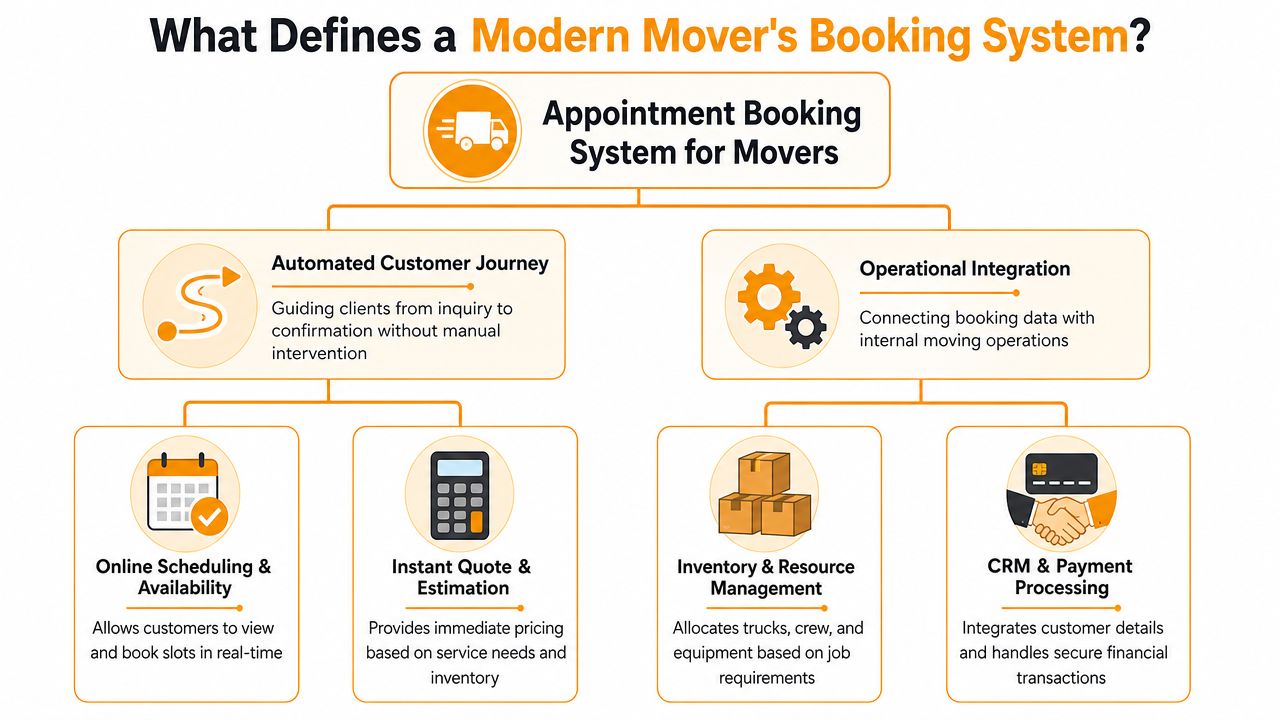
For moving companies, the workflow looks more like this:
- Capture the inquiry from phone, form, text, or chat.
- Qualify the move with the details that change labor, truck needs, and price.
- Generate a quote path using your pricing rules, whether that means ballpark, survey, or firm estimate.
- Check live capacity against the dates and job size you can still profitably take.
- Book the next step or the job itself into the system your office and dispatch team already use.
That sequence matters because revenue is won or lost before the job hits the board. A mover-specific booking system closes the gap between a missed call and a signed job. Generic schedulers and answering services do not.
What a Mover-Specific System Does
A useful system handles intake when your coordinators are busy, after hours, or buried in peak-season volume. It asks the questions your office would ask, then routes the lead toward the right next step instead of dumping another callback on the pile.
Good systems also apply business rules. If the customer wants a two-bedroom apartment moved across town, the tool should know whether to offer a fast quote and booking flow. If the lead involves a large home, packing, storage, or unclear inventory, it should push that prospect into a survey or human review. That is how automated moving estimate workflows help sales teams quote faster without pretending every move is simple.
Capacity control matters just as much. If quoting logic sits in one tool and scheduling sits in another, your office ends up selling dates you cannot staff cleanly. Systems built to eliminate double bookings protect the board by tying availability to shared resources such as trucks, crews, and time windows.
Practical rule: If the tool can collect contact info but cannot qualify the move, apply pricing logic, and reserve workable capacity, it is not a booking system for movers. It is a lead catcher.
Most moving companies already own pieces of this stack:
- Answering services capture messages, but rarely gather enough detail to quote.
- Generic voice tools can ask questions, but often miss moving-specific edge cases.
- CRMs like SmartMoving, Supermove, or MoveitPro are strong once the lead is in the system.
- Simple calendars track appointments, not margin, truck utilization, or sales fit.
The missing piece is the layer up front that turns inbound demand into scheduled revenue. That is what an appointment booking system for movers is supposed to do.
Core Features That Actually Book Moving Jobs
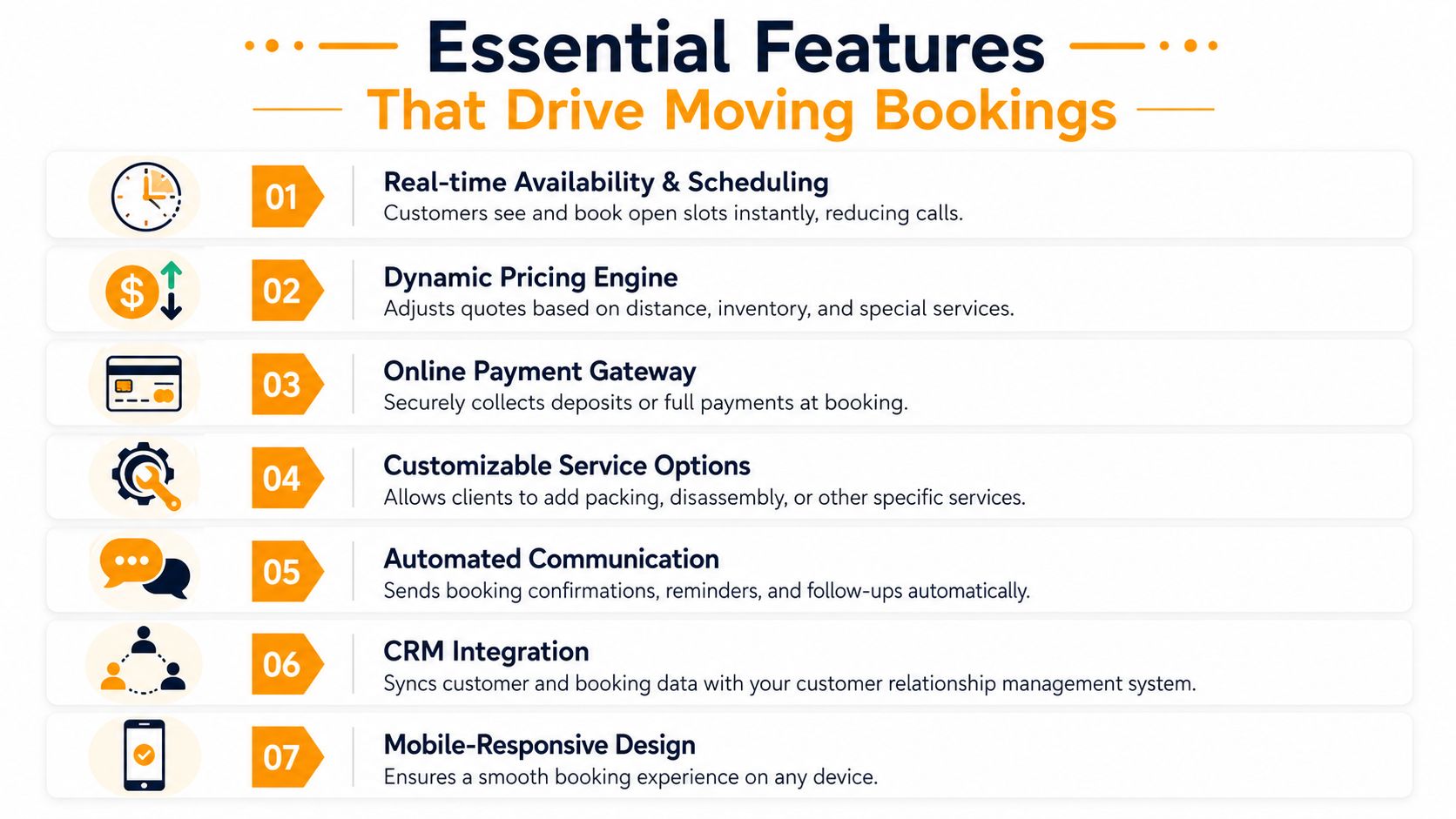
A lot of software demos well and still fails in the field. The reason is simple. It handles intake as a communication task, not as a sales and operations workflow. Movers need features that close the gap between inquiry and scheduled revenue.
Always-on intake
The first requirement is coverage. Every inbound path should feed the same process. Calls, web leads, after-hours inquiries, and weekend demand all need immediate handling.
That doesn't mean every lead should get the same script. A local apartment move, a larger home with packing, and a commercial relocation need different question flows. But they all need the same outcome: no delay, no dropped handoff, and no “we'll call you back tomorrow.”
What works:
- Immediate response: The system should engage the customer as soon as they reach out.
- Structured qualification: It should ask for move date, origin, destination, size, access details, and add-on services.
- Escalation paths: If the inquiry is unusual, it should flag it for human review instead of guessing.
What doesn't work:
- Message taking: You're still depending on callbacks.
- Static contact forms: They collect names and numbers, not bookable jobs.
- One-size-fits-all scripts: They miss the details that affect price and crew planning.
Quoting logic built around your rate card
Many tools fall short at this stage. Movers don't need software that says, “Thanks, someone will contact you.” They need software that can price the move with enough accuracy to keep the sale moving forward.
The quoting engine should reflect how your company sells. Hourly or flat rate. Travel charges. Stair fees. Long carry. Packing labor. Material charges. Storage transitions. Time minimums. Service area rules.
That's also where specialized automation becomes useful. If you want a picture of how a mover-specific workflow should function, look at how automated moving estimates connect intake details directly to quoting logic instead of forcing the office to rebuild every estimate manually.
A good quoting workflow should do three things well:
- Use the same pricing rules your staff uses
- Ask enough questions to avoid obvious quote errors
- Keep the customer moving toward commitment instead of forcing a second conversation for basic pricing
The fastest quote isn't the best one. The best one is fast enough to win and accurate enough not to blow up on move day.
Booking and dispatch integration
Once the customer is ready, the booking needs to land where your team works. That means direct sync into SmartMoving, Supermove, MoveitPro, or Google Calendar. If someone still has to copy and paste customer info, retype notes, or manually create the job, you haven't fixed the bottleneck. You've relocated it.
There's also a technical side that owners should care about even if they don't want tech jargon. Booking systems need clean structure and solid reservation logic. Academic and system-design guidance points to layered or 3-tier architecture for separating presentation, business logic, and data access, which keeps booking and cancellation workflows easier to maintain in production settings, as described in this layered architecture reference. And on the transaction side, the booking core should treat each slot as a shared resource with atomic reservation logic, conflict resolution, indexing, and connection pooling, which is highlighted in this booking engine system design discussion.
For operators, the plain-English takeaway is straightforward:
| Feature | Why it matters in a moving company |
|---|---|
| Live availability | Prevents office staff from promising dates you can't service |
| Automatic job creation | Cuts re-entry and admin lag |
| Conflict controls | Helps prevent schedule collisions under load |
| Calendar sync | Keeps sales, dispatch, and operations looking at the same day |
If the tool can't quote, can't book, and can't sync to operations, it won't book more moving jobs. It'll just create cleaner paperwork around the same old leak.
The Business Case Recovering Revenue and Boosting Efficiency
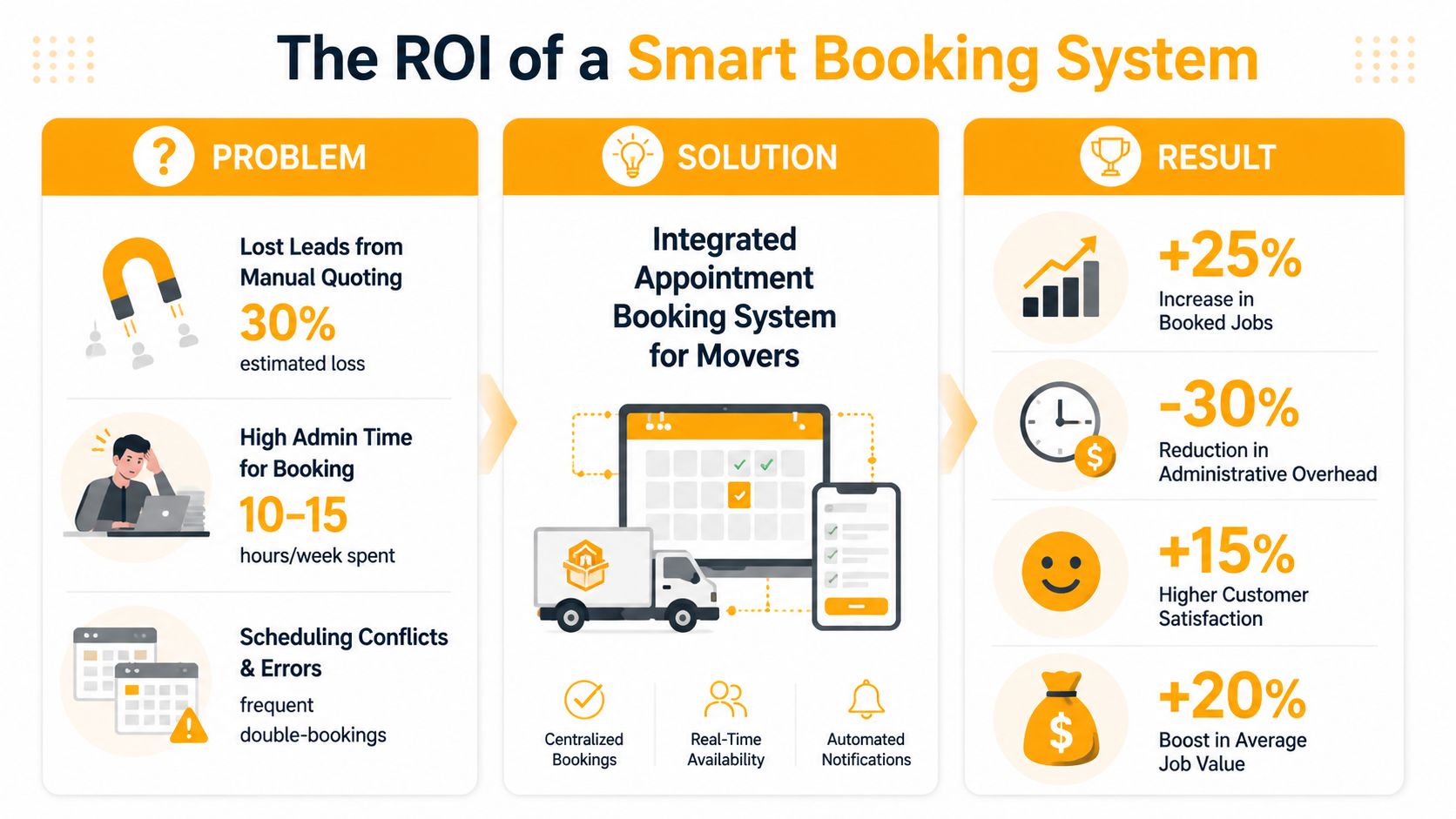
The return on a booking system isn't theoretical for operators. It shows up in fewer idle gaps, faster intake, cleaner handoffs, and less office chaos during the months when demand spikes.
Revenue comes from utilization, not just convenience
A lot of owners evaluate booking tools like they're buying a nicer customer experience feature. That's too narrow. The bigger payoff is operational utilization.
A documented clinical study found that after online appointment scheduling was introduced, one medical practice had 2,806 online bookings, which was 22.8% of 12,312 scheduled appointments, while a companion hospital setting had 6,288 online bookings, or 7.2% of 81,173 appointments, according to the online appointment scheduling study published on PMC. More important than the channel mix, the same study found unused appointments fell from 22.7% to 10.3% and never-booked appointments fell from 8.6% to 1.6% in the practice setting.
For movers, the direct lesson is simple. Better booking systems don't just make customers happy. They help you use the capacity you already have.
Where operators actually feel the payoff
When a moving company tightens booking operations, the improvements usually show up in a few predictable places:
- Cleaner front-office workload: Staff stop spending their day chasing missed calls and retyping intake notes.
- Better schedule quality: Sales and dispatch work from the same source of truth.
- Fewer quote breakdowns: Customers get pricing logic earlier, which reduces confusion later.
- Stronger peak-season control: You can manage demand instead of reacting to it.
That last point matters more than most owners realize. Booking faster is good. Booking blindly is not. Appointment scheduling is really a supply-and-demand matching problem, and AHRQ's open-access scheduling guidance is useful because it frames availability as a capacity decision, not just a convenience feature. Movers face the same challenge every summer. If demand spikes and truck capacity is fixed, your booking logic has to protect the schedule, not just fill it.
A similar operations mindset shows up outside moving too. If you want a broader logistics view, this complete delivery management guide is worth reading because it highlights how routing, scheduling, and fulfillment all depend on reliable upstream job intake.
Booking software should protect dispatch, not create more cleanup work for dispatch.
Owners who want the biggest gain should focus on throughput first, then admin efficiency. That means building a process that captures demand, prices it correctly, and feeds the schedule in a way your team can trust. That's the path to improving operational efficiency without piling another disconnected tool onto the stack.
How to Evaluate Vendors A Mover's Checklist
The market is full of tools that sound similar in a demo. Automation. AI. Scheduling. Lead capture. The language overlaps. The actual capabilities don't.
The fastest way to avoid a bad fit is to ask questions that force the vendor to deal with real moving workflows instead of generic appointment talk.
Questions that expose generic systems
Start with pricing logic. If the platform can't handle your actual estimate rules, stop there.
Ask these questions directly:
- Can your system quote using my exact rate card? Ask about hourly jobs, flat-rate work, travel charges, minimums, packing, materials, stair fees, and long carries.
- Can it handle moving terminology naturally? If the vendor gets lost on walk-up, elevator reserve, shuttle, bulky items, or valuation coverage, that's a warning sign.
- Does it book directly into SmartMoving, Supermove, MoveitPro, or Google Calendar? Manual re-entry means more admin and more errors.
- How does it manage follow-up after an unbooked quote? If it captures the lead but leaves the next step to your staff, you still own the bottleneck.
- What happens with edge cases? Storage-in-transit, partial packing, date changes, or multi-stop jobs shouldn't break the workflow.
It also helps to compare broader software categories before you narrow the field. This rundown of the best appointment scheduling software is useful for seeing how general tools are typically positioned, which makes it easier to spot what's missing for movers.
Vendor Evaluation Green Flags vs Red Flags
| Green Flag (Built for Movers) | Red Flag (Generic System) |
|---|---|
| Understands moving-specific quote variables | Talks mostly about calendars and reminders |
| Supports direct booking into operating systems | Exports leads for your team to process later |
| Handles rate card logic without workarounds | Needs custom manual review for routine estimates |
| Knows the difference between answering and closing | Frames success as “messages captured” |
| Fits dispatch and sales workflow | Creates a separate inbox your team must babysit |
| Can explain how it supports busy-season load | Works fine only in low-volume, simple scheduling setups |
A second screen for vendors is how they talk about the job to be done. Good vendors talk about bookings, quoting accuracy, and operational fit. Weak vendors talk about “engagement” and “customer touchpoints” without showing how the move gets priced and scheduled.
If you're comparing options across your office stack, a mover-focused review of best software for moving companies can help you separate core operating systems from front-end booking tools.
Don't buy the tool that sounds smartest. Buy the one that can survive a real Thursday in July.
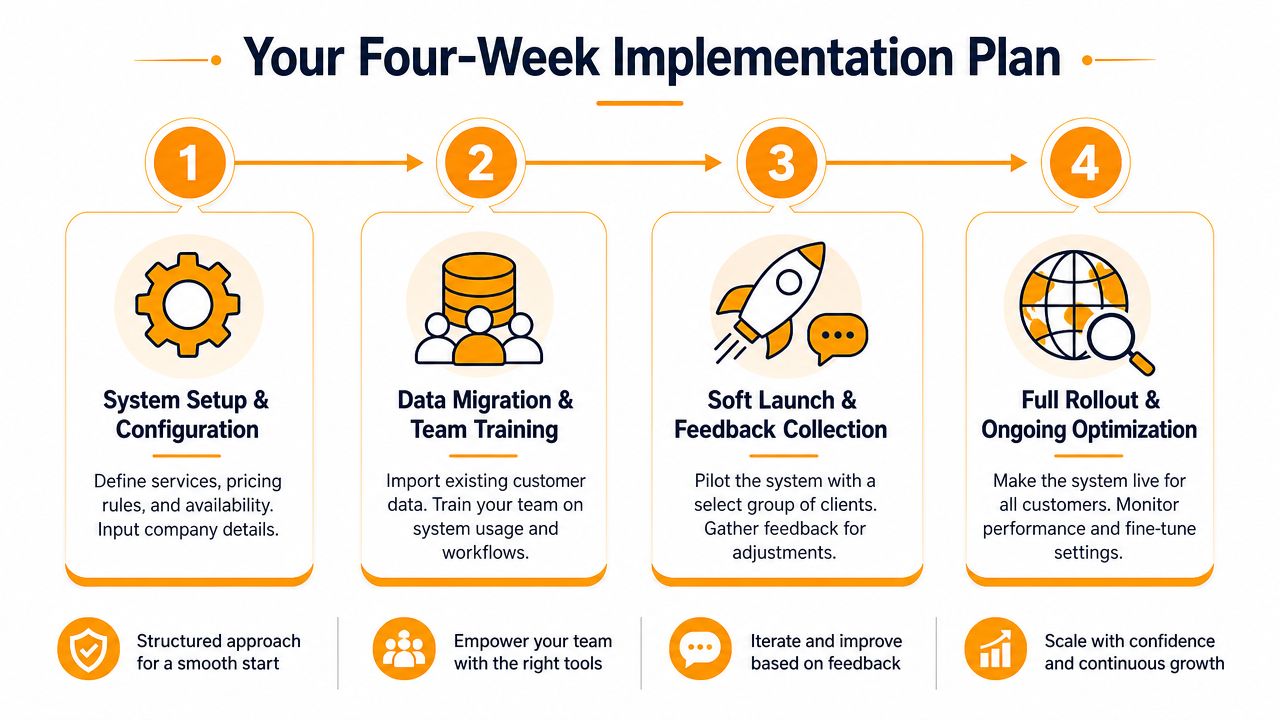
Your Four-Week Implementation Rollout Plan
Most moving company owners don't avoid automation because they hate it. They avoid it because they assume rollout will eat up the office for a month. It doesn't have to if you keep the implementation tied to real workflows and phase it in.
Week 1 and Week 2
Week 1 is about pricing and scope. Load your service areas, move types, rate structures, add-ons, and scheduling rules to ensure the system reflects how your office quotes.
Week 2 is about connection. Hook it into your CRM, calendar, and any dispatch views your team relies on. Then run internal tests using common job types. Local apartment move, suburban house move, packing add-on, stair carry, date change.
A short Week 1 and Week 2 checklist:
- Rate card review: Clean up old pricing exceptions before you automate them.
- Availability rules: Define blackout dates, crew constraints, and service windows.
- Internal testing: Have office staff try to break the workflow on purpose.
- Fallback handling: Decide what should route to a human.
Week 3 and Week 4
Week 3 should be a soft launch. Put the system on web inquiries first, or route only a limited call path through it. That lets you watch how quotes, bookings, and handoffs behave without changing everything at once.
Week 4 is full rollout. Forward the main line or open the full intake workflow across channels. Then monitor booked jobs, exception cases, and schedule quality every day.
Rollout goes smoother when you automate the routine jobs first and keep unusual jobs on a human lane until the team trusts the system.
One caution matters here. Booking is only half the battle if customers don't follow through. A systematic review on no-shows found that lead time repeatedly predicts whether people miss appointments, prior no-show history also strongly predicts future misses, and reminders alone don't reliably solve the problem in all settings, according to this review of no-shows in appointment scheduling. Movers face the same kind of fragility when a booked job has weak customer responsiveness, uncertain scope, or a shaky close. So during rollout, don't just track bookings. Track booking quality.
Frequently Asked Questions for Moving Company Owners
Will customers want to book a move this way
They will if the system does more than collect a name and phone number.
Moving customers want three things fast. A realistic price range, a clear next step, and a firm confirmation. If your booking flow gives them that without waiting for a callback, many will choose it over voicemail and phone tag. I saw this firsthand. The close rate improved because people could move from inquiry to quote to booked job while they were still ready to buy.
Can a booking system handle complicated moving quotes
Some can handle them well. Many fall apart as soon as the job stops looking standard.
A mover needs logic for crew size, truck count, stairs, long carries, packing, storage, travel time, and service area rules. If the system cannot price those inputs the way your sales team already does, it will produce shaky quotes and your office will have to redo the work. That defeats the point. The right system should automate the repeatable jobs and flag edge cases for a human before they become bad bookings.
Will this create more cleanup work for dispatch
It can, if the tool only captures leads and dumps half-finished records into your workflow.
Cleanup drops when the system writes complete job data into the calendar or moving software your team already uses, follows your blackout dates, and respects crew availability. Dispatch usually gets buried by bad intake. Wrong zip codes, missing inventory, vague time windows, and jobs booked without checking truck capacity cause more damage than automation does.
Is online booking enough by itself
No.
A basic online form helps with convenience, but it does not solve the front-end revenue gap. Movers do not just need appointment scheduling. They need a way to answer the inquiry, quote the job, and close it while the customer is still engaged. Generic booking tools and answering services rarely do that well because they stop before the hardest part, which is turning interest into a confirmed move.
What's the biggest mistake movers make when choosing a system
They buy a tool that sounds good in a demo but does not match how their company prices and books work in peak season.
Ask one hard question. Can this system take a missed call or web inquiry, apply our rate card, screen for fit, and confirm a real booking without office staff stepping in on every job? If the answer is no, you are buying another layer of admin, not a revenue system.
If your phones are still turning into voicemail, delayed callbacks, and quotes that sit unbooked, it's worth looking at a tool built for the front-end revenue gap. MoveJoy is designed for moving companies that want to answer, quote, and book jobs automatically using their own rate card and existing workflow.