Automated Lead Qualification: Movers’ Guide 2026

If you run a 5 to 20 truck moving company, you already know the problem. The phone rings while your coordinator is helping a walk-in, your dispatcher is juggling crews, and your sales manager is calling back estimates from yesterday. By the time someone returns that missed call, the customer has already talked to two other movers.
That’s where automated lead qualification matters. Not as a trendy add-on, but as an operational system for deciding, in real time, whether a caller is a fit, what they need, whether you can price the job accurately, and whether the opportunity should be booked, routed, or declined. For movers, that process has to work on the phone, not just through web forms and email sequences.
The challenge is that most automated lead qualification advice was written for generic B2B sales teams. It assumes long sales cycles, demos, and email nurture. Moving companies don’t work that way. Your leads arrive by phone, they want answers quickly, and the details that determine whether a job is profitable are specific: dates, access, inventory, distance, packing, specialty items, and whether the move falls inside your service area. If your system can’t handle those details, it isn’t really qualifying leads. It’s just collecting messages.
Table of Contents
- First Define What a Bookable Lead Looks Like
- Design Your Automated Call Flow and Script
- Connect Automation to Your Moving Company CRM
- Test Your System Rigorously Before Going Live
- Track the KPIs That Actually Drive Revenue Growth
- Operational Best Practices for Long-Term Success
First Define What a Bookable Lead Looks Like
Most movers skip this step. They say they want more leads, but what they really need is more bookable leads. Those are not the same thing.
A generic answering service usually captures a name, phone number, and maybe a moving date. That’s not enough to decide whether the job fits your operation. It creates work for your office staff because someone still has to call back, ask the necessary questions, build the quote, and figure out whether the move even belongs in your pipeline.
Why generic qualification fails for movers
Moving companies lose money when vague leads clog the front end. One cited sales statistic says 67% of lost sales come from poorly qualified leads, and another says only 25% of marketing leads qualify for direct sales engagement, which is a strong reminder that weak intake standards waste sales time from the start, as noted by LeadBoxer’s review of manual vs automated lead qualification.
For movers, poor qualification usually looks like this:
- Missing service area checks. The caller wants a move you don’t cover.
- Ignoring scheduling reality. They want your busiest Saturday when your board is already tight.
- Skipping profitability filters. The job is too small, too complex, or too labor-heavy for the margin.
- No access details. You price it like a standard apartment move, then discover a long carry, freight elevator issue, or four-flight walk-up.
- No decision signal. The caller is only collecting ballpark numbers and isn’t ready to choose anyone.
Practical rule: If your team can’t explain why a lead should be quoted, booked, nurtured, or declined, your automation won’t fix the problem. It will scale the confusion.
The best way to tighten this up is to borrow structure from broader qualification thinking, then translate it into moving-specific rules. A good starting point is Prometheus Agency’s insights on B2B lead scoring, but movers need to swap abstract sales criteria for operational criteria that affect crew time, truck use, and quote accuracy.
The fields that decide whether a move is worth quoting
Start with a simple qualification checklist your office can agree on. If a lead misses one of your essential criteria, it shouldn’t move through the same path as a strong-fit job.
| Qualification area | What to confirm | Why it matters |
|---|---|---|
| Service fit | Origin, destination, service area match | Prevents wasted quoting on jobs you won’t run |
| Date fit | Preferred move date and flexibility | Helps protect peak-season capacity |
| Move scope | Home size, inventory level, packing needed | Drives labor and truck planning |
| Access complexity | Stairs, elevators, long carries, parking limits | Protects quote accuracy |
| Special handling | Piano, safe, glass, gym equipment, hot tub | Flags jobs needing special pricing or review |
| Revenue potential | Minimum job size or route value | Keeps small, low-margin work from crowding out better jobs |
A practical triage model helps:
- Bookable now. In area, date works, scope is clear, pricing inputs are complete.
- Needs review. Large home, unusual access, multi-stop route, specialty items, or mixed services.
- Nurture. Real prospect, but date is far out or details aren’t complete yet.
- Disqualify politely. Outside service area, wrong job type, or poor fit for your operation.
If you run multiple crews, define this by lane or season. A profitable winter local move may not be worth the same attention during peak season when you should protect calendar space for higher-value jobs.
Design Your Automated Call Flow and Script
A strong automated lead qualification workflow doesn’t sound robotic. It sounds organized. The caller should feel like your company knows exactly what to ask and why.
The biggest mistake is loading the front of the call with every possible question. That frustrates real buyers and makes the system feel slow. A better approach is to ask questions in the same order an experienced sales rep mentally builds a quote.
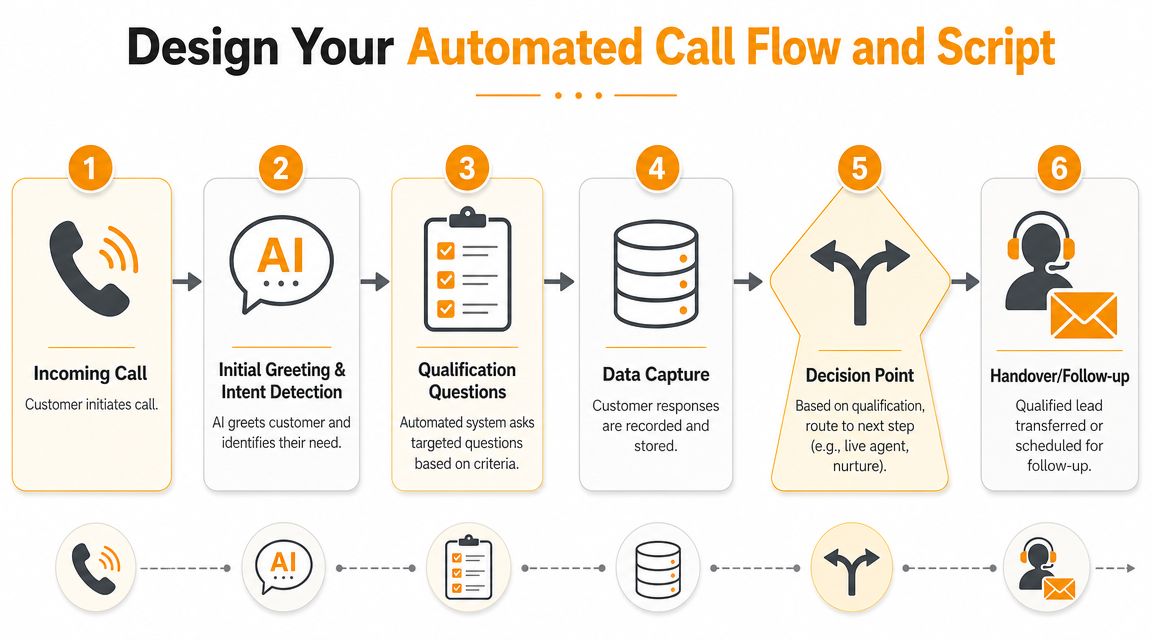
Build the call in the same order a rep would think
A high-performing automated qualification workflow collects first-party data, uses predictive scoring based on past wins, and routes leads using both positive signals and negative ones, according to Default’s guidance on AI lead scoring. For movers, that means the system should listen for signals like an urgent move date or a pricing request, while also flagging issues like being out of service area.
The call flow should move in layers:
Intent first
Are they asking for a local move, long-distance move, packing, storage, junk removal, or something else?Contact and route basics
Name, phone number, email, move-from zip code, move-to zip code.Timing and availability
Requested date, backup date, and whether timing is flexible.Scope and price drivers
Home size, estimated boxes, major furniture, packing needs, disassembly, special items.Access and labor complexity
Stairs, elevator reservation, long carry, shuttle risk, loading restrictions.Decision path
Are they looking to book now, comparing quotes, or just gathering information?
A good script branches. If someone says they’re moving a studio into a first-floor apartment across town, the system shouldn’t ask the same questions it would ask for a four-bedroom house with packing, storage, and a piano.
For teams building their own intake logic, a detailed call intake script for service businesses is useful because it shows how to keep the conversation natural while still gathering pricing inputs in the right sequence.
A sample flow for a common local move
Take a standard three-bedroom local move. A good automated lead qualification script would sound something like this in practice:
Opening
“Thanks for calling. Are you looking for a moving quote, help with an existing move, or something else?”Location check
“What address are you moving from, and where are you moving to?”Date check
“What date are you planning to move, and do you have any flexibility if that day is unavailable?”Size and inventory
“Is the home a house, apartment, or condo? How many bedrooms are being moved?”Complexity questions
“Are there stairs, elevators, or a long walk from the truck to the entrance?”
“Do you have any specialty items like a piano, safe, or gym equipment?”Service add-ons
“Do you need packing, unpacking, or storage?”Closing step
“Would you like a quote now if everything looks like a fit?”
A weak script captures facts. A strong script captures the facts that determine whether you can quote accurately on the first call.
Many generic tools break down here. They can ask a few questions and store notes, but they don’t understand moving logic well enough to turn the answers into a usable quote path.
Connect Automation to Your Moving Company CRM
A lead isn’t qualified until it lands where your team works. For most movers, that means SmartMoving, Supermove, MoveitPro, or at minimum a shared scheduling system like Google Calendar.
If the automation ends with “someone should follow up later,” you still have a front-office bottleneck. The handoff is where a lot of moving companies lose the value they thought they bought.
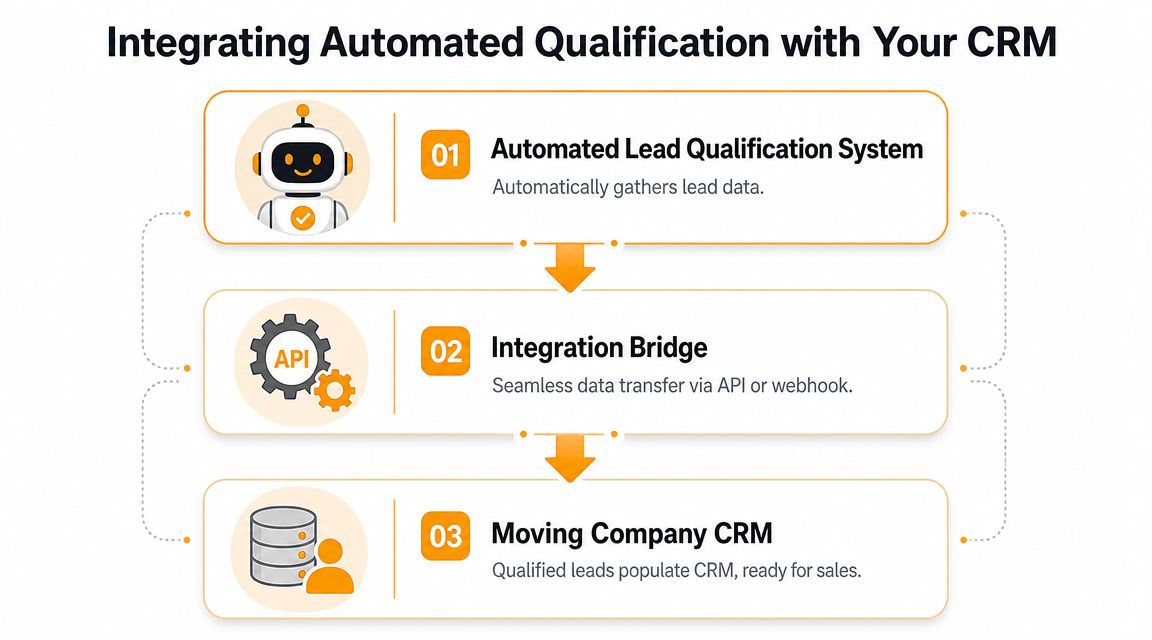
Lead capture is not the same as job creation
There are three common setups in the market, and they’re not equal.
| Option | What it usually does well | Where it breaks for movers |
|---|---|---|
| Human answering service | Picks up overflow calls | Usually takes messages, rarely quotes accurately |
| Generic voice automation | Captures caller details and basic intent | Often stops before pricing and booking |
| Moving-specific automation with CRM tie-in | Collects move details and pushes structured records into ops systems | Requires strong setup and testing |
The key distinction is simple. Capturing a lead means recording contact information. Closing a job means the move is priced, scheduled, and entered into the system your team already uses.
That difference matters because moving customers shop fast. If your process creates another callback task, your team is still racing against competitors after the initial conversation ends.
What good CRM integration looks like for movers
A useful integration should do more than create a contact. It should create operational clarity.
Look for these outcomes:
- Structured intake data. Addresses, dates, inventory notes, access details, and services should land in the right fields.
- Quote-ready records. Your sales team shouldn’t have to reconstruct the call from scratch.
- Calendar or job creation. If the move is bookable, the next step should already be visible on the board.
- Clear ownership. Strategic or unusual jobs should be routed to the right manager, not dumped into a generic queue.
- Follow-up triggers. If the lead isn’t booked, the system should trigger the next touch automatically.
A broad overview of CRM workflows for service businesses is helpful here because it highlights the operational gap many owners feel every day. The software may be in place, but the intake process still depends on people remembering to enter clean information.
When the CRM only receives partial notes, the office still does manual cleanup. That isn’t automation. It’s delayed admin work.
For movers, the ideal setup is simple to explain: the caller gets qualified, the quote gets built from your pricing logic, and the job appears where your team schedules work. That’s what reduces burnout during nights, weekends, and in-season call spikes.
Test Your System Rigorously Before Going Live
No moving company should trust a qualification workflow just because the demo sounded good. The test that matters is whether the system can handle real call scenarios without creating bad quotes, bad routing, or bad customer experiences.
Office teams usually test only the easy path. A basic local move, perfect inputs, no special items, no scheduling conflict. That’s not enough. Your real calls won’t be that clean.
Run scenario tests, not just happy-path tests
Build a test sheet with different move types your office sees every week.
Include scenarios like:
- Simple local move. Small apartment, no stairs, standard date.
- Peak-season family move. Larger home, tighter calendar, higher booking urgency.
- Complex access job. Elevator rules, long carry, multiple flights of stairs.
- Multi-stop move. Pickup, storage, then final delivery.
- Out-of-area inquiry. Caller should be declined or rerouted cleanly.
- Specialty-item move. Piano, safe, or oversized furniture that needs escalation.
For each test call, verify four things:
- Did the system ask the right questions?
- Did it avoid irrelevant questions?
- Did the quote logic follow your rate card rules?
- Did the record land correctly in your CRM or calendar?
Use a go-live checklist your team can trust
Before launch, have someone from sales, dispatch, and operations sign off. Each team sees different problems.
Use a short checklist:
- Pricing accuracy. Confirm hourly rules, flat-rate logic, minimums, travel charges, and add-ons.
- Routing accuracy. Confirm what happens to qualified, unqualified, and manager-review calls.
- Data integrity. Confirm every field maps correctly into SmartMoving, Supermove, MoveitPro, or your scheduling system.
- Edge-case handling. Confirm the system knows what to do when information is incomplete.
- Fallback path. Confirm a human can step in when the job is unusual or high value.
The point of testing isn’t perfection. It’s confidence. Your staff needs to know the system won’t create avoidable cleanup or embarrass the company with a bad quote.
Track the KPIs That Actually Drive Revenue Growth
Too many operators judge automation by one question: “Did it answer the phone?” That’s the wrong scorecard.
A phone can be answered and the revenue can still be lost. The better question is whether the workflow turns more inbound demand into qualified opportunities, booked jobs, and cleaner front-office operations.
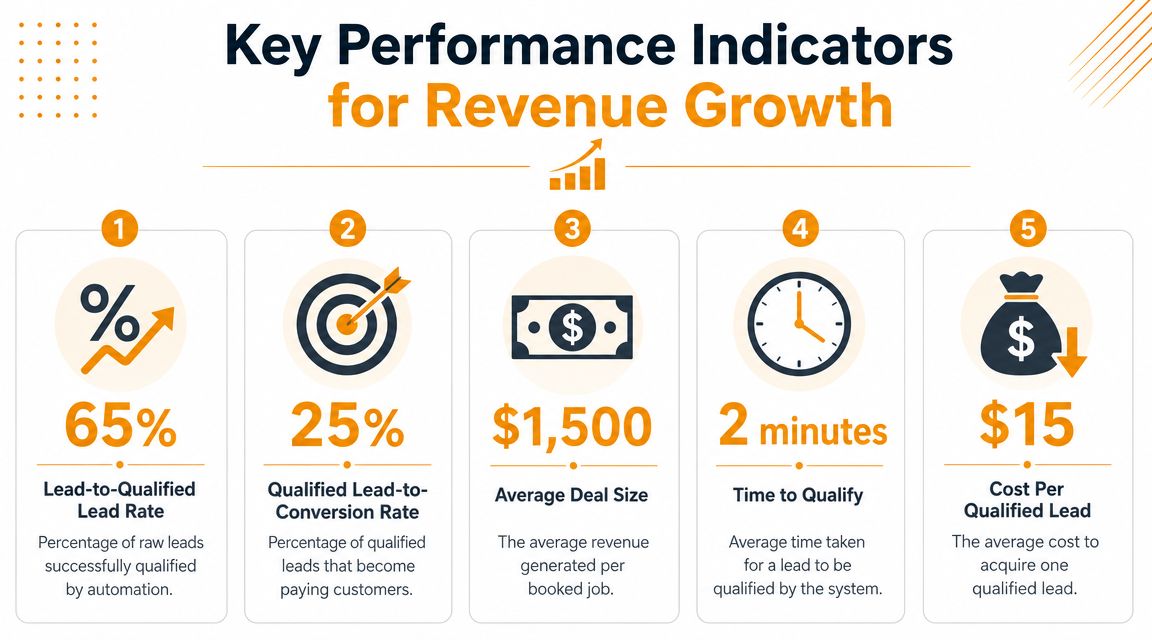
Measure outcomes, not activity
The business case for automated lead qualification is tied to speed and efficiency. A 2025 article citing HubSpot says companies adopting automated lead qualification can see at least a 10% revenue increase within months, while automation in lead nurturing can generate 50% more sales-ready leads at one-third of the cost, according to Droxy’s review of automated lead qualification.
Those are useful directional benchmarks, but movers should still track their own numbers with discipline. Don’t focus on vanity metrics like total calls handled if you’re not tying them back to booked work.
A good supporting resource is this breakdown of key performance indicators for contact centers. It’s not moving-specific, but it helps owners think beyond call volume and start measuring response quality, follow-up, and conversion flow.
The KPI that matters most is the one that changes staffing decisions, quoting discipline, or booking behavior. If a metric doesn’t help you act, it’s noise.
Simple KPI formulas movers can use
Start with five metrics that your office can calculate without a data analyst.
Qualified lead rate
Qualified leads ÷ total inbound leads
This tells you whether your intake rules are too loose or too strict.Lead-to-booking rate
Booked jobs ÷ total qualified leads
This is the cleanest measure of whether your qualification and quoting process is producing real jobs.Quote accuracy review rate
Number of quoted jobs needing manual correction ÷ total automated quotes
If this is high, your pricing logic or call flow needs work.Recovered revenue from missed-call windows
Revenue from after-hours, weekend, or overflow bookings that would otherwise require voicemail follow-up
Track this separately so you can see whether the system is plugging a real leak.Cost per qualified lead
Total spend on lead source and intake workflow ÷ number of qualified leads
If you need help framing this, this guide to calculating cost per lead is a practical place to start.
A simple dashboard is enough. Weekly review is usually better than daily because it gives you enough volume to spot patterns without overreacting to one busy afternoon.
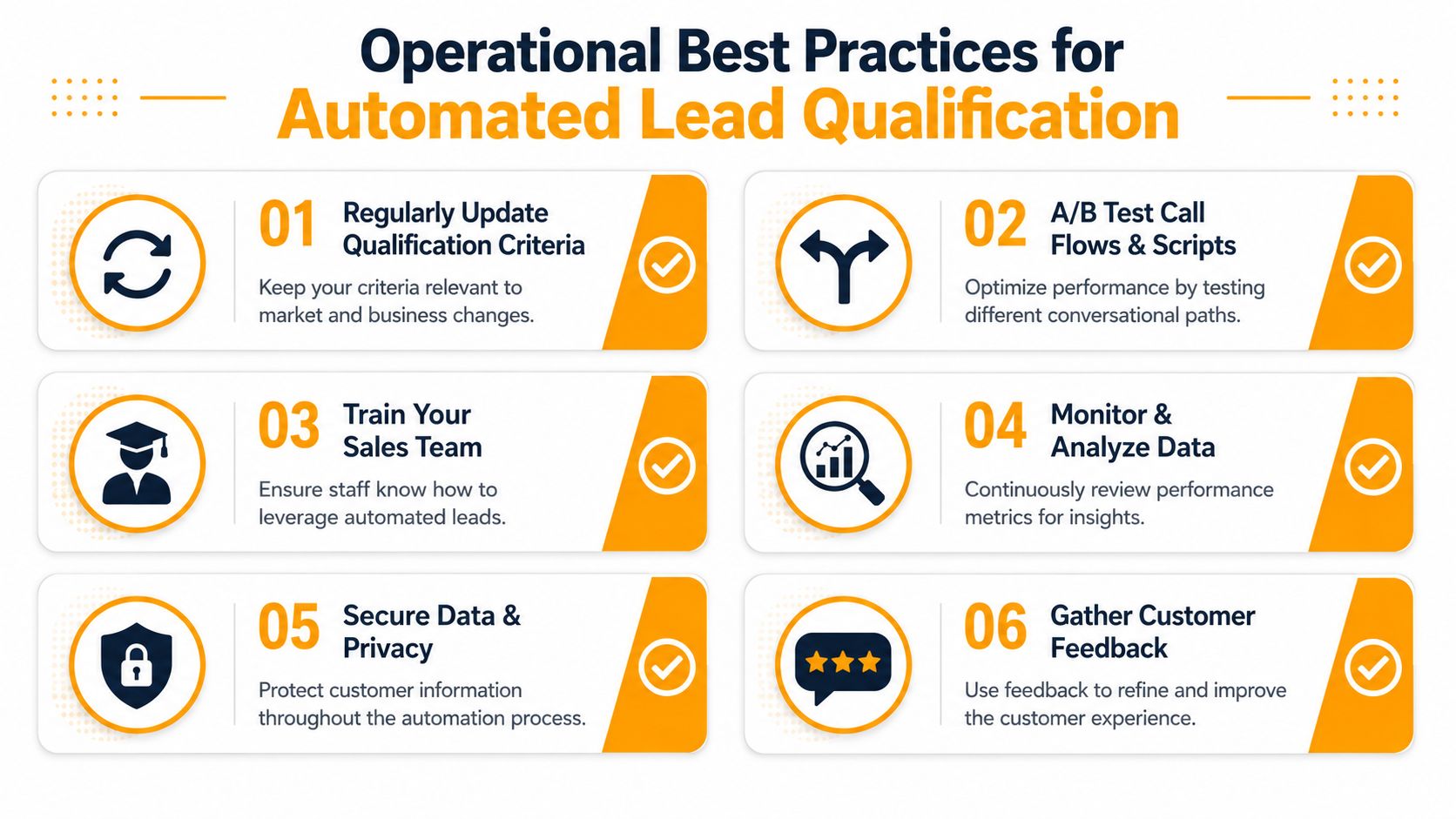
Operational Best Practices for Long-Term Success
Most automation problems don’t come from bad software. They come from neglect after setup. Rate cards change, service areas shift, new office staff override old habits, and seasonal demand changes what a “good” lead looks like.
That’s why automated lead qualification should be treated like an operating process, not a one-time install.
Use human review where automation is weakest
The biggest mistake I see is over-automating edge cases. Enterprise sales teams have the same issue, and the lesson applies directly to movers. Highspot’s lead qualification guidance warns that automation should support speed, not replace final judgment, especially for high-value or ambiguous prospects.
For moving companies, those edge cases usually include:
- Large homes with uncertain inventory
- Multi-day or multi-stop jobs
- Commercial moves mixed with residential requests
- Specialty-item heavy jobs
- Requests that don’t fit neatly into hourly or flat-rate logic
Set clear fallback rules. If a job crosses a complexity threshold, the system should collect the information and hand it to a manager for review instead of pretending certainty.
Some leads should move fast. Others should slow down long enough for a human to protect margin.
That same mindset applies to workflow design more broadly. If you want a simple, non-technical overview of implementing workflow automation, it’s a useful reference because it frames automation as process discipline, not just software setup.
Keep the system current or it will drift
A strong process includes regular maintenance. Review call recordings or transcripts. Look for repeated customer confusion, missing questions, and jobs that required manual correction after the fact.
Focus your review on:
- Pricing updates. Rate card changes should be reflected immediately.
- Script tuning. Remove questions that slow down straightforward calls.
- Qualification thresholds. Tighten or loosen criteria based on season and capacity.
- Disqualification reasons. Track why poor-fit leads are coming in and whether marketing is attracting the wrong calls.
- Rep feedback. Office staff should be able to flag false positives and false negatives.
The healthiest setup is one where automation handles repetitive intake, while your team keeps authority over exceptions, pricing changes, and quality control. That’s what makes the system durable during busy season instead of fragile when call volume spikes.
If your process does that, the payoff is straightforward. Fewer callbacks. Cleaner quotes. Better use of dispatcher and sales time. More booked jobs without adding more chaos to the front office.
If your team is losing jobs to missed calls, slow follow-up, or quoting bottlenecks, it’s worth looking at a system built specifically for movers. MoveJoy helps moving companies qualify leads, generate accurate quotes using their own rate card, and book jobs directly into their CRM or calendar so the phone process does more than capture interest. It helps close work.