How to Automate Moving Company Bookings: A 2026 Guide
If you run a 5 to 20 truck moving company, you already know the scene. It’s Saturday in peak season. Crews are on jobs, the dispatcher is juggling schedule changes, a salesperson is chasing deposits, and the phone keeps ringing while nobody can stay on it long enough to quote properly.
That’s where most moving company bookings system break down. Not because movers don’t care, but because the front office gets buried exactly when demand is strongest. A missed call turns into a missed estimate. A delayed estimate turns into a shopped lead. A generic call tool captures a name and number, but it still leaves your team with the hard part, pricing the move accurately and locking in the job before the customer moves on.
If you want to automate moving company bookings, you need more than call coverage. You need a system that can handle moving-specific quote logic, connect to the tools your office already uses, and escalate edge cases without creating chaos for dispatch. That’s the difference between adding software and fixing revenue leakage.
Table of Contents
- The Real Cost of Your Ringing and Unanswered Phone
- Your Automation Blueprint Before You Buy Anything
- Configuring a Quoting Engine That Thinks Like a Mover
- Connecting Your AI to Your CRM and Calendars
- The Go-Live Plan Testing Training and Transition
- How to Measure Success and Calculate Your Real ROI
The Real Cost of Your Ringing and Unanswered Phone
A lot of owners treat missed calls like an irritation. In practice, they’re a revenue leak sitting in plain sight.
On a busy summer weekend, the damage usually happens in small moments. A prospect calls while your coordinator is helping a driver find the next stop. Another caller reaches voicemail after hours and decides to try the next mover on Google. A referral lead comes in during a truck delay, and nobody follows up fast enough to turn the inquiry into a booked job.
The financial hit adds up faster than most operators realize. Missing just 5 calls per week can result in approximately $390,000 of lost annual revenue for moving companies, according to Boosted Movers’ analysis of moving lead loss.
Practical rule: If your phone workflow depends on someone “getting back to it later,” you don’t have a booking process. You have a leak.
That’s why the ultimate fix isn’t just hiring someone to answer phones or adding another inbox to monitor. Those options may capture contact details, but they often stop short of the step that matters most, giving the customer a credible quote and a clear next action.
For moving company owners, the front-end problem is bigger than “coverage.” It’s whether your business can convert demand while crews are in the field and the office is stretched thin. If you want a deeper look at how missed calls turn into unbooked jobs, this breakdown on moving company missed call revenue loss is worth reviewing.
Your Automation Blueprint Before You Buy Anything
Most operators shop for software too early. They buy based on demos, then try to force their office into the tool later. That usually creates more manual cleanup, not less.
Before you automate moving company bookings, map what already happens from first contact to confirmed move. If you skip that step, the software will amplify your weak spots.
Start with the actual booking path
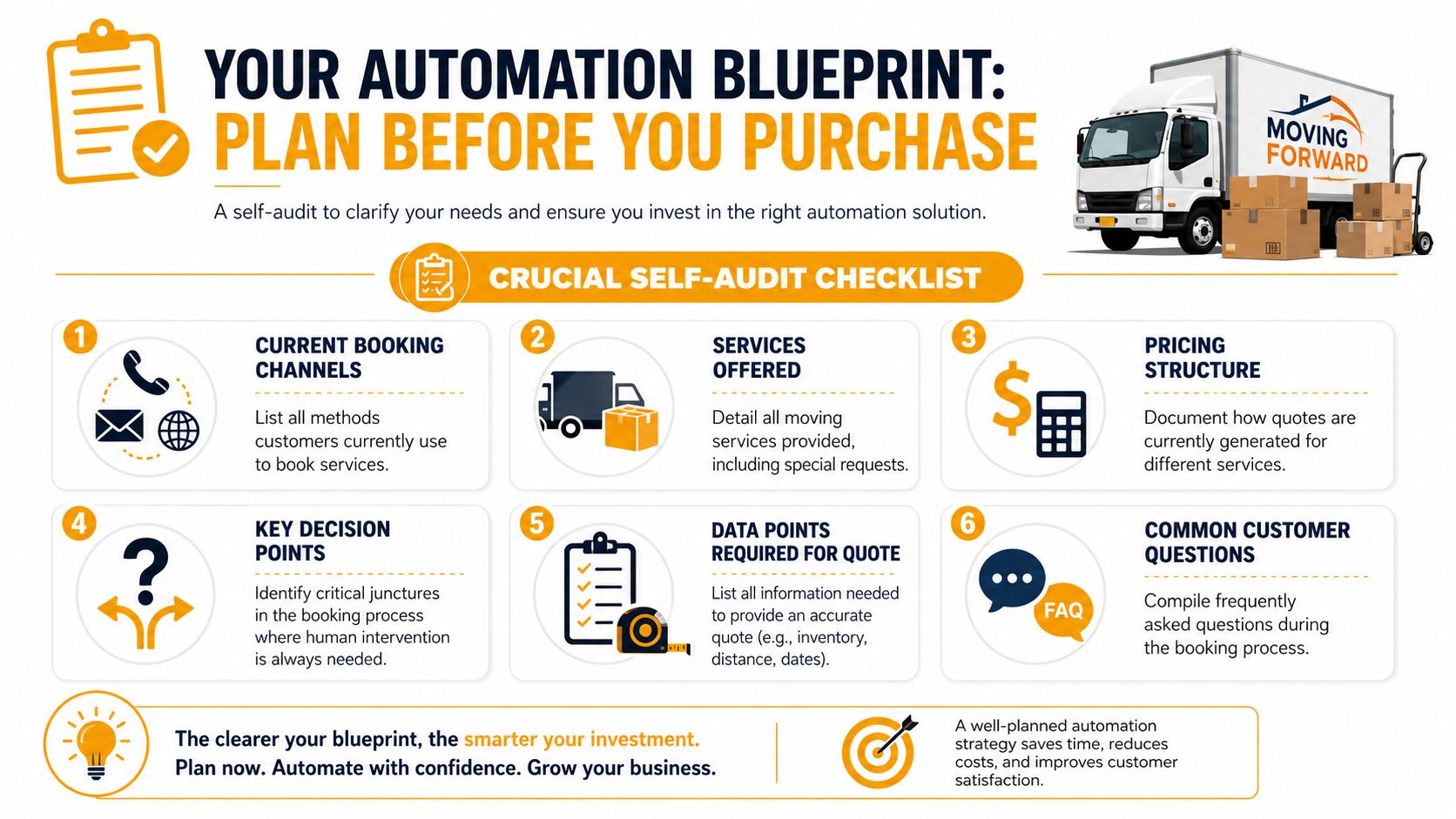
Write down every way a lead reaches you now. Don’t make this theoretical. Use the actual path your office sees every week.
Include:
- Phone calls: Live calls during office hours, overflow calls, after-hours calls, and weekend inquiries.
- Website forms: Quote requests, contact forms, chat prompts, and any lead form tied to ads.
- Email inquiries: Apartment managers, realtors, commercial prospects, and repeat customers.
- Referral handoffs: Leads that arrive through partners and need a fast callback before they cool off.
Then list the points where your team has to stop and think before quoting. For most movers, those moments include access issues, uncertain inventory, specialty items, travel time, scheduling conflicts, and rate-card exceptions.
Audit speed, not just volume
One of the clearest booking gaps is response time. Leads contacted within five minutes of their inquiry are 21 times more likely to convert than those contacted after 30 minutes, based on Elromco’s review of structured follow-up for movers.
That’s why your audit shouldn’t just ask, “How many calls do we get?” It should ask:
- How long does it take to respond during office hours?
- What happens after hours when nobody is available to quote?
- Which leads wait on an estimate because pricing requires a callback?
- Who owns follow-up when the original rep gets pulled into dispatch or claims?
A simple working baseline looks like this:
| What to document | What to look for |
|---|---|
| Booking channels | Which channels bring leads that actually book |
| Quote turnaround | Where estimates stall |
| Human-only decisions | Which jobs need review before pricing |
| Calendar workflow | How jobs get scheduled today |
| Follow-up gaps | Where warm leads go cold |
| FAQ patterns | Repeated questions that should be automated |
For operators trying to tighten lead handling beyond the moving industry, this article on Boosting SMB revenue operations is useful because it frames appointment setting around process discipline, not just staffing.
The best automation projects start with a boring worksheet. That worksheet usually reveals why the office feels busy but bookings still slip away.
Configuring a Quoting Engine That Thinks Like a Mover
Generic tools typically fall short. They can answer a phone. They can collect a name. Some can even send a canned estimate request. But moving quotes aren’t simple intake forms.
A quoting engine has to think the way your best coordinator thinks. It has to sort the move type correctly, ask the right follow-up questions, apply the right pricing logic, and avoid quoting a job in a way that will either kill the sale or destroy the margin later.
Separate service types before you price anything
The first rule is simple. Don’t let one quote template handle every move.
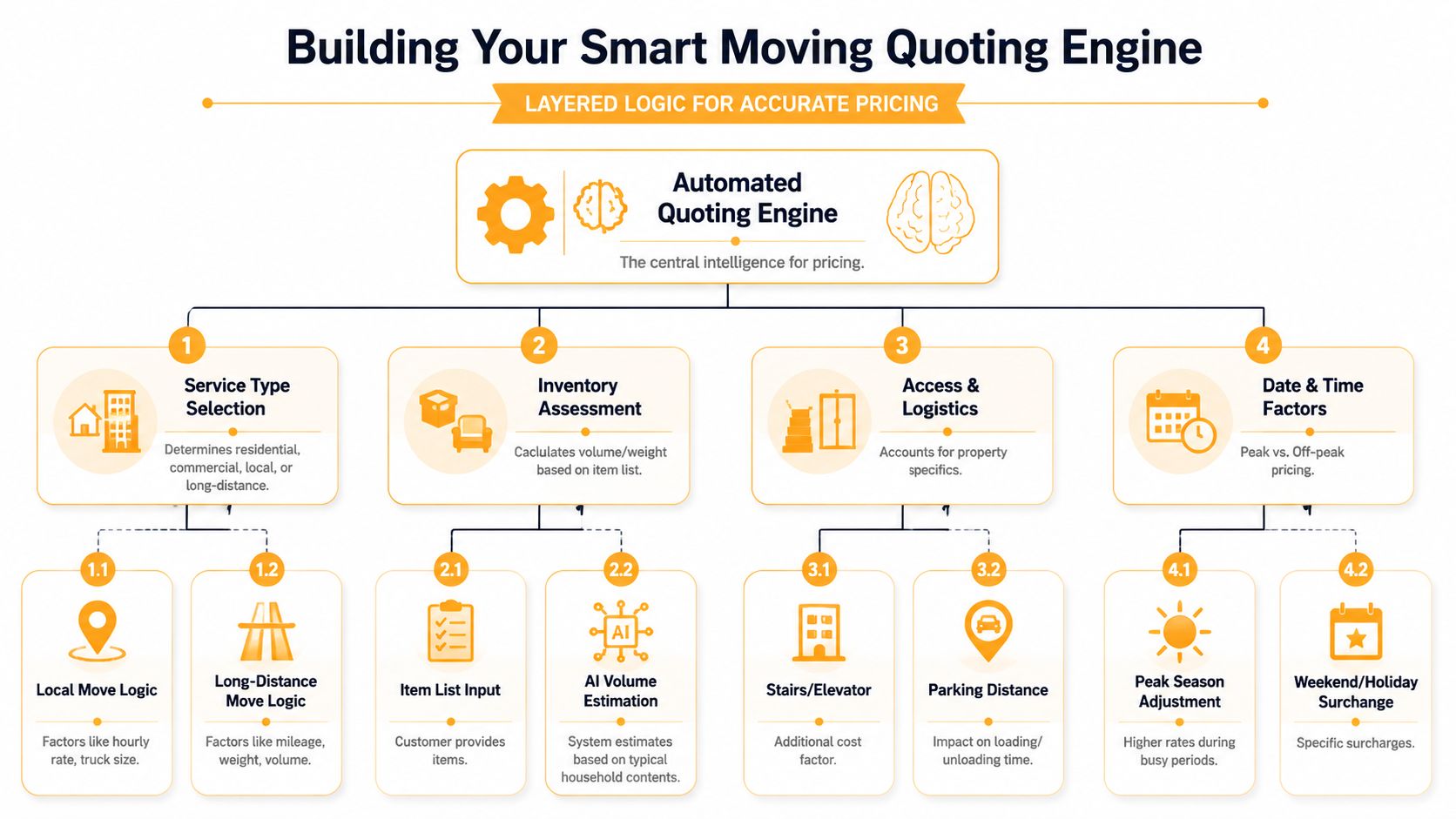
A critical requirement for booking automation is service-type-driven pricing logic that distinguishes local (hourly), intrastate (hourly or tariff), interstate (tariff), and commercial pricing structures, because systems that force a single template create inaccurate quotes and lost bookings, as noted in Movegistics’ software guidance for movers.
That means your setup should split jobs early.
- Local residential moves: Usually need hourly logic, crew sizing, truck count, travel policy, and minimums.
- Intrastate and interstate jobs: Need different pricing rules, and the workflow should reflect that before a number is ever shown.
- Commercial work: Often needs line items, site complexity review, and a different approval path than household moves.
If your tool can’t branch quote logic by service type, stop there. It’s not ready for a real moving operation.
Build accessorial logic into the first quote
This is the part owners underestimate. Plenty of systems can ask for zip codes and move dates. That doesn’t make them bookable.
Your quoting engine needs rules for the things that change labor time and customer trust:
- Stairs and walkups: The system should ask where they apply, not just whether they exist.
- Long carries: A quote that ignores parking distance often creates conflict on move day.
- Elevator constraints: If there’s a service elevator, reserved window, or freight restriction, the estimate needs to reflect it.
- Packing and materials: Full pack, partial pack, fragile-only service, and carton needs shouldn’t live in side notes.
- Special items: Safes, pianos, glass, gym equipment, and oversized furniture should trigger either pricing logic or human review.
If the quote sounds fast but ignores the hard parts of the move, the customer hears “cheap and careless,” not “efficient.”
A smart setup also defines escalation thresholds. For example, you may choose to auto-quote straightforward local jobs but route larger homes, longer mileage, or unusual access conditions to a coordinator before booking.
Where purpose-built quoting fits
This is the gap many offices run into. A human answering service takes a message. A generic voice platform captures a lead. A CRM stores the opportunity after someone on your staff enters it. None of that closes the loop by itself.
Purpose-built tools for movers sit in the middle. They use your own rate card, collect move details in a structured way, and feed a usable quote directly into the next system. A tool like MoveJoy’s moving quote calculator for movers is built around that specific front-end problem, turning inbound demand into quote-ready bookings instead of just handing your staff another callback list.
Connecting Your AI to Your CRM and Calendars
A quoting engine by itself can still create office drag if it lives outside the rest of your workflow. When the quote sits in one system, the customer record sits in another, and the schedule lives on a whiteboard or a shared calendar, your team ends up retyping the same job three times.
That’s not automation. That’s double entry wearing modern clothes.
Why disconnected tools create more work
The operators who get real value from automation treat lead capture, quoting, booking, and scheduling as one revenue system.
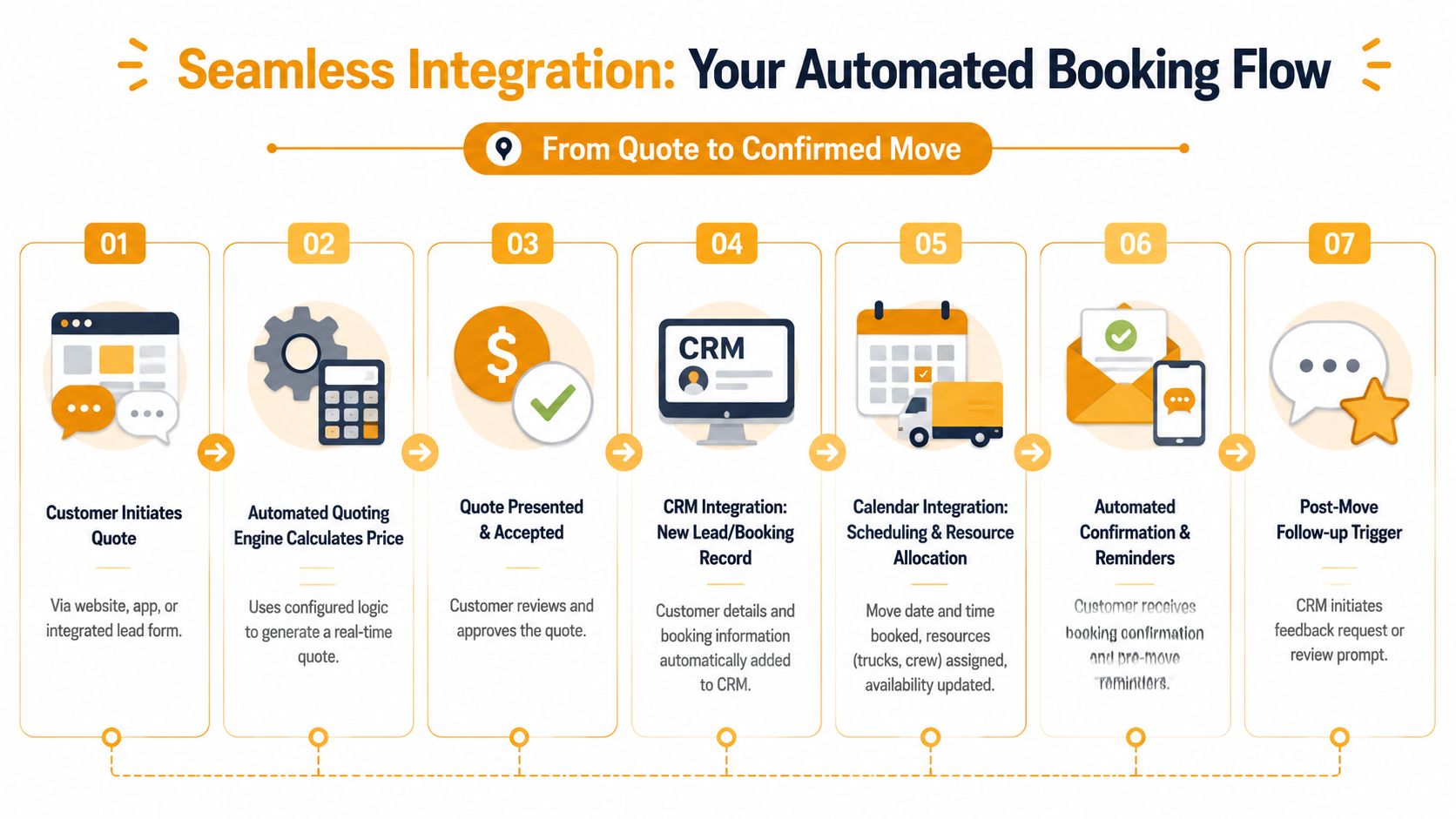
When a customer accepts a quote, the next actions should happen without somebody rebuilding the file from scratch:
- Create the lead or booking record inside the CRM your office already uses.
- Push date and time details into the scheduling layer your dispatcher relies on.
- Store quote details with the job, including service notes, pricing assumptions, and escalation flags.
- Trigger confirmation messages and reminders so the office isn’t chasing basic admin work.
That matters whether you work inside SmartMoving, Supermove, MoveitPro, or a simpler shared calendar process. The principle is the same. One accepted quote should create one clean operational record.
For teams thinking through scheduling connections more broadly, this guide to scheduling software compatible with QuickBooks is a helpful reference point because it highlights how scheduling decisions affect the rest of the back office, not just dispatch.
What a usable booking flow looks like
Here’s the standard I push owners toward:
- A lead comes in by phone, web form, or another inbound channel.
- The system collects move details in a structured sequence.
- A price is generated or escalated based on your quoting rules.
- The accepted job lands in your CRM with no manual re-entry.
- The booking appears on the calendar your office checks.
- The customer gets confirmation and the team sees the same information.
Clean integration reduces two expensive problems at once: office time wasted on duplicate entry and scheduling mistakes caused by mismatched records.
If your current tools can’t share data cleanly, fix that before you expand automation. A connected workflow through a CRM for service business operations is what turns quoting into actual booked jobs instead of admin work for Monday morning.
The Go-Live Plan Testing Training and Transition
Bad rollouts make good systems look broken. Most booking automation failures don’t happen because the idea was wrong. They happen because nobody stress-tested the quote logic, trained the office on exception handling, or decided what should still be reviewed by a human.
For moving companies, go-live needs to feel controlled. Your team already operates under pressure. The new process should remove friction, not introduce public mistakes.
Test ugly scenarios, not easy ones
Don’t test the system with a perfect two-bedroom local move and call it done. Use the jobs that usually trip up your coordinators.
Run test calls and quote requests for scenarios like:
- Fourth-floor walkups: Include stairs at origin, narrow access, and carry distance.
- Date-sensitive moves: Test how the system handles short-notice requests and calendar pressure.
- Mixed-service jobs: Add packing, storage, or partial unload requirements.
- Commercial wrinkles: Include elevator reservations, building COI requirements, or limited dock access.
The point is to find where the workflow misclassifies jobs, misses follow-up questions, or offers dates your operation can’t support.
Train the office around new roles
Automation changes who handles what. That’s good when it’s planned.
Dispatchers should know how to manage a calendar that receives cleaner bookings automatically. Sales staff should spend less time on routine estimates and more time on complex escalations, deposit collection, and saving jobs that need human reassurance.
A practical training checklist looks like this:
- Review escalation rules: Everyone should know which jobs stay automated and which jobs require review.
- Confirm ownership: Decide who handles exceptions, quote disputes, and unusual service requests.
- Standardize edits: If staff adjusts a quote, document why so you can tighten the rules later.
- Protect the customer experience: Make sure the office uses the same language the automated workflow uses, especially around pricing assumptions.
Roll out in phases
A phased launch is usually safer than an overnight switch.
Start with after-hours and overflow calls. Then extend to weekends. Then move into full coverage once the quote logic, calendar sync, and team confidence are stable.
This staged approach also helps you avoid common breakdowns. Operational guidance on automating moving company processes notes pitfalls such as failing to set minimum service-day buffers, delayed crew confirmations, and missing escalation protocols when crew responses are insufficient, all of which can lead to booking failures.
A booking system isn’t ready because it answered the phone correctly. It’s ready when it protects your schedule from bad promises.
How to Measure Success and Calculate Your Real ROI
If you only track calls answered, you’ll miss the point. Movers don’t buy automation to admire dashboard activity. They buy it to recover jobs that were slipping away and to reduce the admin time attached to every inquiry.
The useful question is simple. Did the system create more booked work, with less manual effort, and without damaging quote accuracy?
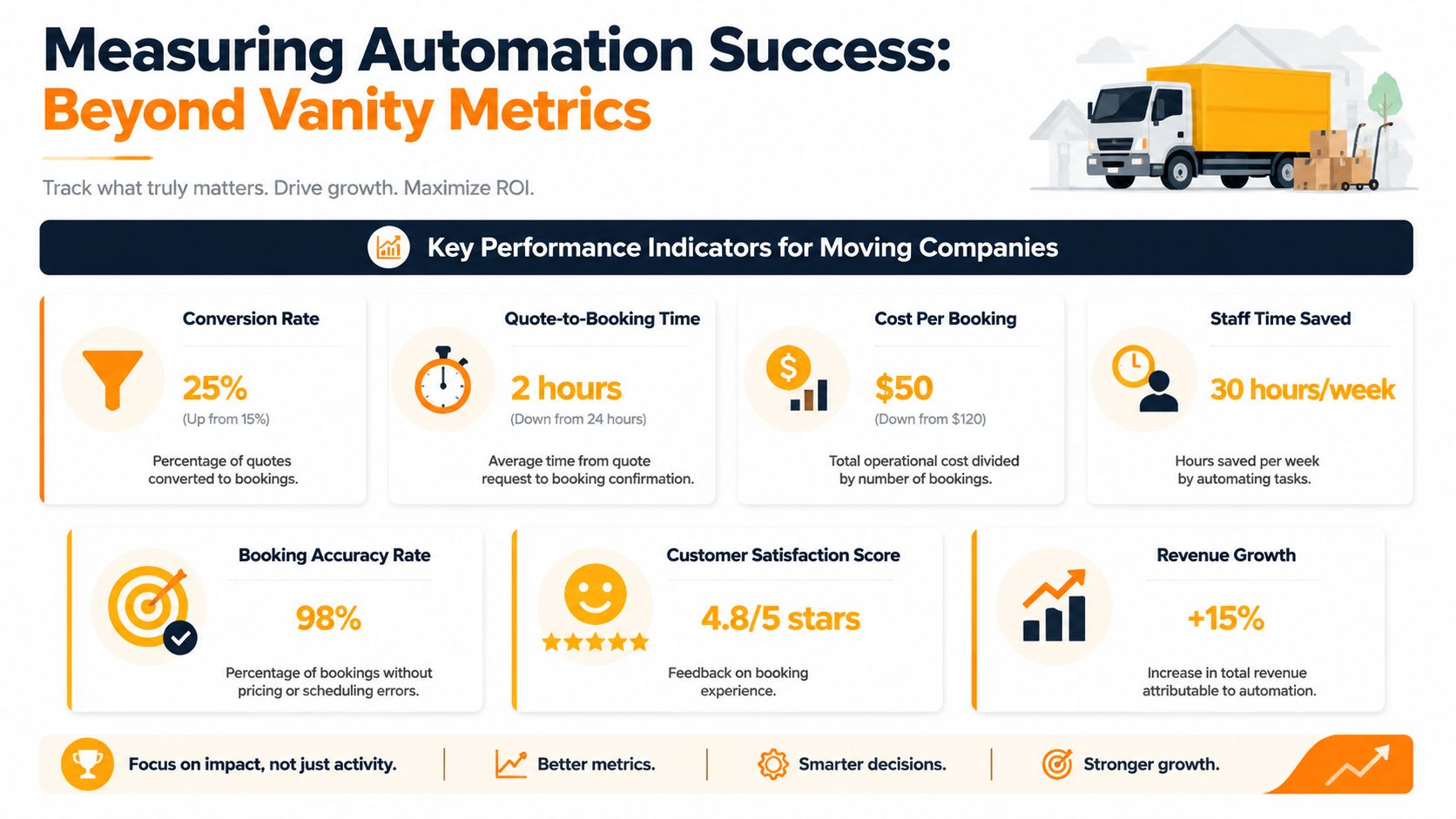
Track booked jobs, not vanity activity
Start with operational KPIs your office can verify each week.
Use metrics like:
- Booking rate from automated inquiries: Compare qualified inquiries against booked jobs.
- After-hours revenue recovered: Look at what was booked outside normal staff coverage.
- Quote turnaround: Measure how quickly a customer moves from inquiry to usable estimate.
- Manual touches per booking: Count how often staff had to re-enter, re-quote, or chase details.
- Escalation quality: Review whether complex jobs were routed appropriately instead of forced through bad automation.
There is real upside when follow-up and estimating are tightened. Automating moving company bookings through multi-step follow-up sequences and integrated digital estimating can lift booking success from approximately 28% to 38% of qualified leads, according to Virtual Estimate’s guide to smart moving company operations.
That kind of improvement matters because it reflects the metric owners care about most. More of the leads you already paid for turn into work on the board.
Use a simple ROI worksheet
You don’t need a complex finance model. Use a plain worksheet your office can update every month.
| ROI input | What to enter |
|---|---|
| Qualified inquiries from automated channels | Monthly total |
| Booked jobs from those inquiries | Monthly total |
| Average revenue per booked job | Your own number |
| Admin time saved | Internal estimate from office staff |
| Missed-call recovery | Jobs that would likely have gone to voicemail before |
| Total software and setup cost | Full monthly cost |
Then ask three questions:
- Did we book jobs we were previously missing?
- Did quoting and scheduling get cleaner or messier?
- Did the office get time back for higher-value work?
If the answer to all three is yes, the system is doing its job.
Owner mindset: Don’t judge booking automation by how futuristic it sounds. Judge it by whether it recovers revenue and reduces front-office friction during busy weeks.
The movers who get the best results usually treat automation like an operating system upgrade, not a gadget. They measure booked jobs, follow-up speed, quote quality, and calendar accuracy. That’s how you tell whether the investment is paying back in real business terms.
If your phones ring hardest when your office is least able to respond, that’s exactly where a purpose-built booking system can help. MoveJoy is designed for moving companies that need accurate quotes using their own rate card, direct booking into the tools they already run, and a cleaner path from inbound call to confirmed job.