Virtual Receptionist for Movers: Boost Your Bookings

Your crew is on a job. The office line rings. Nobody picks up because your dispatcher is juggling schedule changes, your estimator is in the field, and you’re halfway through a carry from a second-floor walkup. By the time anyone sees the missed call, that customer has already called the next mover.
That scenario is routine in this industry, and it’s expensive. Independent moving companies lose between 3 and 7 jobs every month, which adds up to $50,000 to $150,000 in annual revenue loss, largely because of missed calls. The pressure gets worse from March through September, when call volume rises by over 40% and many companies still don’t have coverage after hours or on weekends, according to industry data on missed-call losses for movers.
Most owners already know they need calls answered. The bigger issue is what happens after the phone gets picked up. If the system can’t qualify the move, collect the right pricing variables, and move the caller toward a quote or booked estimate, it’s still leaking revenue.
Table of Contents
- The Missed Call That Cost You a $2000 Job
- Beyond Answering Machines What Is a Virtual Receptionist for Movers
- The Three Pillars of an Automated Booking Engine
- The ROI of Never Missing Another High-Intent Call
- Human Answering Service vs Generic AI vs Mover-Specific Automation
- Your Implementation Roadmap From Decision to First Booked Job
- Common Questions and Objections from Movers
The Missed Call That Cost You a $2000 Job
A missed call in moving isn’t just a missed conversation. It’s often a missed booking window.
A customer calling for a local move usually isn’t in research mode. They’re trying to solve a problem quickly. If your line goes to voicemail while another company answers, asks the right questions, and gives a useful next step, you’ve likely lost that job before your callback even starts.
What that looks like in the real world
A common example is the caller who needs a 3-bedroom local move and has enough details to make a decision on the phone. If someone can ask about access and price it properly, that move can often be quoted in the $1,400 to $2,100 range right away, and one booked move often produces $2,000 to $4,000 in revenue, based on mover-specific quoting and booking data.
That’s why owners feel the pain of a single unanswered call so sharply. It isn’t abstract. It’s the difference between a truck schedule that fills up and one that still has dead space next week.
Customers don’t reward good intentions. They book with the mover who responds while the need is still urgent.
Why voicemail doesn’t solve the problem
Voicemail only records the loss after it happened. It doesn’t protect the lead, qualify the job, or keep the caller from dialing the next company on the search results page.
For operators running multiple trucks, this gets worse during busy season because the same teams responsible for service delivery are often the same people expected to answer inbound sales calls.
- Crews are unavailable: They’re loading, driving, unloading, or handling problems on-site.
- Office staff gets overloaded: Dispatch changes, reschedules, and customer updates crowd out new inquiries.
- After-hours demand is real: Many callers shop in the evening or on weekends when nobody is at the desk.
Owners often think the fix is “answer more calls.” That’s incomplete. You need a front-end system that can capture, qualify, quote, and book while your staff is doing the work that already pays today’s bills.
Beyond Answering Machines What Is a Virtual Receptionist for Movers
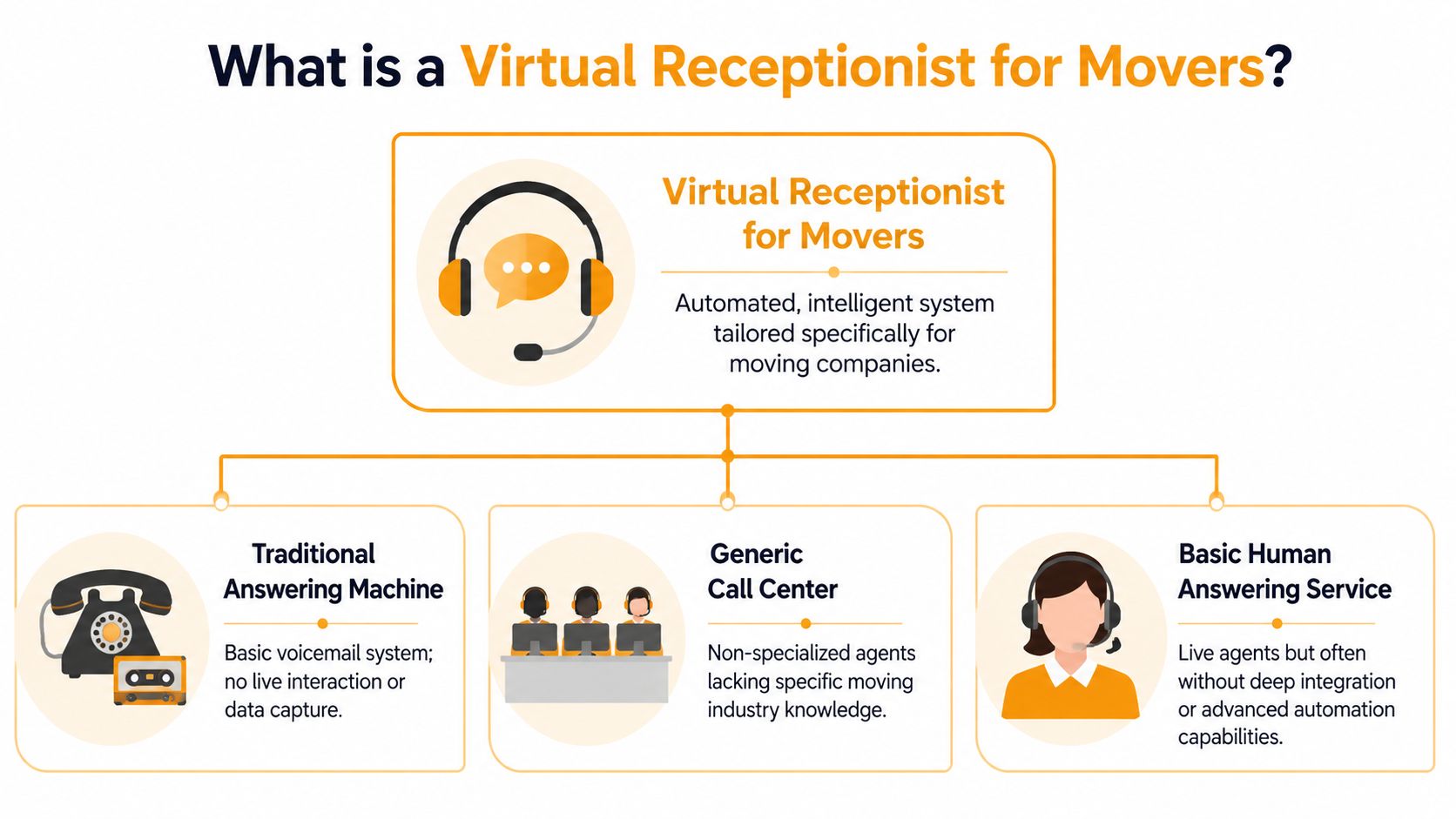
A virtual receptionist for movers is only useful if it protects revenue. In this business, that means more than answering the phone. It means gathering the right job details, applying moving-specific logic, and getting the caller to a booked next step before they call the next company.
Plenty of owners buy a reception tool and still end up with the same problem. The phone gets answered, but nobody has moved the sale forward. The office still has to call back, re-ask basic questions, figure out whether the lead is worth quoting, and find time to schedule an estimate. That is not a booking system. It is a delay.
For movers, the gap between a generic receptionist and a mover-specific one is simple. Generic tools capture contact info. A system built for movers captures the variables that change price and crew planning.
What falls short
Voicemail records a missed opportunity.
A traditional answering service improves coverage, but many moving companies still use it as a message pad. The caller is acknowledged, then the actual sales work waits for someone in the office to become available.
Generic AI tools are faster, but speed alone does not solve quoting. If the system cannot ask about stairs, elevator access, long carries, packing needs, inventory size, shuttle requirements, or storage, it cannot support a serious quote. It creates another follow-up task for your team.
What a mover-specific virtual receptionist needs to do
A system built for moving companies should work like the front end of your sales process. It should:
- Answer every inbound call immediately
- Identify the job type such as local, intrastate, interstate, commercial, labor-only, or packing
- Collect quote-driving details including access conditions, move size, service add-ons, and scheduling constraints
- Follow your pricing rules so the response matches how your company quotes work
- Route the caller to the right next step such as a ballpark quote, a booked estimate, or a handoff for complex jobs
That last point matters more than many owners expect. A receptionist built for movers should not just “take intake.” It should help complete the sale. In practice, that means connecting call handling to the same kind of workflow used in an appointment booking system for movers, where lead capture, qualification, and scheduling happen in one motion.
Practical rule: If the system only takes messages, your staff still owns the bottleneck. If it qualifies and books using moving-specific logic, it starts producing revenue.
There is also a real operating trade-off here. Hiring an in-house receptionist gives you control, but it also adds payroll, coverage gaps, training time, and turnover risk. A virtual receptionist lowers that burden, but only if it is configured around how movers sell jobs. Otherwise you bought coverage, not conversion.
That distinction is the whole point. For a moving company, a virtual receptionist should function less like an answering service and more like a quoting and booking engine that knows the difference between a first-floor apartment move and a fourth-floor walk-up with a 150-foot carry.
The Three Pillars of an Automated Booking Engine
The difference between a generic phone tool and a mover-specific system comes down to three operating requirements. Miss one of them and the whole thing starts creating extra work instead of reducing it.
Instant response wins the first shot
Moving leads don’t arrive on a neat schedule. They come in when customers are at work, at home after dinner, comparing quotes on a Saturday, or calling during your busiest dispatch hour.
That’s why the first pillar is simple. The system has to answer every time and do it without depending on who happens to be available in the office.
When owners look at scheduling automation, they usually focus on calendar convenience. The bigger benefit is that the caller gets a real next step on the first interaction. If you want to see how that workflow looks in practice, a dedicated appointment booking system for movers shows the operational model more clearly than a basic answering setup.
Quoting logic has to match how movers actually price jobs
Most tools fall short here.
A mover-specific intake system is most effective when it collects the access variables that materially change a quote, including stairs, elevator access, parking or truck access, floor level, special items, and pickup and drop-off details, because those factors drive labor needs, long-carry adjustments, and specialty handling in the estimate workflow, as explained in this mover-focused guide to AI receptionist intake.
If your system doesn’t ask those questions, it can’t protect margin.
What good quoting logic looks like:
- For local jobs: It identifies the move size, access constraints, labor requirements, and add-ons such as packing.
- For specialty jobs: It flags items that change crew planning or handling.
- For edge cases: It knows when not to price immediately.
A front-end system should be able to handle a normal local move smoothly. It should also know when to stop and escalate.
The handoff has to be automatic
Lead capture without workflow integration creates a second bottleneck. Someone still has to re-enter the details, chase down the estimate, and make sure the follow-up happens.
The strongest setups push structured information straight into the tools movers already use. That might be SmartMoving, Supermove, MoveitPro, or a calendar workflow that dispatch and sales can trust.
One practical example is MoveJoy. It sits in the gap between a generic answering service and a CRM by generating quotes from the company’s own rate card and booking the job directly into existing workflows. That matters because movers don’t need more disconnected software. They need the phone call to become an actionable booking event without another manual handoff.
The ROI of Never Missing Another High-Intent Call
It is 4:47 p.m. Your crews are still out, the office is juggling schedule changes, and a prospect calls needing a local move for next week. They are ready to book if they can get a clear answer on price, timing, and whether a third-floor walk-up changes the rate. If that call goes to voicemail, there is a good chance the job goes to the next mover who picks up.
The cost of inaction is usually bigger than owners think
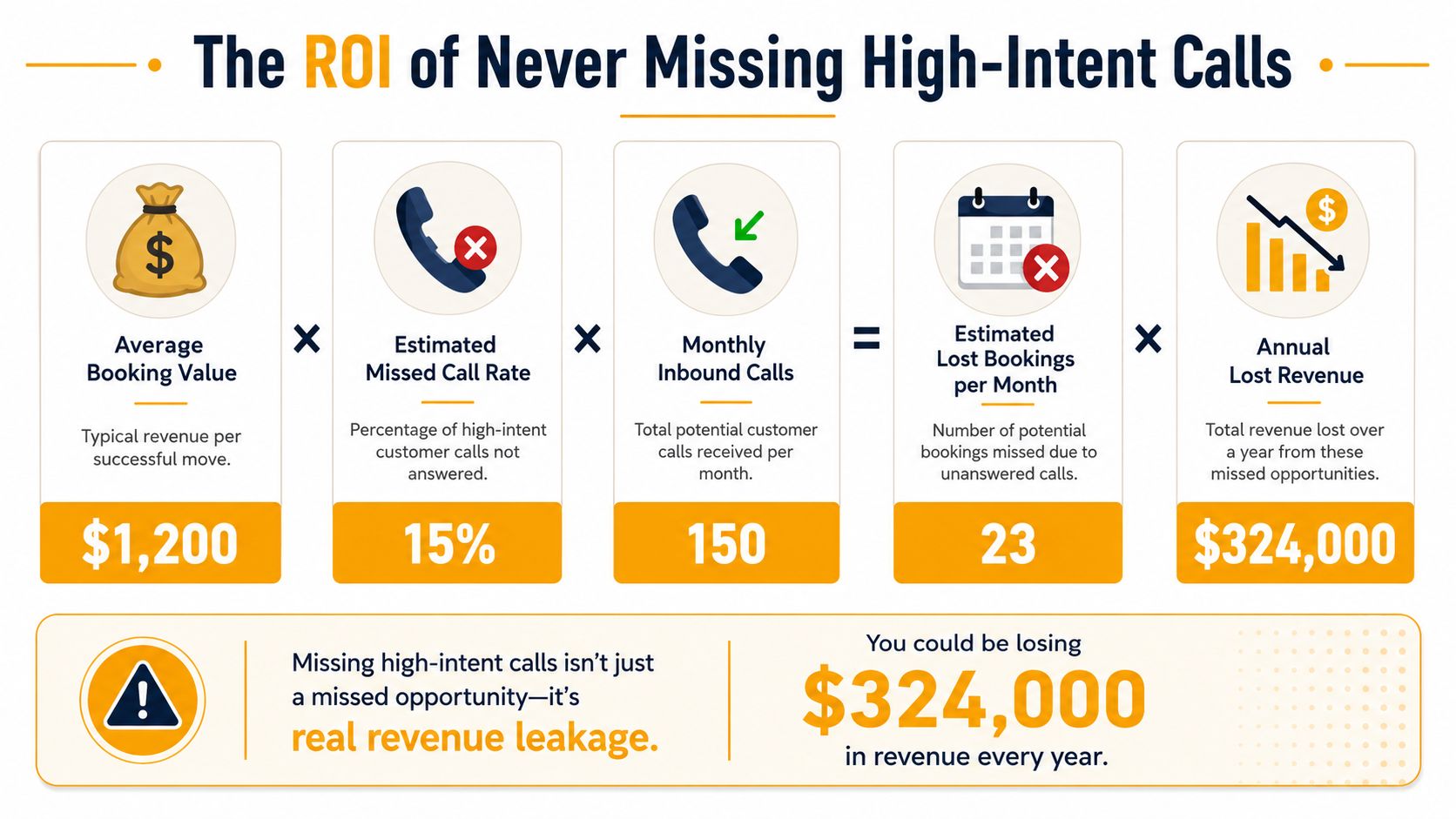
Missed calls are not an admin problem. They are a sales leak. Earlier data cited in this article shows many independent movers lose multiple jobs each month from missed inbound calls, and the losses get worse during peak periods when call volume rises.
Start with what leakage already exists.
Then compare that number to the cost of coverage. Based on the same earlier source, mover-focused virtual receptionist services often land in the range of about $149 to $499 per month. For many operators, one recovered job can pay for months of service. A few recovered jobs can cover the year.
The bigger return comes from call quality, not just call coverage. A generic answering tool can stop the bleeding. A mover-specific system can turn a live inquiry into a quoted opportunity by asking the details that affect crew count, truck time, and margin. Stairs, elevators, long carries, packing, and specialty items decide whether a call becomes profitable work or a bad estimate.
A practical way to think about return
Use this framework inside your operation:
| Question | What to review |
|---|---|
| When are calls missed | During jobs, lunch hours, evenings, weekends, and dispatch spikes |
| Which calls matter most | New estimate requests, same-week availability calls, and local moves that can be priced quickly |
| What happens after the miss | Voicemail, delayed callback, incomplete intake, or no follow-up |
| What would recovery look like | Immediate qualification, quote range, scheduled estimate, or direct booking |
Owners often assume they need more office staff. In many cases, they need better intake discipline and systems that boost efficiency with AI automation without creating more manual follow-up.
Speed matters here. If your team has to call back and re-ask basic survey questions, the prospect is already cooling off. A workflow built for automated moving estimates shortens the path from first ring to booked job because it captures the details needed to price the move correctly the first time.
Recovering one solid job can justify the system. Recovering qualified jobs week after week improves close rate, protects margin, and takes pressure off the office.
Human Answering Service vs Generic AI vs Mover-Specific Automation
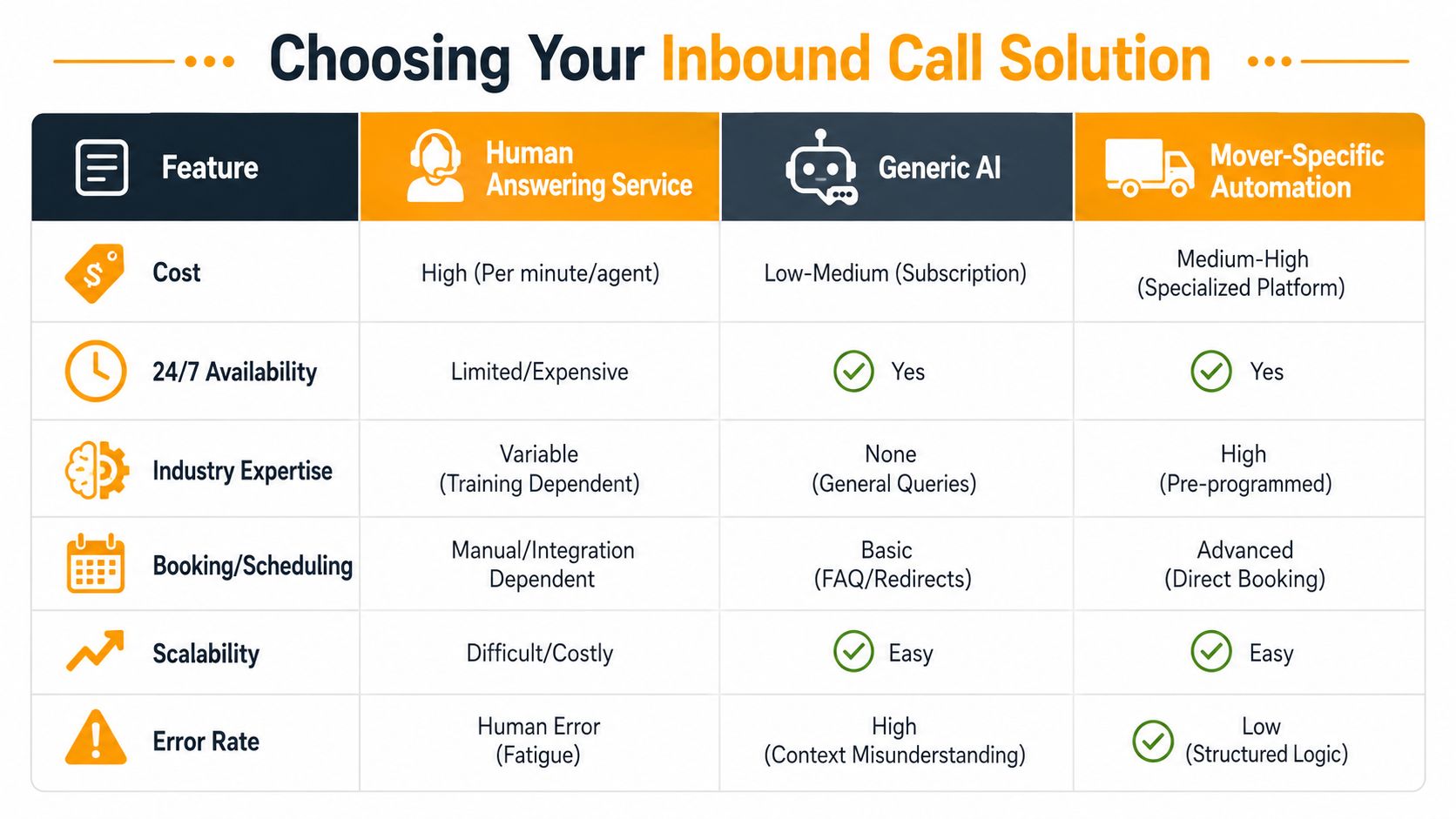
A lot of moving companies make this decision too narrowly. They compare who can answer the phone fastest, then miss the bigger question: who can turn that call into a correctly priced job without handing your office a cleanup problem an hour later?
What each option does well
| Option | Strength | Limitation that matters |
|---|---|---|
| Human answering service | Warm interaction and flexible judgment | Usually stops at message taking or basic intake |
| Generic AI | 24/7 availability and fast deployment | Usually misses moving-specific pricing and booking logic |
| Mover-specific automation | Can qualify, quote, and route based on specific move details | Needs a clean rate card and clear business rules |
Human answering services still fit some operations. They help with upset customers, claims calls, and odd situations that need judgment. The trade-off is labor cost and training time. If the service is not trained on your trip charges, stair fees, valuation language, packing options, and service area rules, they answer the call but do not finish the sale.
Generic AI has a different weakness. It sounds efficient until you look at what your coordinators have to fix. Missing inventory details, bad assumptions about access, and vague booking notes push the work back onto your team. You saved time on the ring. You lost it in quoting, callbacks, and margin mistakes.
Mover-specific automation earns its keep because it uses moving logic, not generic call-center logic. It can ask the follow-up questions that change price and crew planning. Second-floor walk-up or elevator. Long carry or easy truck access. Packing for kitchen only or full pack. Grand piano, safe, or no specialty items. That is the difference between a tool that answers calls and one that functions as a booking system.
Here is the standard I use when evaluating platforms for movers:
- Captures price-changing variables: stairs, elevator access, long carry, shuttle risk, bulky or specialty items
- Applies your pricing rules: minimums, travel time, packing add-ons, and review triggers
- Books into operations: estimate calendar, CRM, dispatch workflow, or a structured follow-up queue
- Fits your existing call handling service for moving companies: without adding another manual handoff
If a system cannot do those four things, it is still only partial coverage.
One more practical point. Generic tools often look polished in demos because they handle broad business conversations well. Some vendors even use media features that can generate hyper-realistic videos for sales and training content. That has nothing to do with whether the tool can quote a move correctly. For movers, quoting logic matters more than presentation.
The right choice depends on your operation. If your volume is low and your office manager already handles every lead personally, a human-first setup can still work. If you are missing calls during active move hours or after hours, generic AI may patch availability but still leave your staff doing estimate triage. If your goal is to book more jobs without wrecking margin, mover-specific automation is usually the better fit because it handles the details that decide price, crew time, and profit.
Your Implementation Roadmap From Decision to First Booked Job
A moving company usually decides whether this system is working in the first two weeks. Calls either turn into clean estimates and booked jobs, or the office ends up babysitting another tool.
Treat implementation like an operations rollout tied to revenue. The goal is simple. Answer more high-intent calls, collect the right move details, quote what can be quoted, and route the rest without tying up dispatch.
Start with your current call flow
Follow one inbound lead from ring to outcome. Check what happens during office hours, after hours, during active move windows, and when your coordinator is stuck helping a crew or calming down a delayed customer.
What matters is not whether calls get picked up. What matters is whether the system captures the details that change price and crew time, then pushes that information into the place your team works from. For movers, that means the intake has to ask about stairs, elevator access, long carries, packing, and specialty items before anyone promises a number or a time slot.
Audit three things first:
- Missed-call windows: nights, weekends, lunch gaps, active move hours, and estimate appointments
- Intake quality: whether enough information is collected to quote, schedule, or send the lead to review
- Follow-up delay: how long a new caller waits before getting a useful next step
If you skip this step, you will automate a broken process.
Prepare pricing rules before you automate
The system can only quote as well as your rules are written. A lot of owners learn this fast.
Put your pricing logic into plain language. Hourly minimums, travel charges, stair fees, long-carry thresholds, packing rates, bulky items, piano handling, and the point where a lead must go to a human estimator all need clear rules. If two office staff members would quote the same call differently, fix that before launch.
Training matters here too. If you onboard new CSRs or dispatch staff, short internal demos help keep quoting and handoff standards consistent. Some operators even generate hyper-realistic videos to document intake scripts and pricing rules for internal use.
Test the real calls you get
Do not test with polished demo scenarios. Test the calls your office struggles with every week.
Use examples like these:
- A short-notice local move with stairs at pickup and poor truck access
- A long-distance inquiry that should go into an estimator workflow instead of an instant quote
- A move with packing added where materials and labor change the price
- A specialty-item job where the system needs follow-up questions before giving any range
Listen for failure points. Did it miss a stair charge. Did it book a job that should have gone to review. Did it collect enough detail for the crew to show up prepared. Those are the details that decide whether this becomes a booking engine or just a nicer answering layer.
A solid rollout feels ordinary once it is set up. Calls get handled, pricing stays within your rules, and your team spends less time cleaning up intake mistakes.
Common Questions and Objections from Movers
Skepticism is healthy here. Most owners have already tried some combination of voicemail, overflow answering, or generic software and ended up with more admin work.
Will customers push back
Customers care about speed, clarity, and whether they can move forward. If the interaction is smooth and the questions are relevant, most callers are fine with an automated front end.
The bigger frustration is the old model. They call, get voicemail, wait for a callback, repeat themselves, and still don’t get a useful answer.
Fast, competent intake usually matters more to the caller than whether a human picked up on ring one.
What about complicated jobs
This is the right objection, because not every move should be quoted immediately.
A key challenge is pricing accuracy for complex moves. A well-designed system should distinguish local hourly jobs from long-distance moves and escalate the right calls to a human estimator instead of trying to quote everything on the first call, which helps protect margin when a front-line system might otherwise overpromise, as explained in this guide to handling complex moving inquiries.
That means the system should know when to refuse a simple on-the-phone quote. Good examples include:
- Interstate jobs: Better routed into a written-estimate workflow.
- Storage-in-transit situations: Better reviewed by someone who understands the operational details.
- Access-heavy jobs: Where unusual carry distance, elevators, or specialty handling could skew pricing.
- High-risk specialty moves: Where the office should confirm scope before giving numbers.
Is setup a hassle
It shouldn’t be, if the provider understands moving-company operations.
The hard part isn’t technology. The hard part is getting your business rules clear enough that the system can follow them. Once your rate card, escalation rules, service areas, and booking rules are organized, setup becomes straightforward.
The mistake owners make is choosing a generic tool and expecting it to learn moving logic on its own. It won’t. The smoother path is using a workflow designed around moving intake from the start.
If your phones still go unanswered when crews are on jobs, or your office still treats every new inquiry as a callback task, it’s worth looking at systems built to recover revenue instead of just capture messages. MoveJoy is one option built around that outcome, with quoting and booking workflows designed specifically for independent movers.