How Do Moving Companies Handle After Hours Calls

At 6:12 PM, your office is closed, your crews are still on jobs, and your phones are still doing sales work whether anyone is there to answer them or not. That's the part many moving company owners learn the hard way. The after-hours phone line isn't an admin issue. It's a revenue channel.
When owners ask how do moving companies handle after hours calls, they're usually asking the wrong question. The better question is this: how do you recover revenue that would otherwise go to the next mover on the list? A voicemail box can “handle” a call. A script-based answering service can “handle” a call. Neither one necessarily closes the job.
For independent movers running 5 to 20 trucks, especially during March through September, the gap between answering and booking gets expensive fast. Nights, weekends, and peak daytime overflow all create the same problem. A customer wants pricing, wants confidence, and wants a next step now. If your system can't move the call toward a real quote and a real booking, you're still leaking money.
Table of Contents
- The Real Cost of a Call You Miss After 5 PM
- Four Common Strategies for After-Hours Calls
- The Difference Between Answering a Call and Booking a Job
- Your Checklist for a Bulletproof After-Hours System
- Integrating After-Hours Calls with SmartMoving or Supermove
- Stop Leaking Revenue and Start Scaling Your Operation
The Real Cost of a Call You Miss After 5 PM
A missed evening call feels small in the moment. It isn't. In moving, that one call often comes from a customer who finally got off work, sat down with a spouse, picked a move date, and started calling local movers in order.
Industry call tracking data shows that for a typical independent mover with 1 to 20 trucks, unanswered after-hours calls result in annual revenue losses ranging from $50,000 to $150,000, and roughly 80% of callers who hit voicemail during off-hours never leave a message and never call back according to Boosted Movers' breakdown of missed moving leads. That's why I treat after-hours setup as revenue recovery, not receptionist coverage.
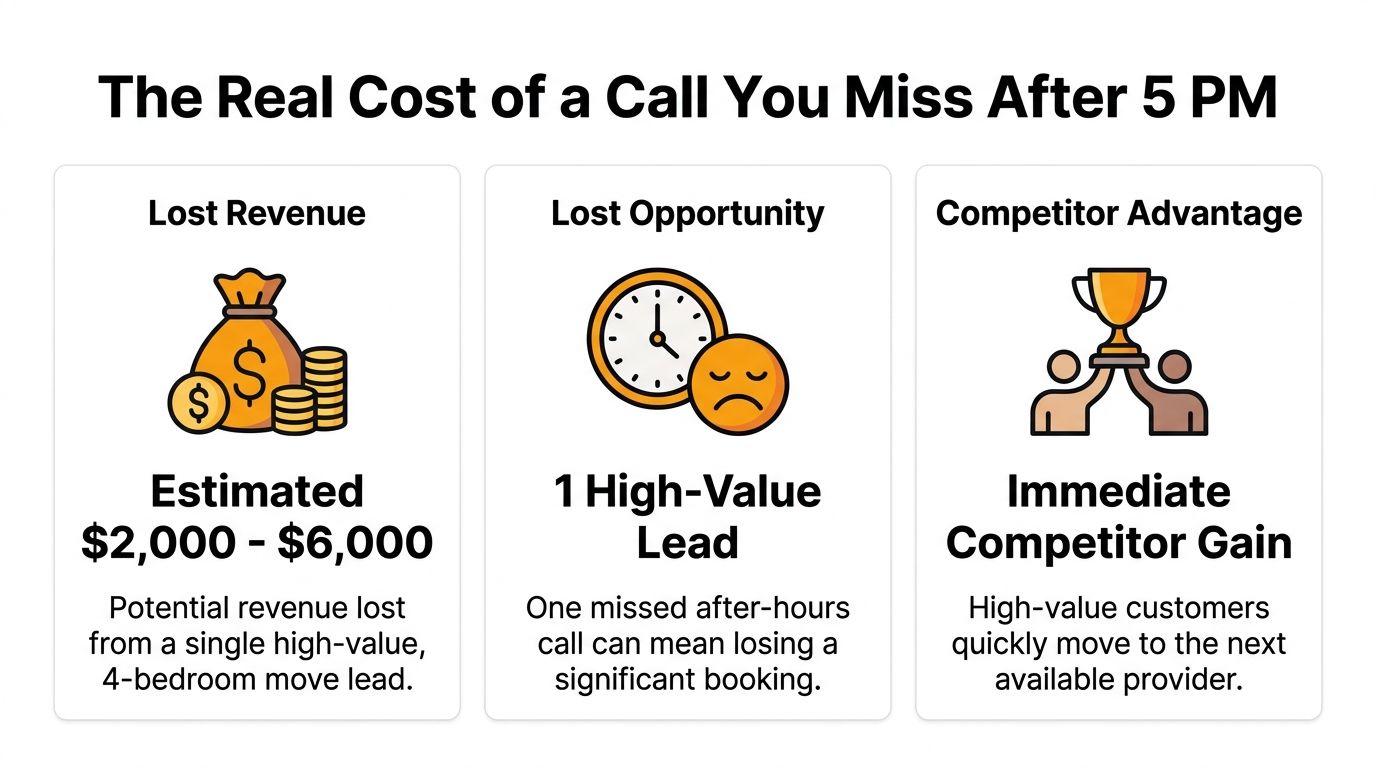
Missed calls are a revenue problem, not a phone problem
Most owners look at the symptom first. Phones rang after hours. Nobody picked up. However, the root issue starts earlier.
You already paid to generate the lead. Maybe through Google Ads, Local Services, referrals, or SEO. Then the lead arrived at the exact time your human coverage was weakest. Crews were on trucks. Dispatch was buried. The office was closed. The customer kept shopping.
Practical rule: If your after-hours process ends in “leave a message and we'll call you tomorrow,” you don't have an after-hours sales process. You have a delayed loss notification system.
The leak gets worse because many owners undercount how often this happens. They hear the voicemails that were left and assume that's the whole picture. It isn't. The bigger pile is the callers who vanished without a trace.
How to calculate your own missed call cost
You don't need a complex spreadsheet to see the problem. Start with three numbers from your own operation:
- After-hours inbound calls: Pull evenings, weekends, and holiday traffic from your phone system.
- Answered versus unanswered: Separate live conversations from voicemails and abandoned calls.
- Average booked job value: Use your real mix of local and long-distance work.
Then compare your estimate with this benchmark: each missed call translates to approximately $1,200 in lost potential revenue based on average move value and conversion rates in the moving industry, as cited in the same after-hours revenue loss analysis for movers.
Here's the practical takeaway. You do not need to miss many calls per week for the annual loss to become painful. A few unworked evening leads each week can erase the profit from a truck, a marketing channel, or a dispatcher hire.
For 5 to 20 truck operators, the after-hours line is one of the easiest places to recover revenue without adding more ad spend. The customers are already calling. The question is whether your business can turn that moment into a booking instead of a voicemail.
Four Common Strategies for After-Hours Calls
Most moving companies use one of four systems after hours. None of them are equal. The key difference isn't whether the call gets picked up. It's whether the caller leaves with momentum toward a booked move.
Voicemail
Voicemail is the default because it's easy. It's also the weakest option for booking more moving jobs.
It asks a ready-to-buy customer to pause, explain their job, trust a callback later, and wait while they keep shopping. That's too much friction for a market where speed matters. Voicemail can still be useful as a backup layer, but it's a poor primary strategy.
Best use case: As a last-resort safety net behind other routing and recovery steps.
Human answering services
A human answering service is better than silence. The main benefit is immediate contact and structured intake. For some movers, that alone is a major upgrade over voicemail.
The trade-off is capability. Outsourced human answering services for movers typically charge between $1–$2 per minute or have monthly plans from $50–$150, while a part-time phone assistant can cost $10–$20/hour. These services focus on capturing essential intake data but rarely provide instant quotes or book jobs, according to Get Next Phone's guide for moving company answering service options.
That last part matters. Message-taking is not the same as job-closing.
Basic IVR and call routing
IVR can sound organized. “Press 1 for new moves, 2 for existing customers, 3 for dispatch emergencies.” That's useful if your main problem is sorting call types.
It's less useful when the caller wants reassurance, pricing, and a fast next step. IVR reduces chaos, but it doesn't build trust on its own. If you rely on it, keep the menu short and make sure it routes high-value quote requests somewhere useful.
A good phone tree can sort calls. It can't sell your service by itself.
Automation that can qualify, quote, and book
This is the strongest model when the goal is revenue recovery. A modern automated system can answer immediately, ask the right moving-specific intake questions, determine whether the lead fits your service area and job type, and move directly into a quote or booking workflow.
That changes the economics. Instead of paying someone to take a message, you're building a process that advances the sale while your team is offline or overloaded.
Here's the side-by-side view most owners need.
| Method | Cost | Lead Capture | Instant Quoting Ability | Direct Booking Ability | Best For |
|---|---|---|---|---|---|
| Voicemail | Low | Low | No | No | Very low call volume as backup only |
| Human answering service | Per-minute or monthly service fees | Moderate to high | Rarely | Rarely | Owners who need live coverage but can tolerate follow-up delays |
| Basic IVR | Low to moderate | Moderate | No | Limited | Routing existing customers, dispatch issues, and simple call sorting |
| Automation built for movers | Varies by setup | High | Yes, if configured to your pricing logic | Yes, if integrated with calendar or CRM | Growth-focused movers who want calls to turn into jobs |
If you're comparing options, this moving company answering service breakdown is the right way to frame it. Don't ask which method answers the phone. Ask which method gets the customer closer to a confirmed move.
The Difference Between Answering a Call and Booking a Job
A customer calling at 8:47 PM usually doesn't want a callback tomorrow. They want progress now. They want to know whether you handle their type of move, whether you can give them a price range, and whether there's a path to getting it scheduled.
That's why the phrase “after-hours call handling” hides the core issue. The money isn't in the answer. The money is in the next step.

What the caller actually wants at night
Moving customers shop fast. They're often comparing three local movers in one sitting. If one company can give a clear path to price and availability while another can only promise “someone will call in the morning,” the first company controls the conversation.
That's why I push owners to redesign their thinking around speed to quote, not just speed to answer. The customer who gets a useful response stays engaged. The customer who gets a message pad keeps shopping.
A lot of conversion advice in broader digital marketing comes back to the same point. This Definitive conversion guide is about conversion optimization in a wider sense, but the lesson applies perfectly here. Remove friction, answer buying questions, and make the next step immediate.
Speed to quote beats speed to message-taking
The benchmark is harsh. Contacting a lead within 5 minutes makes a moving company 21 times more likely to qualify that lead compared to waiting just 30 minutes. If a callback for an after-hours call waits until the next business day, it's highly likely that 2–3 competitors have already called that customer, according to Elevate Moving Sales on response speed for movers.
That's why most traditional setups underperform even when they technically “work.” They capture a name, a phone number, and maybe a move date. Then they hand the sale back to your office for later. By then, later is too late.
The winning system doesn't just answer. It qualifies, prices, and creates commitment while the customer is still on the line.
For moving companies, that means using your own rate card, your own service rules, and your own booking calendar logic. It means knowing the difference between a small local apartment move and a higher-value long-distance opportunity. It means handling access details, inventory size, date flexibility, and service area checks before the prospect drifts away.
This is the real dividing line in after-hours performance. Passive tools collect leads. Strong systems close jobs.
Your Checklist for a Bulletproof After-Hours System
Most after-hours failures come from one of two problems. Either the system never responds fast enough, or it responds without enough structure to move the lead forward.
A workable setup doesn't need to be complicated. It does need to be deliberate.
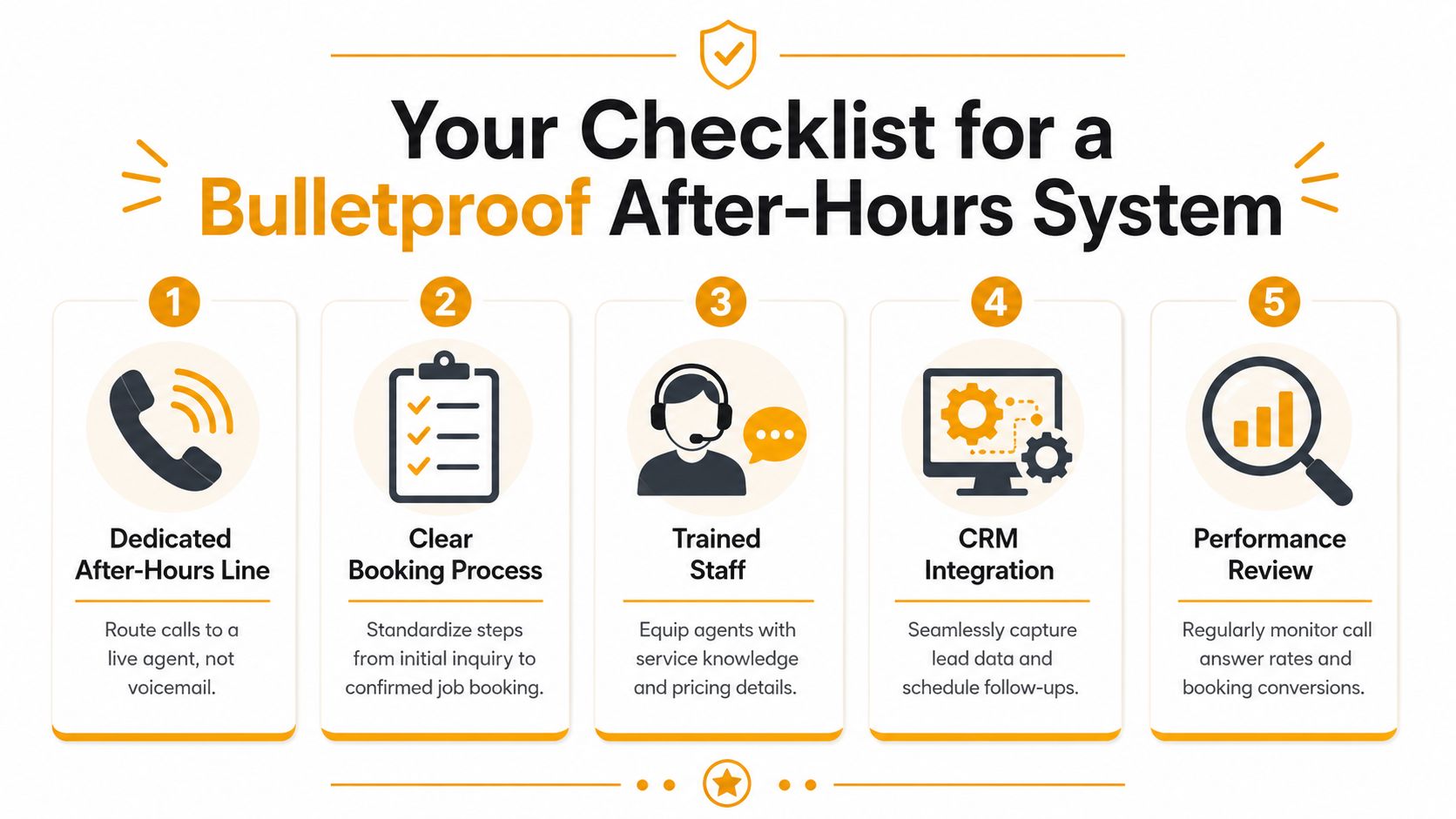
Routing and response rules
Start with the phone system itself.
- Set time-based routing: Your after-hours flow should switch automatically at the exact close of business. Manual switching gets missed.
- Create a fallback layer: If the first destination fails, route to a second one immediately.
- Add escalation for real emergencies: Existing customers with active load failures or urgent dispatch issues should not be mixed into new quote traffic.
A common technical mistake is relying on basic voicemail alone. Standard voicemail without a voicemail-to-email or automatic text-back escalation protocol can cause a 30-50% drop in callback compliance because messages get lost in phone system queues that staff rarely check, according to Vistanet's guidance on after-hours call handling.
What your after-hours script must capture
If a human service or automated workflow takes the call, it needs a moving-specific script. Generic reception language won't cut it.
Minimum intake should include:
- Move locations: Origin and destination, ideally with zip codes.
- Timing: Requested date and whether the customer is flexible.
- Job size: Bedrooms, cubic volume, or another usable estimate.
- Access details: Stairs, elevator, long carry, or loading restrictions.
- Special items: Piano, safe, fragile pieces, or anything that affects crew or equipment.
The first questions should qualify the job, not just collect contact info.
A simple owner decision filter
Choose your system based on what you're trying to fix.
- If you only need overflow support, call routing and a disciplined callback process may be enough for now.
- If your office loses nights and weekends regularly, you need a system that captures structured intake instantly and triggers follow-up without waiting on staff memory.
- If your goal is growth, build for quoting and direct booking, not message capture.
Owners often say they don't want more software. Fair. What they need is less manual cleanup in the morning and fewer leads stuck between the phone and the CRM.
Integrating After-Hours Calls with SmartMoving or Supermove
After-hours systems fail when they create more admin than they save. If your receptionist, answering service, or phone bot drops a lead into an email inbox and somebody has to retype everything into SmartMoving, Supermove, MoveitPro, or a calendar the next morning, you've created delay and extra labor at the exact point where speed matters.
Why disconnected systems fail
The front end of the sale depends on details. Moving companies that fail to capture specific intake data such as origin and destination zip codes, home size, and stair access on the first call lose approximately 62% of booking opportunities, according to Instanexus on moving company intake and booking loss.
That's why integration matters. It isn't about software elegance. It's about operational continuity. The same data captured on the call should populate the record your dispatcher, estimator, or sales coordinator sees the next morning.
If you've looked at workflow automation in other service industries, the thinking is similar to these real estate workflow automation APIs. Different industry, same principle. Data loses value when it sits in separate tools waiting for someone to copy it over.
What a clean workflow looks like
A strong after-hours workflow does five things well:
- Creates the lead record automatically in SmartMoving, Supermove, MoveitPro, or your operating calendar.
- Preserves call notes and intake answers so nobody has to reconstruct the customer's situation.
- Triggers follow-up tasks automatically if the job isn't booked on the call.
- Applies tags or status labels such as local, long-distance, urgent, or estimate needed.
- Keeps the morning team focused on action instead of data entry.
Many movers often underestimate the hidden cost of “cheap” solutions. A low-cost tool that spits out messy notes can still burn office hours, create quoting errors, and slow down response the next day.
For owners comparing systems around this workflow layer, this SmartMoving, Supermove, and MoveitPro comparison helps clarify what clean handoff should look like. The best setup is the one that makes a 10 PM inquiry appear as a usable, organized opportunity by the morning huddle.
Stop Leaking Revenue and Start Scaling Your Operation
The best movers don't treat after-hours calls as overflow noise. They treat them as booked-job opportunities arriving when their human team is least available.
That shift in mindset changes a lot. You stop asking whether somebody “covered the phones.” You start asking whether your business can qualify, quote, and move a lead toward commitment even when crews are out, dispatch is swamped, and the office is dark.
What growth-minded movers do differently
Operators who scale cleanly usually have three habits in common.
First, they separate urgent operational calls from new revenue calls. A driver issue, access problem, or active customer concern follows one path. A new quote request follows another. That alone reduces owner burnout.
Second, they standardize intake. Every lead gets the same critical questions, the same service-area checks, and the same next-step logic. That makes quoting more accurate and follow-up faster.
Third, they build around conversion, not appearances. A live voice is nice. A booked job is better. A CRM entry is useful. A confirmed move on the calendar is what pays for trucks, payroll, and growth.
The companies that win after hours are usually the companies that are easiest to buy from, not the companies with the fanciest phone setup.
If you're running 5 to 20 trucks, this matters even more during busy season. Volume spikes expose every weakness in the front office. Missed calls rise. Follow-ups slow down. Crews stay busy, but revenue still leaks because the next wave of jobs never gets locked in.
The practical answer to how do moving companies handle after hours calls is this: the good ones build systems that recover revenue while they sleep. They don't depend on voicemail, memory, or next-morning cleanup. They make it easy for customers to get answers, get pricing, and get booked.
If you want to see what that looks like in practice, MoveJoy is built for exactly this gap. It doesn't stop at answering calls. It uses your rate card to generate accurate quotes, qualifies the lead, and books jobs directly into your CRM or calendar so after-hours demand turns into real revenue instead of missed opportunity.