Moving Quote Calculator for Movers: A Complete Guide

The owner is out on a job. One crew member is asking about a wardrobe carton. A customer at the destination wants to know where the dresser should go. The phone rings with a new lead asking for a quote on a 3-bedroom move next Saturday.
So the owner does what a lot of movers still do. He grabs a receipt, writes down an address, guesses at the hours, asks a few rushed questions, and says, “I’ll send you something later.”
That “later” is where revenue leaks out.
By the time the crew is wrapped up and the office catches up, that lead has already called two other movers. One gave a fast number. Another sent a clean estimate. The first mover may still have the better service, better people, and better reputation. But slow quoting makes all of that harder to sell.
For small and mid-sized moving companies, a moving quote calculator for movers isn’t just a convenience. It’s an operations tool. It standardizes pricing, shortens response time, and takes your quoting logic out of somebody’s head and puts it into a repeatable system.
Introduction The Quoting Chaos That Every Mover Knows

If you run a moving company with a small team, you already know the pattern. The phones ring when you're busy. Good leads don't arrive in neat blocks. They show up while you're driving, during a walk-through, while dispatch is juggling arrival windows, or after the office has closed.
That creates quoting chaos. Notes get scribbled on paper. Important details get missed. One person includes a stair charge and another forgets it. One customer gets quoted with travel time. Another doesn't. Then the job either gets underpriced, overpriced, or delayed long enough for the customer to move on.
What manual quoting really feels like in the field
The problem usually isn't effort. Owners and office staff are trying hard. The issue is that manual quoting depends on memory, availability, and consistency under pressure.
A lot of companies still quote from habit:
- One person knows the pricing best: Everyone else has to text or call for approval.
- Rate rules live in people's heads: Not in a system.
- Follow-up happens later: Which often means after the lead has cooled off.
- Booking is separate from quoting: So the customer has to wait for a second step.
When quoting depends on who's available, your sales process isn't a process. It's improvisation.
A proper calculator changes that. It doesn't replace judgment. It organizes it. Your pricing rules become usable on demand, even during the busiest part of the day.
Why this matters more than most movers think
Most owners don't need another dashboard. They need fewer dropped balls.
A mover-side calculator gives structure to the front end of the business. It helps you quote faster, quote more consistently, and stop treating every incoming lead like a custom math problem. That's the core benefit. You're not just saving time. You're making it easier to win work without dragging the office back into chaos every time the phone rings.
Why Your Pen-and-Paper Quotes Are Costing You Jobs

Pen-and-paper quoting feels cheap because there’s no software bill attached to it. In practice, it’s expensive.
The cost shows up as delayed callbacks, inconsistent pricing, forgotten add-ons, and leads that never get booked because nobody could give a confident quote while the customer was still on the phone. Consumer calculators exist everywhere, but they mostly serve the shopper, not the mover. That gap matters because independent moving companies with 1 to 20 trucks can lose an estimated $50K–$150K annually from missed calls during peak seasons and after-hours, according to Move.org's analysis of moving costs and quoting gaps.
Slow quoting loses to fast quoting
Customers shop fast. They don't separate “nice company” from “responsive company.” To them, speed is part of professionalism.
If your process sounds like this, you're probably losing jobs:
- Take a rough message
- Promise a callback
- Try to reconstruct the move details later
- Send an estimate when the office gets a chance
- Hope the customer hasn't already booked
That process creates friction for everyone. The customer has to wait. Your office has to chase information. Your estimator has to guess what was meant by “third-floor apartment, kind of a long walk.”
Inconsistent quotes damage trust
Customers may not know your labor model, but they know when a quote feels shaky.
If one staff member quotes one way and another quotes differently for the same job type, customers notice. They start asking why the numbers changed. Then the conversation shifts away from service and into defense mode.
A consistent quote does three things:
- Sets expectations early: The customer understands what's included.
- Reduces rework: Staff doesn't have to revise the estimate repeatedly.
- Builds confidence: A clear process makes the company look organized.
Practical rule: If your team can't explain the quote the same way every time, the problem isn't the customer. The pricing logic hasn't been standardized.
Manual methods also hurt your team
This is the part owners often overlook. Bad quoting doesn't just lose sales. It burns out the people handling the phones.
Dispatch gets dragged into sales questions. Owners get interrupted for approvals. Office staff waste time rewriting estimates instead of confirming jobs, collecting documents, or handling customer updates.
Manual quoting is also hard to train. New hires don't know which charges are standard, which are situational, and which ones the owner “usually includes unless it sounds like a problem.” That's not a repeatable system.
The real issue is control
A lot of movers think pen-and-paper gives them flexibility. It often does the opposite. It forces the business to rely on a few people who know the pricing well enough to quote accurately under pressure.
A mover-side quote calculator gives you control back. It creates one quoting standard, one intake flow, and one version of pricing logic that can be used consistently. That's how you stop losing jobs to faster competitors who aren't necessarily better. They're just easier to buy from.
The Anatomy of an Accurate Moving Quote
The fastest way to build a bad calculator is to oversimplify your own business.
A real moving quote isn't just hourly rate times hours. An accurate quote has to reflect how you price jobs in the field, not how you'd like pricing to look on a clean spreadsheet. According to Extra Space Storage's calculator guidance, an accurate quote needs to account for 15–20+ granular cost variables, including stairwell fees, long carries, and furniture disassembly. Calculators that ignore these add-ons can show 25-35% quote variance, and 40-60% of customer complaints come from unexpected extras.
Start with your core pricing model
Every mover should write down the base structure first.
For local work, that usually means one of these:
- Hourly pricing: Crew size, truck, minimum hours, travel time, and labor increments
- Flat-rate local pricing: Fixed amount based on move size, complexity, and expected time
- Hybrid pricing: A flat starting charge plus variable labor or add-ons
For longer hauls, the structure changes. The quote may depend on weight, mileage, service level, and operational constraints that aren't present on a local day move.
If your calculator doesn't separate those models, it will confuse your staff and your customers.
Your rate card worksheet should include more than labor
A useful internal worksheet usually needs these categories:
- Base service type: local labor-only, local full-service, intrastate, long-distance
- Crew and truck rules: how many movers, what truck size, what minimum applies
- Time assumptions: normal load time, unload time, drive time, travel fees
- Access conditions: stairs, elevators, long carry, parking limitations, walkups
- Special handling: pianos, safes, oversized furniture, assembly/disassembly
- Materials and extras: shrink wrap, boxes, mattress bags, packing labor, storage stops
The key is to write your pricing in operational language. “Third-floor walkup” is better than “access complexity surcharge.” Your staff speaks move language, not software language.
| Fee Type | What It Covers | Common Billing Method |
|---|---|---|
| Stair fee | Flights of stairs, walkups, extra labor time | Per flight, per item, or flat add-on |
| Long carry | Distance from truck to entry | Flat fee or time-based add-on |
| Assembly and disassembly | Beds, tables, sectional setup, reassembly work | Per item or labor-time add-on |
| Packing materials | Boxes, tape, wrap, mattress bags, specialty cartons | Per item or bundled materials charge |
| Specialty items | Pianos, safes, gym equipment, oversized furniture | Per item or custom quote |
| Elevator or access delay | Limited access, building rules, reserved elevator timing | Time-based or flat complexity fee |
| Extra stop | Storage unit, second pickup, donation drop, split delivery | Flat stop fee or added time |
| Travel charge | Drive time to and from the job | Flat fee or billable labor time |
Hidden fees aren't hidden to you
Movers know these charges are real. Customers call them “hidden” because nobody explained them early enough.
That's why a good calculator shouldn't wait until move day to account for common complications. If your company routinely charges for long carries or disassembly, your intake process should ask about them before the estimate is sent.
A quote that ignores known cost drivers isn't competitive. It's incomplete.
Bind your pricing logic to real questions
The best quoting systems are built backward from intake questions. If a fee exists, there should be a question that triggers it.
Examples:
- Is there a walkup?
- How far can the truck park from the entrance?
- Are there items that need disassembly?
- Are there building restrictions or elevator windows?
- Is packing included, partial, or not needed?
If your calculator asks weak questions, it will produce weak quotes. That's true whether you build it in Google Sheets or buy specialized software.
Accuracy starts before the math
The math matters, but intake quality matters first. Most quote problems start with missing details, not bad arithmetic.
Owners who tighten up their rate card logic usually see another benefit right away. Their office gets better at qualifying leads. The quote becomes clearer because the questions become clearer. That alone can clean up a lot of back-and-forth before you ever automate anything.
Path 1 Building Your Own Moving Quote Calculator
If you're not ready to buy software, you can still build a working calculator. A spreadsheet or form-based setup is enough to improve consistency if your current system is paper, memory, and callback promises.
The DIY path works best for movers who want to standardize local estimates first. It can also be a good way to pressure-test your own pricing logic before rolling it into a larger system.
What to build first
Don't start with every edge case. Start with your most common job type.
For many local movers, that's a straightforward residential move with hourly pricing. Build around the jobs your office sees every week, then add exceptions after the core logic works.
A simple setup usually includes:
- Lead intake fields for origin, destination, home size, stairs, long carry, packing needs, and specialty items
- Pricing fields for hourly rate, crew size, minimum hours, travel charge, and common add-ons
- Output fields that show estimate range, notes, and next step
- Internal notes so staff knows why the number came out the way it did
Google Sheets works because it's flexible and easy to update. Jotform or similar tools work if you want the questions to feel cleaner for office staff or web leads.
Separate local from long-distance logic
Many DIY calculators often fall short. They try to run every move through one formula.
According to MoveBuddha's explanation of moving cost calculators, calculators have to handle two different pricing models. Local moves use hourly-based formulas, while long-distance moves use weight-plus-mileage calculations. That's why local calculators can be highly accurate for instant quoting, while long-distance estimates usually need ranges.
If you're building your own tool, split the workflow early:
- Local moves: deterministic quote logic with hourly assumptions and known add-ons
- Long-distance moves: range-based estimate with review flags for weight, service level, and complexity
Trying to force long-distance jobs into a simple local template creates false confidence. That's dangerous for both sales and operations.
A practical DIY setup
Here’s a basic structure that works:
Sheet one for your rate card
List every rule that affects price. Keep it plain.
Include:
- base hourly rates
- crew options
- truck charges
- minimums
- travel policy
- stair logic
- long carry logic
- material charges
- specialty item fees
Sheet two for intake
This is what your team uses on the phone.
Use dropdowns wherever possible. Free-text fields create inconsistency. “3rd floor no elevator” should not be entered five different ways by five different people.
Sheet three for output
This is the customer-facing estimate summary.
It should show:
- service type
- included crew and truck
- expected time or range
- listed add-ons
- exclusions or assumptions
- next action
Build for the person answering the phone at a busy moment, not for the owner reviewing it calmly at night.
If you want a reference point for how a more structured estimate flow can look, study tools built for this problem, such as a mover-focused estimate builder. Even if you stay DIY, seeing a cleaner quoting workflow helps you tighten your own intake process.
Where DIY breaks down
DIY calculators are useful, but they have limits.
The main ones are operational:
- Maintenance becomes your job: Every pricing change has to be updated manually.
- Edge cases multiply: The more exceptions you add, the messier the sheet becomes.
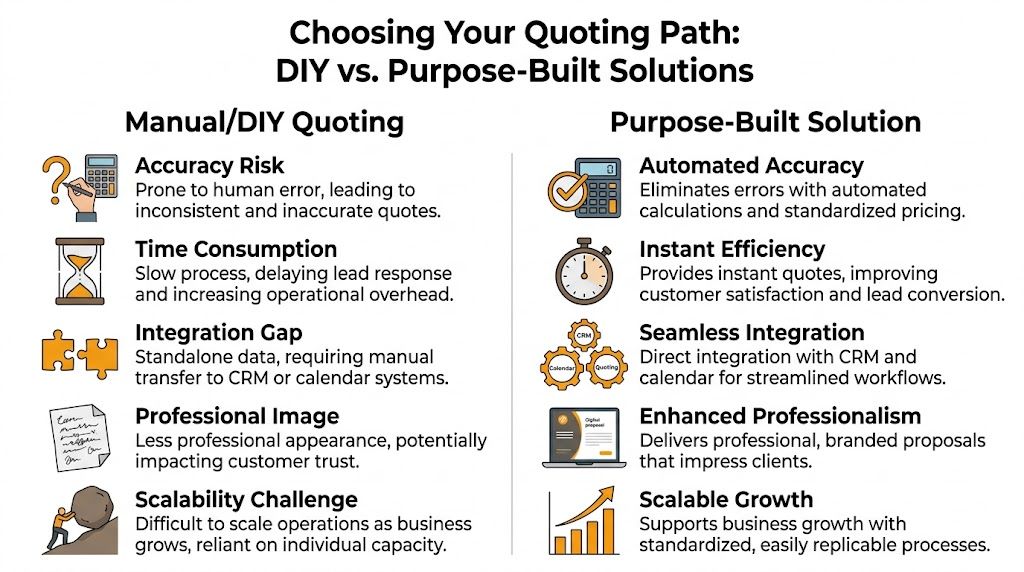
- No real workflow automation: A quote in a sheet still has to be copied into your CRM, your calendar, or your follow-up system.
- Staff adoption can slip: If the spreadsheet is clunky, people go back to texting the owner.
DIY is fine as a starting point. It is not always a long-term front-office system. Once your volume grows, the primary bottleneck isn't the formula. It's everything that has to happen before and after the formula runs.
Path 2 Choosing a Purpose-Built Quoting Solution
At some point, most growing movers hit the same wall. The spreadsheet works, but only if the right person is using it, the logic is up to date, and someone still has time to move the quote into the rest of the business.
That's when a purpose-built quoting tool starts to make sense.
What matters when evaluating a mover-side quoting tool
A real moving quote calculator for movers should be judged on operations, not appearance.
Look for these decision points:
- Rate card flexibility: Can the system use your exact pricing rules, not a generic template?
- Accessorial logic: Can it handle stairs, long carries, walkups, disassembly, and building restrictions automatically?
- Lead handling: Can the tool work when the office is closed or the team is tied up?
- Booking flow: Can a quote turn into a booked job without re-entering the same details?
- CRM fit: Does it connect to the software your team already relies on?
A nice interface doesn't solve quoting problems if the logic underneath is weak.
Don't confuse lead capture with quote capability
A lot of tools can collect a name, phone number, and move date. That's not the hard part.
The hard part is generating a quote that reflects your actual operation. Generic systems often stop at intake. They pass a message to your team and call that automation. For movers, that still leaves the most important work undone.
If you're evaluating software outside the moving space, it's worth reviewing broader field-service resources that simplify estimates, quotes, and invoicing. Not because those tools solve mover-specific quoting by themselves, but because they help clarify the baseline features professional service businesses now expect from estimate workflows.
Accuracy is no longer just a manual process issue
Purpose-built quoting systems have another advantage. They can use more data than a human can reasonably process during a call.
According to Moovick's overview of AI-powered moving cost calculators, AI-powered moving quote calculators can deliver estimates 20-30% more accurate than traditional methods by analyzing millions of data points from past moves and adjusting for seasonality, fuel prices, and labor costs in real time.
That doesn't mean every tool with “AI” in the headline is good. It means the best systems can standardize quoting in ways a rushed office team can't.
Questions to ask before you commit
Use this checklist in demos or sales calls:
- Can you import or mirror my company rate card?
- How does the system treat local versus long-distance quoting?
- Can it apply add-ons automatically based on intake answers?
- What happens if a lead wants to book immediately?
- Does the quote flow into my CRM or calendar without manual entry?
- Can staff review and override quotes when needed?
- How hard is it to update pricing before busy season or after a rate change?
A stronger software option for movers should answer those questions clearly. If it can't, you're probably buying a lead form with extra steps.
If you want to compare what a mover-specific platform looks like against more generic options, review moving company estimate software built around mover workflows. Even if you don't switch tools immediately, it gives you a useful benchmark for what purpose-built quoting should cover.
Integrating Your Calculator with Your CRM and Calendar
A standalone quote is better than a handwritten note. An integrated quote is better than both.
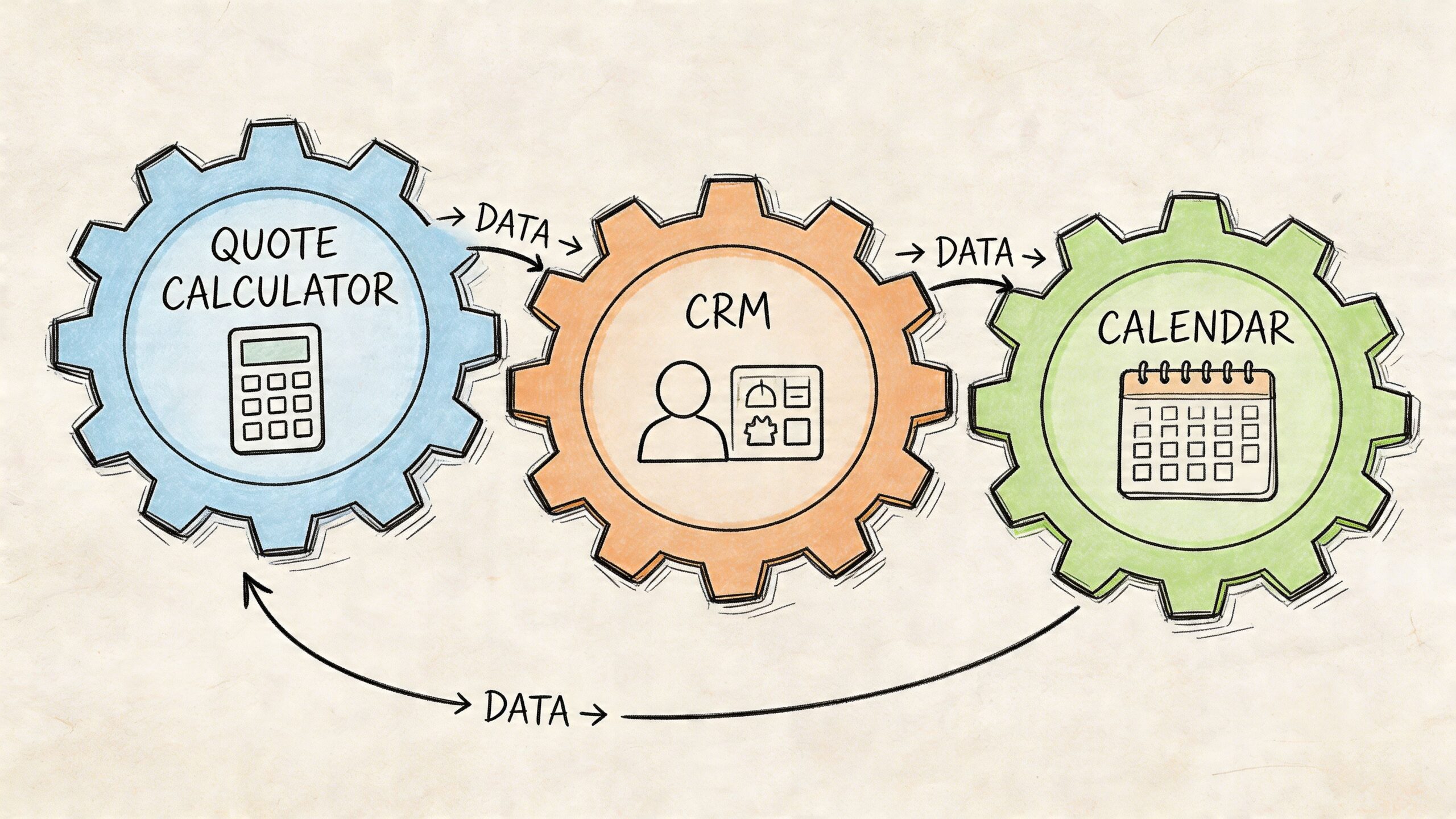
The reason is simple. Quoting is only one part of the front-office workflow. After the estimate is created, someone still has to save the lead, schedule the job, assign the date, trigger follow-up, and make sure operations sees the same information sales collected.
What integration fixes in daily operations
Without integration, staff ends up doing double entry.
They take a lead on the phone, build the quote, then retype the same customer information into SmartMoving, Supermove, MoveitPro, or a shared calendar. That creates delays and mistakes. Addresses get entered wrong. Notes don't transfer. The move date gets discussed but never held. Sales thinks the job is pending. Dispatch thinks it isn't booked.
When the quote system connects directly to your back-office tools, a lot of that disappears.
Common improvements include:
- Lead records created automatically
- Booked jobs pushed into the CRM without retyping
- Calendar visibility for office staff and dispatch
- Cleaner handoff from sales to operations
- Less dependence on one person remembering every next step
A real-world workflow difference
Here's the operational contrast.
A disconnected process looks like this: lead calls, someone writes notes, quote gets sent later, customer calls back, office has to find the original details, then somebody manually builds the job in the CRM.
An integrated process looks different. The lead comes in, details are captured once, the estimate is generated from the same data, and if the customer is ready, the job is booked directly into the system your team already uses.
If your office has to re-enter quote data to schedule the move, the quote process still isn't finished.
What to look for in the integration itself
Not all integrations are useful. Some only pass basic contact info.
For moving operations, you want the quote tool to carry over the details that matter operationally:
- Origin and destination
- Move date request
- Home size and service type
- Access notes
- Add-ons and special items
- Quoted amount or range
- Booking status and follow-up state
This is especially important for companies trying to scale without adding more admin overhead. A small office can handle a surprising amount of volume if the intake, quoting, and booking steps flow together.
If you're mapping out how your quoting tool should connect with the rest of your operation, it helps to review examples of a CRM workflow for service businesses. The exact software may differ, but the principle is the same. The fewer times your team retypes the same job, the fewer chances you create for error.
Using Your Calculator to Boost Lead-to-Book Conversion
A quote calculator isn't just an estimating tool. It's a sales tool.
Used well, it shortens the distance between inquiry and booked job. Used poorly, it just produces numbers faster. The difference is what happens after the quote is generated.
Speed matters because booking windows are short
A local move has real value. The average local move is worth around $1,400, and for a company that misses only a few calls a week, the lack of instant, bookable quotes can lead to over $50,000 in lost revenue annually, according to Moving.com's moving cost calculator data.
That means the calculator should support conversion, not just accuracy.
The strongest process usually includes:
- Immediate quote delivery: Give the customer a usable number while they are still engaged.
- Clear next step: Book now, schedule a follow-up survey, or confirm details.
- Automatic reminders: If the customer doesn't commit, the system should keep the lead warm.
- Fast handoff when needed: Complex jobs can go to a human without losing momentum.
What higher-converting movers do differently
They remove waiting.
If a customer gets a quote and has to wait for someone else to manually send paperwork, confirm availability, or build the job in another system, friction goes up. If the estimate is clean and the booking path is obvious, more leads move forward.
A practical follow-up sequence should answer three things:
- What was quoted
- What assumptions were included
- How the customer confirms the booking
Customers rarely object to organized follow-up. They object to confusion.
Use quote data to improve your front end
Your calculator can also tell you where deals stall.
Review patterns like:
- jobs that get quoted but not booked
- service types that need human review too often
- common add-ons that are being missed in intake
- lead sources that produce low-quality quote requests
If you're serious about measuring what happens between first contact and booked move, tools that connect quoting activity to reporting can help. For operators who want cleaner attribution around lead behavior and follow-up performance, Google analytics mcp is one example of a useful analytics integration to review.
A better quote process doesn't just create estimates. It creates a tighter revenue loop.
Conclusion Stop Quoting and Start Booking
Most moving companies don't have a lead problem. They have a quoting and follow-up problem.
When pricing lives on paper, in somebody's memory, or across three different tools, jobs slip through. Good leads wait too long. Staff gets interrupted. Owners stay stuck in the same cycle of answering calls, patching quotes together, and chasing bookings after the fact.
A proper moving quote calculator for movers changes that. It turns your pricing into a system. It makes local quoting more consistent, long-distance quoting more realistic, and booking more immediate. Whether you start with a spreadsheet or move to a purpose-built platform, the goal is the same. Capture the lead, quote it clearly, and move it toward a booked job without unnecessary delay.
If your current process depends on callback promises and handwritten notes, that's the first leak to fix.
If you want to see what mover-specific quoting and booking automation looks like in practice, take a look at MoveJoy. It’s built for independent movers who want to turn inbound calls into accurate quotes and booked jobs, without adding more front-office chaos.