
Peak season exposes every weakness in a moving company’s front office.
The phone rings with a new lead. A driver calls about a truck issue. Someone in the office is chasing paperwork. A prospect wants a quote right now, not later tonight after you finish dispatch. If your pricing lives in a spreadsheet, a notebook, or in one experienced salesperson’s head, that call can slip from opportunity to mistake in a few minutes.
That is why moving company estimate software matters. Not because software is trendy. Because quoting sits at the point where sales, operations, and profit all meet. Get it right and you book cleaner jobs. Get it wrong and you either lose the move or win work you should not have taken at that price.
The Moment a Bad Quote Loses You a $2000 Job
A small moving company owner usually does not lose a good job because of one dramatic failure. They lose it in the middle of a normal day.
A caller asks for a quote on a three-bedroom move. At the same time, a crew lead wants approval for extra labor, a truck needs attention, and another customer is asking if you can change tomorrow’s arrival window. You rush the estimate, skip a few questions, and send a number that feels close enough.

That is where the leak starts.
If you quote too high, the customer keeps shopping. If you quote too low, your crew finds out on move day that there are stairs, a long carry, packing add-ons, or access issues that never made it into the price. Either way, the estimate did not do its job.
Why manual quoting breaks down under pressure
Manual quoting looks cheap because there is no obvious software line item. In practice, it creates hidden costs:
- Missed detail: Stair charges, bulky items, long carries, and packing needs often get left out when the office is busy.
- Slow response: A delayed quote tells the customer your process is slow before they ever hire you.
- Inconsistent pricing: Two staff members can quote the same move differently when rules are not built into a system.
- Bad handoff to ops: Even when sales wins the job, dispatch inherits unclear notes and bad assumptions.
For a 1 to 20 truck mover, this is not a side issue. It affects booking rate, gross margin, customer expectations, and crew efficiency.
A bad estimate is not only a sales problem. It becomes an operations problem the moment the truck rolls out.
The owners who fix this usually stop treating estimates like office admin. They start treating them like revenue control.
Manual Spreadsheets vs Automated Quoting Software
The difference between manual quoting and software-based estimating is not cosmetic. It changes how fast your team responds, how consistently you price, and how much rework the office creates for itself.
This moving estimate template resource is useful for seeing what a structured quote should capture, but a template still depends on the person filling it out correctly every time. That is a core limitation of manual systems.
What manual estimating costs you
Movers using dedicated estimate software reduce quoting time from an industry-standard 20 minutes per estimate to under 5 minutes, according to SmartMoving’s estimate software analysis. That gap matters because customers do not wait around while you build a spreadsheet.
A manual process usually looks like this:
| Method | What happens in real life | Risk |
|---|---|---|
| Spreadsheet quote | Staff manually enters labor, travel, materials, and notes | Pricing omissions and slower response |
| Notebook or memory-based quoting | Experienced estimator fills in gaps from memory | Inconsistent pricing between team members |
| Manual follow-up by email | Quote goes out later, after calls and dispatch tasks | Prospect shops competitors first |
| Separate systems for sales and ops | Office re-enters data into CRM or calendar | Errors during handoff |
The owners I see struggle most with quoting are not lazy. They are overloaded. They rely on memory because they have to move fast. That works until volume increases.
What software changes
Software-based estimating forces discipline into the process. It applies the same logic every time, regardless of who takes the call.
That matters when your team needs to account for:
- Hourly vs flat-rate jobs
- Drive time and distance rules
- Crew size
- Packing and unpacking services
- Access complications like stairs or long carries
- Specialty items
- Seasonal and route-based pricing adjustments
Good moving company estimate software also improves the customer experience. The quote looks cleaner, the timing is faster, and the next step is clearer.
Speed wins attention. Accuracy protects margin. You need both.
The biggest mistake is thinking software only saves admin time. It also reduces avoidable judgment calls. That is why automated quoting does not just feel more organized. It helps operators book work with fewer surprises.
Your Feature Checklist for Choosing Estimate Software
Most movers buy estimate software the wrong way. They look at dashboards, branding, or whether the demo feels polished. That is not what determines success.
The right system must reflect how your company prices moves. If it cannot do that, your staff will work around it, and once they start using workarounds, the software stops protecting margin.
This guide to the best software for moving companies is a good starting point when you compare options, but the shortlist should come down to a few operational must-haves.
Essential features
AI-powered estimate software can reduce quote preparation time by 83% from 47 minutes to under 8 and lead to a 28% increase in job close rates, according to Yembo’s moving estimate benchmarks. Speed matters, but only if the system can still quote your jobs correctly.
Use this checklist when evaluating any tool:
Your own rate card support
The system should use your rules, not a generic pricing model. If you charge differently by zip code, job type, truck minimum, or season, the software needs to match that.Hourly and flat-rate quoting
Small and mid-sized movers often need both. Local residential work may be hourly. Commercial, long-distance, or specialty jobs often need a different structure.Built-in surcharge handling
The tool should make it easy to add stairs, long carries, elevators, bulky items, shuttle scenarios, packing materials, and storage-related services without creating a custom workaround every time.Virtual survey or inventory support
Some jobs need more than a rough verbal description. Tools that support photos, video, or room-by-room inventory help staff quote with more confidence.Multi-channel estimate delivery
A modern system should not trap quotes in one channel. Prospects want estimates by voice, SMS, email, and API depending on how they first contacted you and how your workflow is set up.
What operators often overlook
A feature list can hide weak execution. Ask harder questions.
Ask how edits happen
If every change requires vendor support, your office will hate the system. Your team should be able to update tariffs, pricing rules, and service options without waiting on a ticket queue.
Check how the quote becomes a booking
Some tools stop at estimate generation. That leaves staff to manually send the quote, follow up, and create the job elsewhere. A better workflow carries the same data forward into scheduling and dispatch.
Watch for generic logic
General sales tools can send polished proposals, but moving quotes require moving math. Purpose-built quoting handles long carries, stairs, walkups, labor logic, and service combinations far better than generic software.
If the software cannot reflect how your estimators think through a move, it will not get adopted.
The best buying question is simple. “Can this system help my staff quote fast without guessing?”
How to Integrate Software with Your Current Workflow
Most implementation problems come from one issue. The estimate tool sits beside the rest of your workflow instead of inside it.
When that happens, your office takes a lead in one place, creates the quote in another, copies details into a CRM, and then retypes the booking into a calendar or dispatch board. Every handoff creates another chance to lose information.
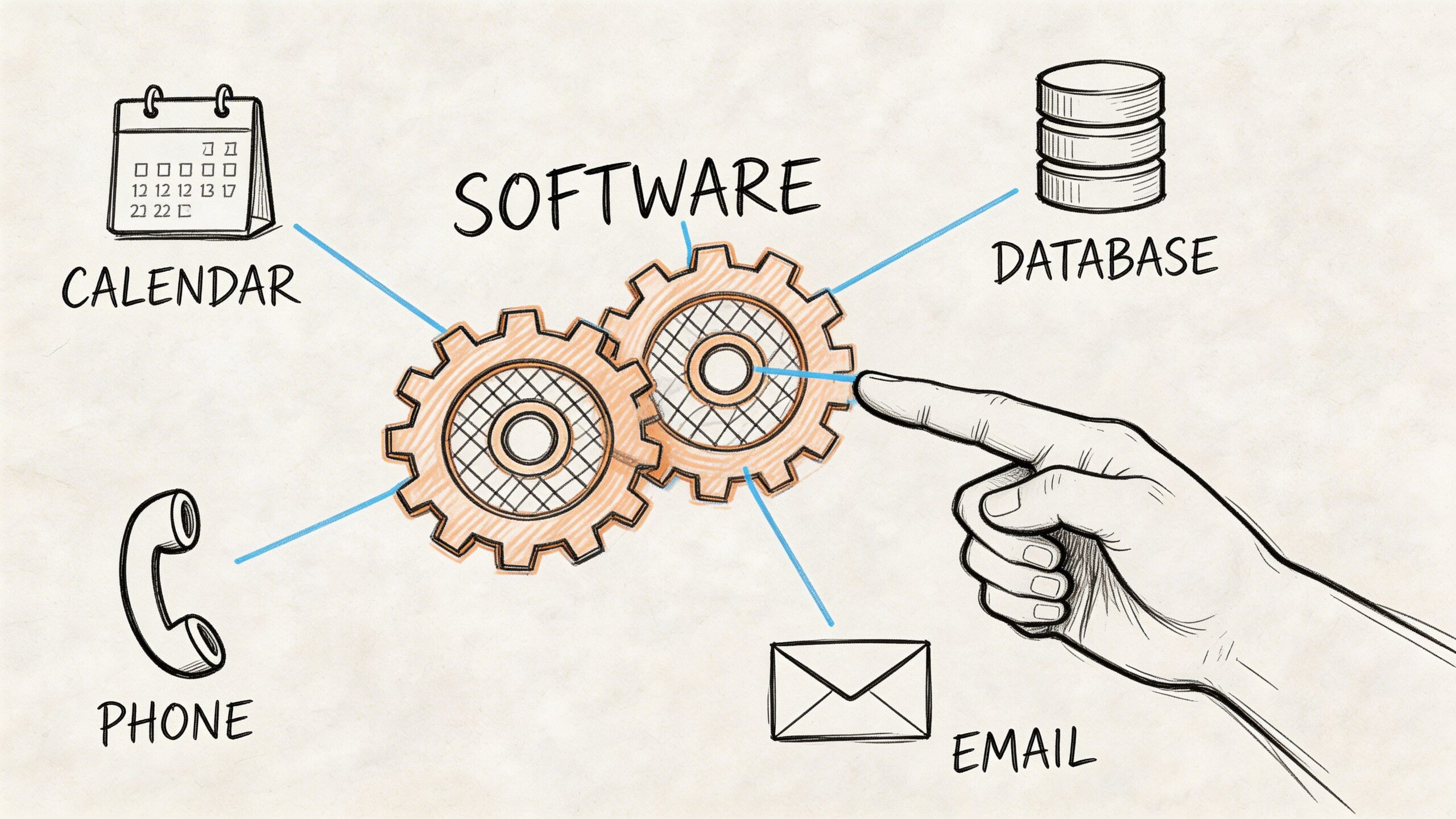
Build one flow from lead to job
Your estimating workflow should connect to the tools your team already uses, especially if you run operations through SmartMoving, Supermove, MoveitPro, or a simpler setup built around Google Calendar.
A clean workflow usually looks like this:
- Lead enters the system by phone, web form, text, or email.
- Estimator collects job details and creates the quote.
- Quote data syncs automatically into the customer record.
- Booked jobs appear on the calendar or in the CRM without re-entry.
- Dispatch and office staff work from the same record instead of separate notes.
If you are still evaluating ways to connect tools, a general resource on integrations can help you think through how data should move between phone, calendar, email, and CRM systems.
What to connect first
Do not try to connect everything on day one. Start with the links that remove the most double entry.
First priority
- CRM sync
- Calendar sync
- Customer contact records
- Estimate-to-booking status updates
Second priority
- Email and SMS follow-up
- Document generation
- Accounting handoff
- Crew-facing job details
What works and what does not
What works is one source of truth. Sales enters the details once. Everyone else works from the same record.
What does not work is a “half integrated” setup where office staff still copy customer notes from one system into another because the estimate tool never became part of the operating process.
If the quote does not flow into scheduling, your staff will create side systems. Side systems always create mistakes.
For small operators, even a basic integration into a calendar is better than a polished estimate trapped in an isolated app.
The 3-Step Plan for Testing and Team Training
Most software rollouts fail for a simple reason. The owner buys the tool, assumes the team will figure it out, and goes live before the pricing rules are clean.
That creates mistrust fast. One bad quote in the first week can make the whole office retreat to spreadsheets.
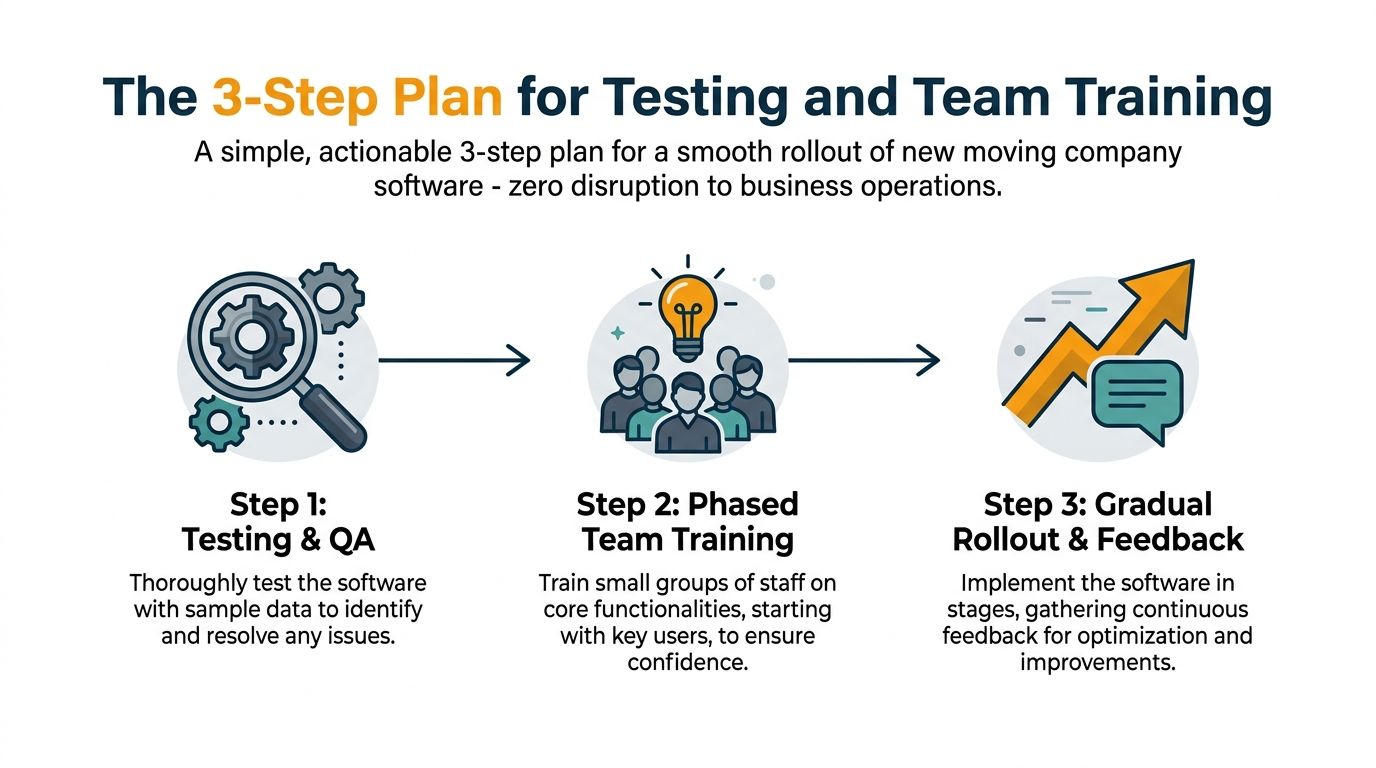
Step 1 testing and QA
Start with sample jobs your team knows well.
Run test quotes for a small apartment move, a larger home, a job with packing, a move with stairs, and one with a long carry or specialty item. Compare the software’s output against what your best estimator would price manually.
Look for missing service logic, confusing fields, or unclear output. Fix those before anyone takes a live lead with the new system.
Step 2 phased team training
Train the people who answer leads first. Do not start with everyone.
Give them a simple script for the call flow:
- Confirm core move details
- Ask access questions early
- Clarify packing or specialty items
- Review the quote before sending
- Explain the next step clearly
Keep training practical. Nobody needs a long software lecture. They need a repeatable way to quote while speaking with a customer.
The best training sounds like operations, not technology. “Ask this. Enter this. Confirm this. Send this.”
Step 3 gradual rollout and feedback
Go live with a limited group, then review early quotes closely.
Listen to calls if needed. Check whether sales captured enough detail. Confirm that booked jobs reached the right calendar or CRM record. If the team keeps pausing at one field or skipping one question, that is a process problem, not a people problem.
A steady launch beats a rushed one. Owners who treat rollout as a short operating project usually get adoption. Owners who treat it like a software purchase usually get resistance.
Calculate Your ROI on Recovered Moving Jobs
The fastest way to judge moving company estimate software is not by features. It is by recovered revenue.
Most owners already know they miss calls, delay follow-ups, or lose leads during busy hours. The problem is they rarely put a number around it, so the software keeps looking like an expense instead of a sales tool.

A simple ROI formula
Use this basic framework:
Recovered jobs x average job value = recovered revenue
Then compare that number against your monthly software cost, plus any setup or training time.
You can also layer in margin protection. Advanced estimate calculators can land within 5-10% of job costs, compared with a 20-30% variance in manual estimates, according to Network Leads’ analysis of moving software accuracy. That matters because recovered revenue only helps if the job was priced correctly in the first place.
What to track every week
Use a simple scorecard. You do not need complicated reporting to get useful answers.
- Quotes created
- Quotes sent the same day
- Booked jobs from quoted leads
- Jobs requiring price corrections later
- Missed leads that never received a quote
- Average time from inquiry to estimate
If you want a broader framework for how businesses think about clawing back lost opportunities, this overview of revenue recovery software is useful context.
You can also run your own back-of-the-napkin math with a dedicated moving company ROI calculator.
The practical way to judge success
Do not wait for a full quarter of data before deciding whether the system is working. Early signs are visible.
Look for these outcomes:
| Signal | What it usually means |
|---|---|
| Faster quote turnaround | Fewer leads cooling off before follow-up |
| Fewer price changes after booking | Better upfront scope capture |
| More complete job records | Smoother dispatch handoff |
| Fewer customer disputes over pricing | Better estimate clarity |
If your staff sends cleaner quotes faster and dispatch sees fewer surprises, the software is already paying you back operationally.
That is the right lens. Better quoting should recover work you were losing and protect jobs you were underpricing.
The Difference Between Answering Calls and Closing Jobs
A lot of front-office tools can answer the phone. Very few can help a moving company win the job.
That distinction matters more every year as the category grows. The moving company software market is projected to reach $3.5 billion by 2033 with a 12% CAGR, driven by cloud-based tools that reduce administrative time by 40-50% and connect quoting, dispatch, and billing, according to Data Insights Market’s moving software projection.
Lead capture is not the finish line
A basic answering service can take a message. A generic voice bot can collect contact information. A CRM can store the lead.
None of those things, by themselves, solve the core front-end problem for movers. The customer wants an answer, a price range or quote, and a next step while they are still engaged.
If your process stops at “we’ll call you back,” you did not close anything. You just preserved a chance.
What closes jobs
Closing requires a chain that works together:
- Lead qualification
- Accurate quote logic
- Fast delivery through the customer’s preferred channel
- Booking into the company’s operating system
- Follow-up when the customer does not decide immediately. Purpose-built tools separate themselves from general systems. Moving is not a generic service business. It has route logic, access charges, inventory uncertainty, labor variables, and seasonal pressure.
The operators who gain the most are not always the ones with the biggest software stack. They are the ones who remove friction between inquiry and booking.
Customers do not reward you for answering the phone. They reward you for helping them move forward.
That is the key upgrade. Not better call handling alone. Better conversion from first contact to booked job.
Stop Quoting and Start Booking
Manual estimating feels familiar, but familiarity is not the same as control.
If your team still builds quotes from spreadsheets, memory, or disconnected tools, you are asking sales staff to make margin decisions under pressure and asking dispatch to clean up the result later. That is why so many small and mid-sized movers feel busy all the time but still see jobs leak out of the pipeline.
Good moving company estimate software fixes more than quote speed. It standardizes pricing, improves handoff, reduces avoidable disputes, and gives your office a repeatable process for booking more moving jobs without adding more chaos.
The right system does not need to be flashy. It needs to fit your rate card, match your workflow, and help your team move from inquiry to confirmed booking with less friction.
If you want to grow, do not just ask whether a tool can produce a quote. Ask whether it helps your company book profitable work more consistently.
If you want to see what that looks like in practice, MoveJoy is built for movers who want more than lead capture. It generates accurate quotes using your own rate card, delivers estimates across voice, SMS, email, and API, and books jobs directly into your CRM or calendar so your front office can stop chasing leads and start closing them.