The 12 Best Scheduling Software for Small Business Movers in 2024

For a moving company owner, a missed call isn’t just a minor inconvenience; it’s a lost job, pure and simple. In an industry where customers shop fast, the first mover to provide a quote often wins the business. Juggling calls during the busy season, managing dispatch, and handling quotes manually creates operational bottlenecks that directly impact your bottom line. Traditional scheduling methods can't keep up with demand, leading to double bookings, inefficient routing, and frustrated customers. When your team is out on a job, every unanswered call is revenue handed to a competitor.
This guide cuts through the noise to help you find the best scheduling software for your small business. We'll analyze the top tools through the lens of a moving company with 1–20 trucks, focusing on features that solve real-world problems like 24/7 lead capture, automated quoting, and seamless calendar integration. The goal isn't just to find another piece of software; it's to find an automated system that recovers lost revenue and gives you a competitive edge. For businesses that rely on both Outlook and Google Calendar, exploring the best Outlook Google Calendar sync software can ensure seamless operations and prevent scheduling errors.
Below, you'll find a curated roundup of top-tier scheduling platforms. Each review includes key features, ideal use cases for movers, practical pros and cons, and clear pricing information. We’ve included direct links and screenshots to help you visualize how each tool works, so you can stop losing jobs to voicemail and start booking more moves automatically.
1. MoveJoy
MoveJoy stands out as more than just a scheduling tool; it's a complete, AI-powered front-office assistant designed specifically for moving companies that depend on inbound calls. For movers, a missed call is a missed job. MoveJoy solves this fundamental problem by ensuring every single call is answered instantly, 24/7. This makes it one of the best scheduling software solutions for small businesses focused on maximizing lead capture and operational efficiency without increasing headcount.
Its core strength lies in its ability to handle the entire lead-to-booking workflow autonomously. The AI is trained on thousands of real moving industry conversations, allowing it to understand industry-specific jargon, capture job details accurately, and provide instant, precise quotes based on your company’s custom rate card. It then checks your live calendar availability and books the job directly, sending confirmations to the customer and your team.
Why It Stands Out
What differentiates MoveJoy is its immediate, measurable impact on revenue and its low-effort implementation. The setup process takes minutes and requires no technical expertise. It integrates natively with essential industry CRMs and universal tools like Google Calendar, ensuring it slots directly into your existing operations. The AI handles unlimited concurrent calls, a critical feature during peak season when call volume spikes unexpectedly. One booked job typically pays for the entire monthly cost of the service.
This system is engineered for growth. Beyond just booking, MoveJoy automates post-job follow-ups for reviews and referrals, helping build your reputation and drive word-of-mouth business. For companies managing crews across different service areas, MoveJoy offers powerful features for multi-location scheduling.
Pricing and Access
MoveJoy offers tiered pricing plans (Starter to Pro) that scale with your business needs, typically ranging from approximately $149 to $499 per month. Each plan includes a set number of call minutes, with per-minute overage fees for additional usage. The company provides a free demo and trial period, allowing you to test the system and calculate your potential return on investment before committing.
-
Pros:
- 24/7 Instant Response: Captures every lead by answering calls in seconds, eliminating voicemail and missed opportunities.
- High-Conversion AI: Industry-trained AI understands mover-specific needs, quotes accurately, and achieves a high booking rate.
- Seamless Integration: Connects directly with major moving industry CRMs and calendars for a unified workflow.
- Cost-Effective Scalability: Manages unlimited calls simultaneously at a fraction of the cost of a human receptionist or call center.
- Secure and Compliant: Offers enterprise-grade security with GDPR and HIPAA compliance.
-
Cons:
- Not for Complex Escalations: While effective for standard bookings, the system is designed to escalate highly complex or sensitive customer issues to a human.
- Variable Cost: High call volumes during peak season can lead to overage fees, requiring businesses to select the appropriate plan based on anticipated usage.
Learn more about how MoveJoy handles scheduling for multiple locations
2. Calendly
Calendly is one of the most recognized names in scheduling automation, making it a strong contender for the best scheduling software for small businesses. It excels at simplifying the process of booking appointments, whether for initial customer consultations, on-site estimates, or follow-up calls. For a moving company, this means you can embed a booking link directly on your website or in your email signature, allowing potential customers to schedule a quote walkthrough without a single back-and-forth email.
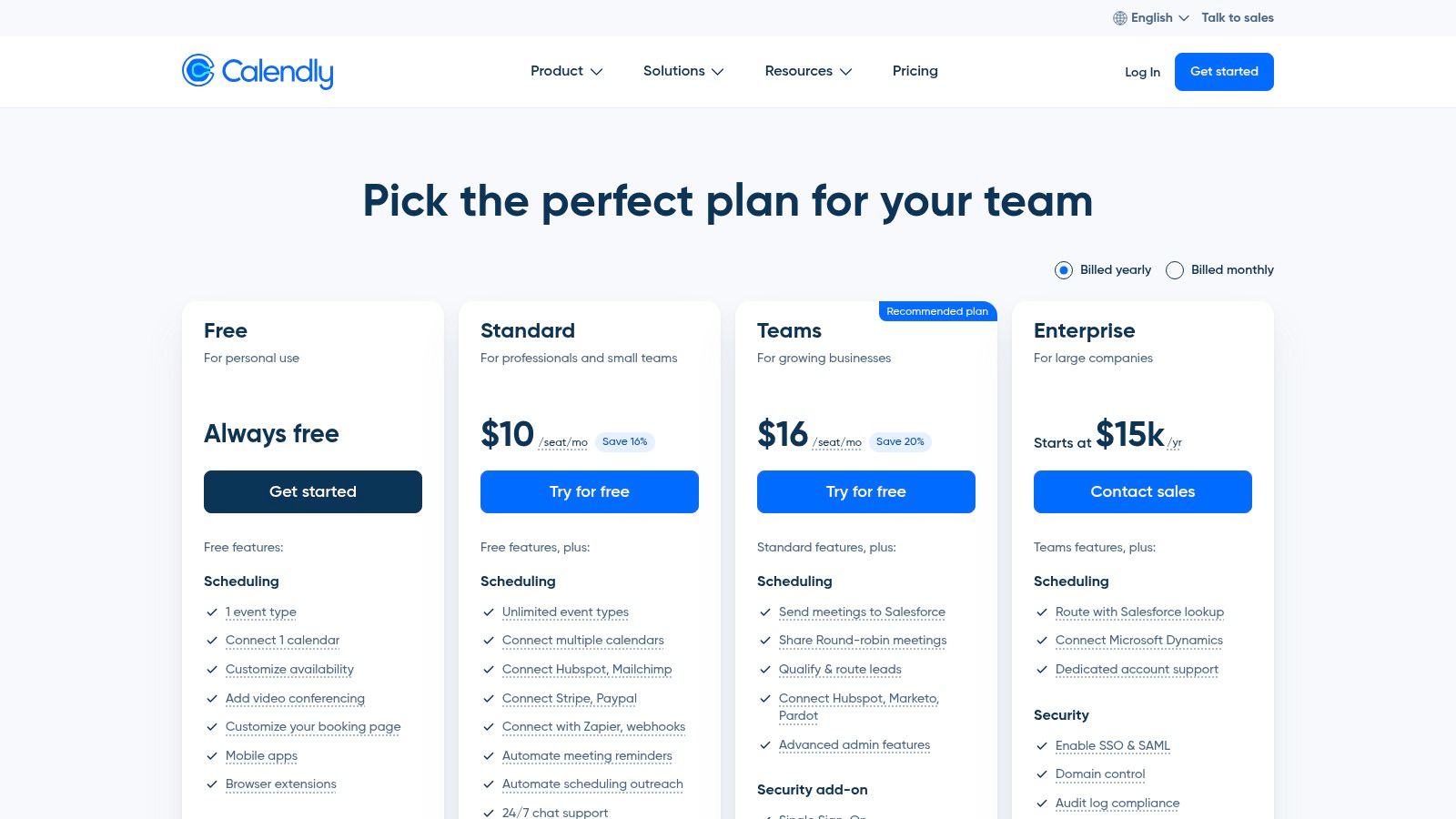
What makes Calendly stand out is its robust integration ecosystem and powerful team-based features on its paid plans. You can connect it to payment processors like Stripe for upfront deposits, CRMs like HubSpot to track your leads, and video conferencing tools for virtual consultations. Its round-robin feature is particularly useful for moving companies with multiple sales estimators; it automatically distributes new appointment requests evenly across your team based on their availability. This ensures every lead gets the fastest possible response, which is critical when a customer is shopping for quotes.
Key Features & Pricing
- Pricing: Offers a functional Free forever plan for individuals. Paid plans start at $10/seat/month (Standard) and go up to $16/seat/month (Teams) for advanced routing and CRM integrations.
- Team Scheduling: Paid tiers unlock pooled availability, round-robin lead distribution, and collective event types.
- Integrations: Connects seamlessly with major calendar platforms (Google, Outlook, iCloud) and hundreds of other apps via Zapier.
- Automated Workflows: Send automated reminders, thank-you notes, and follow-up emails to reduce no-shows and keep customers engaged.
Pros and Cons
Pros:
- Extremely intuitive setup and a user-friendly interface.
- Vast library of third-party integrations.
- Scales effectively from a single owner-operator to a large sales team.
Cons:
- Core team features, like lead routing, are locked behind paid tiers.
- Per-user pricing can become costly for larger moving companies.
For a deeper dive into how Calendly can be integrated into a moving company's workflow, explore our guide on crew scheduling software.
Website: https://calendly.com/pricing
3. Squarespace Scheduling (formerly Acuity Scheduling)
Squarespace Scheduling, widely known by its former name Acuity Scheduling, is a powerhouse for service-based businesses that need more than just simple appointment booking. It goes beyond a basic calendar, offering robust tools to manage classes, sell packages, and offer memberships. For a moving company, this means you can not only schedule on-site estimates but also sell prepaid packing supply packages or offer discounted rates for repeat customers through subscription models, all from one integrated platform.
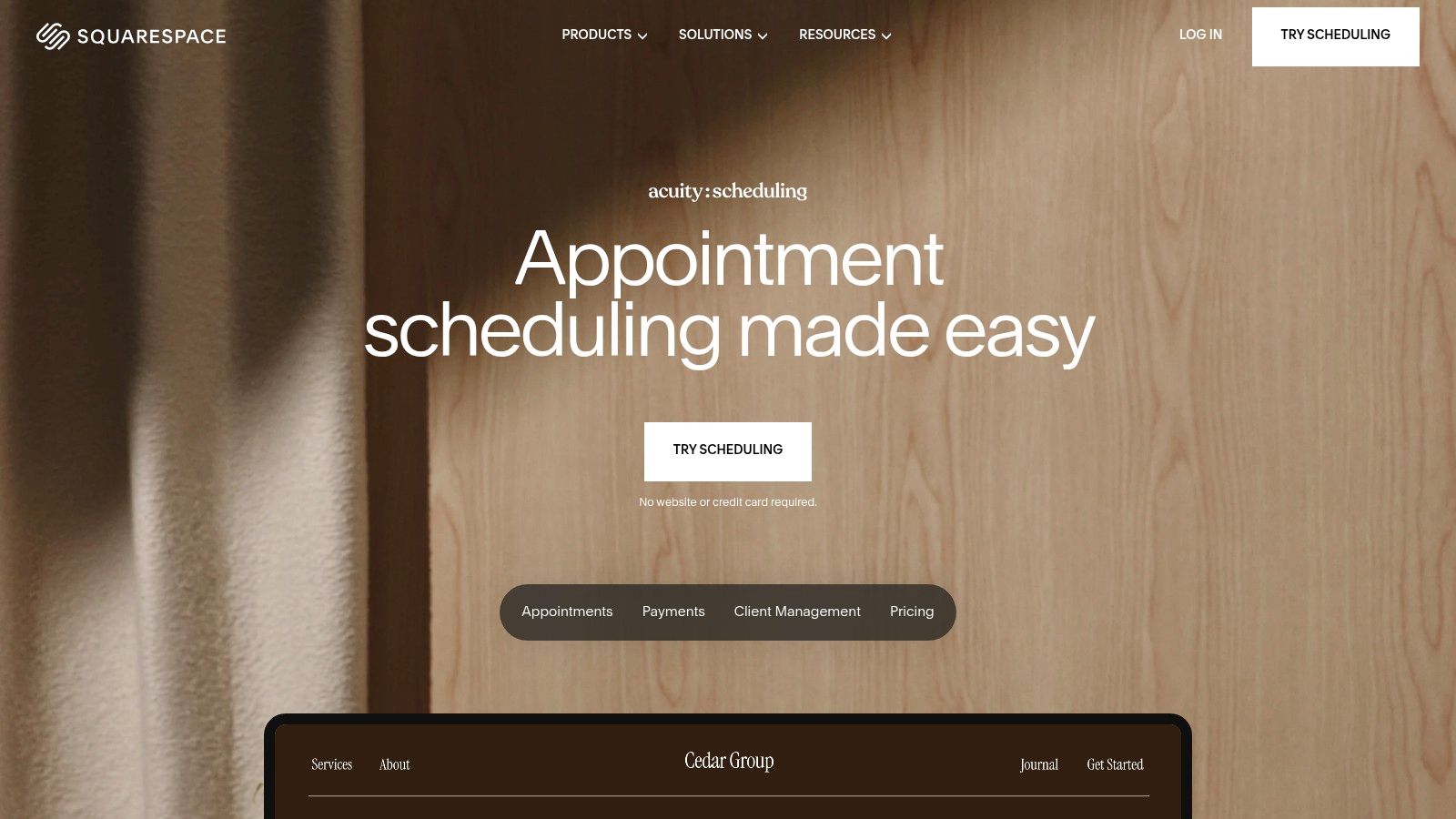
What makes Squarespace Scheduling a strong contender for the best scheduling software for small business is its deep customization and e-commerce capabilities. You can create detailed intake forms to gather all necessary job information upfront, like the size of the home, specialty items, and access details, which saves time during the actual quote. It also integrates directly with payment processors like Stripe, Square, and PayPal, allowing you to require deposits to secure a booking. This single feature significantly reduces costly no-shows and last-minute cancellations.
Key Features & Pricing
- Pricing: Starts with a 7-day free trial. Paid plans begin at $16/month (Emerging), increasing to $27/month (Growing) for SMS reminders and packages, and $49/month (Powerhouse) for multiple staff members and HIPAA compliance.
- Service Packaging: Sell appointment packages, gift certificates, and even recurring memberships or subscriptions directly through your scheduling page.
- Custom Intake Forms: Create detailed, branded questionnaires to collect essential customer and job information before the appointment.
- Payment Processing: Securely accept payments and deposits via Stripe, Square, and PayPal to reduce financial risk from cancellations.
Pros and Cons
Pros:
- Excellent for selling services, not just booking time slots.
- Highly customizable branding and client-facing interface.
- Strong features for managing multiple staff members and locations.
Cons:
- No free-forever plan; requires a paid subscription after the trial.
- Advanced features like API access are locked behind the most expensive tier.
You can learn more about how powerful features like automated reminders and required deposits help reduce no-show appointments for your business.
Website: https://www.squarespace.com/scheduling
4. Square Appointments
Square Appointments is an excellent choice for businesses that need scheduling and payment processing tightly integrated into one system. For moving companies that accept on-site payments for packing materials or require deposits before confirming a job, Square streamlines the entire transaction. It combines appointment booking with Square’s powerful Point of Sale (POS) system, making it a unified platform for managing clients from initial booking to final payment.
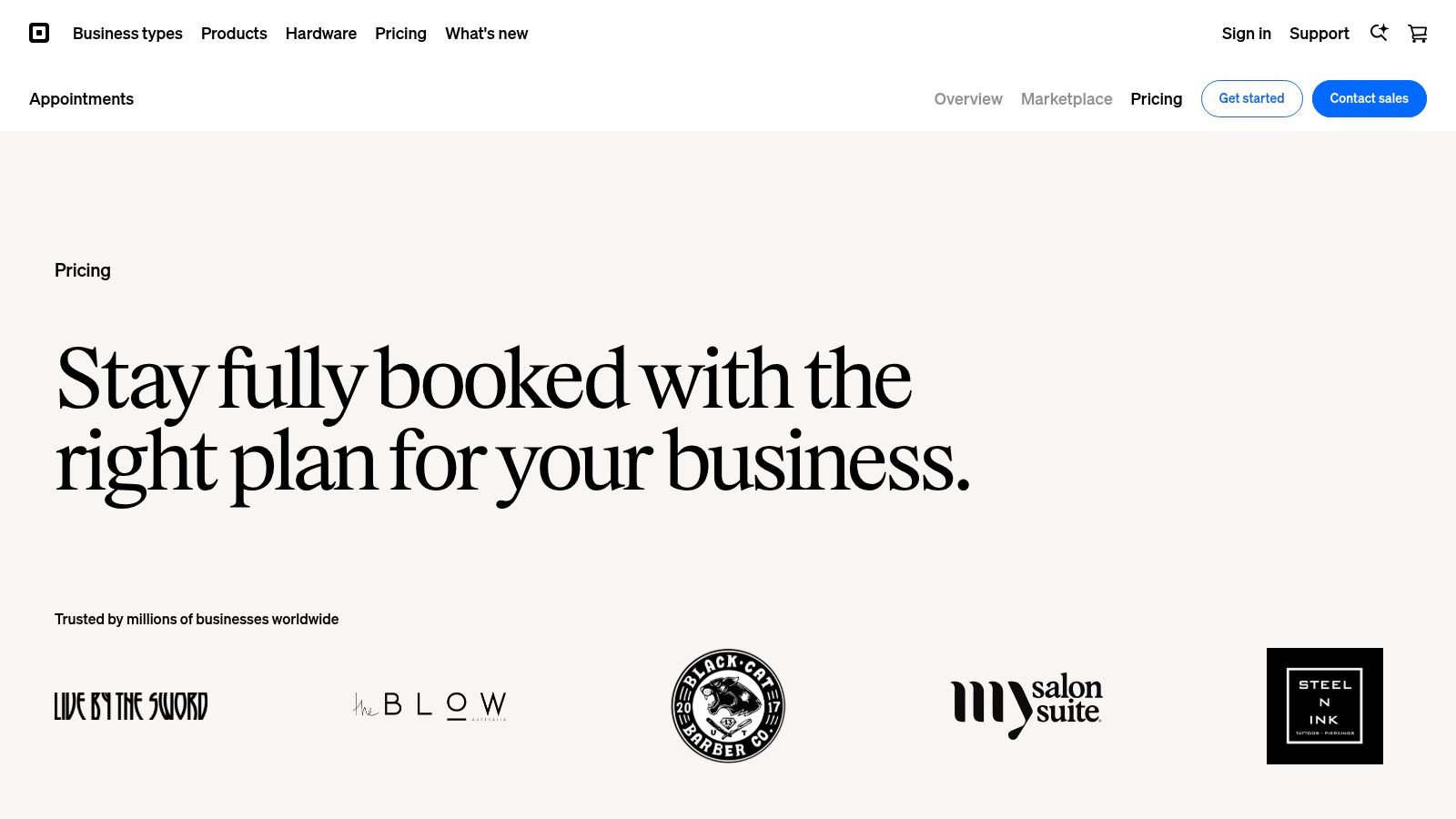
What makes Square Appointments a strong contender for the best scheduling software for small business is its all-in-one nature. A mover can schedule an in-home estimate, and once complete, immediately process a deposit using the same app on a phone or tablet. This eliminates the friction of using separate tools for scheduling and payments. The platform also offers automated text and email reminders, which are critical for reducing no-shows for crucial pre-move walkthroughs, helping ensure your sales pipeline stays full.
Key Features & Pricing
- Pricing: A Free plan is available for single-location sole proprietors. The Plus plan is $29/location/month, and Premium is $69/location/month for advanced staff management and lower processing fees.
- Integrated Payments: Seamlessly accept credit cards, Tap to Pay, Afterpay, and Cash App Pay directly through the scheduling interface. Transaction fees apply.
- Team Management: Paid plans include multiple staff calendars, resource management, and performance reporting to track estimator productivity.
- Automated Reminders: Automatically send booking confirmations and reminders via email and SMS to keep clients informed and reduce cancellations.
Pros and Cons
Pros:
- All-in-one system for bookings, payments, and client management.
- Professional and easy-to-use booking interface for customers.
- Robust free plan for owner-operators or single-person businesses.
Cons:
- Transaction fees are a core part of the business model.
- Advanced features like waitlists and resource booking are locked behind paid tiers.
Website: https://squareup.com/appointments/pricing
5. Setmore
Setmore positions itself as an accessible and affordable scheduling software for small businesses, making it a great starting point for moving companies looking to digitize their booking process. Its primary appeal is a generous free plan that supports multiple users, allowing a small moving business to equip its estimators with individual booking calendars without an immediate investment. You can create a public-facing booking page for customers to schedule their own in-home or virtual estimates.
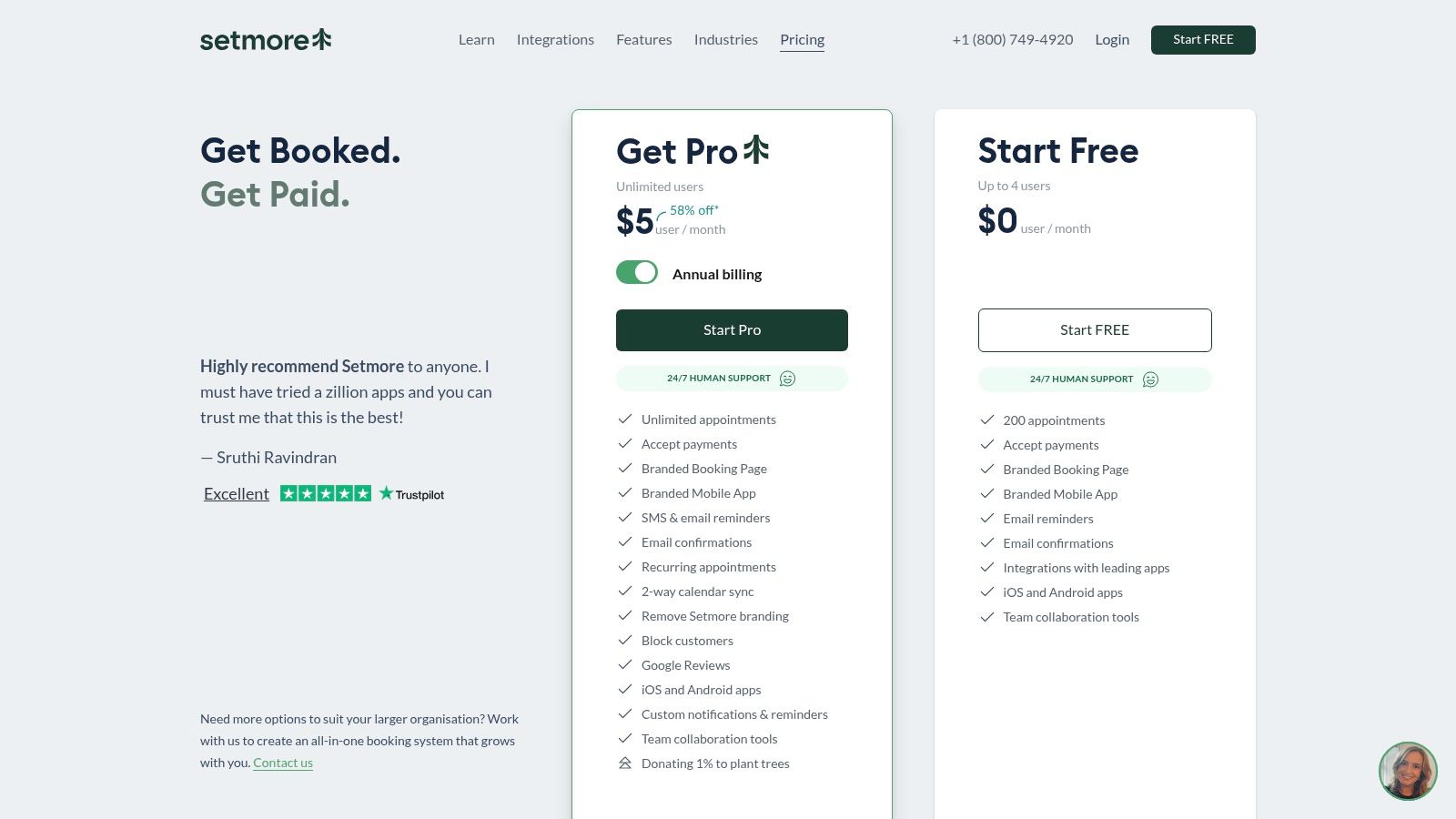
What makes Setmore a practical choice is its focus on core appointment management features combined with payment integrations. A moving company can take a deposit for a scheduled estimate directly through the booking page using Stripe or Square, which helps reduce no-shows. While its most powerful features like two-way calendar sync and SMS reminders are reserved for paid plans, the entry-level offering is robust. It's a solid tool for moving companies that want to automate scheduling without a big initial investment.
Key Features & Pricing
- Pricing: Offers a powerful Free plan for up to 4 users. Paid plans start at $5/user/month (Pro) for advanced features like two-way sync and go up to $8/user/month (Teams) for larger crews.
- Payment Integrations: Accepts payments and deposits via Stripe, Square, and PayPal directly on your booking page.
- Booking Page: Provides a customizable online booking page that can be linked from your website or social media profiles.
- Automated Reminders: Paid plans include automated email and SMS reminders to confirm appointments and reduce forgotten estimates.
Pros and Cons
Pros:
- Extremely generous free plan that supports up to 4 staff members.
- Low per-user cost on paid plans makes it highly scalable.
- Simple interface is easy for non-technical teams to adopt.
Cons:
- Essential features like two-way calendar sync require a paid subscription.
- Lacks some of the advanced CRM and marketing integrations found in other tools.
Website: https://www.setmore.com/pricing
6. SimplyBook.me
SimplyBook.me is a highly versatile and one of the best scheduling software for small business owners who need more than just appointment booking. Its strength lies in its modular design, allowing service businesses like moving companies to build a custom booking system with features like upfront payments, memberships, and even a branded client app. This means you can create a comprehensive booking portal where clients can not only schedule an in-home estimate but also purchase packing supplies or book add-on services directly.
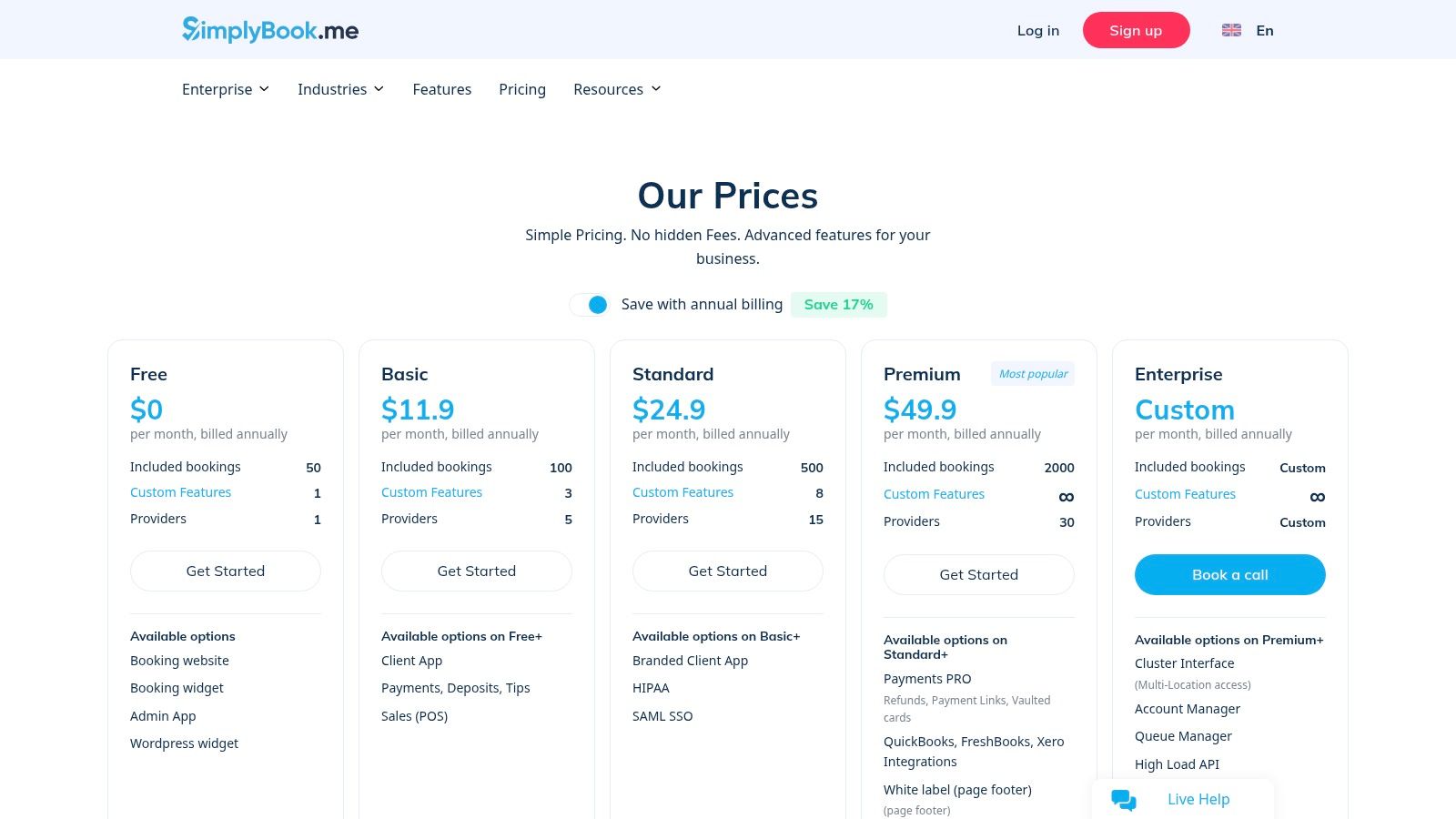
What sets SimplyBook.me apart is its extensive library of "custom features," which act like plugins you can enable as needed. For a growing moving company, this could mean adding features for coupons to run promotions, accepting deposits to reduce no-shows for paid consultations, or using its intake forms to gather crucial details about a move (like home size and access issues) right at the time of booking. This level of customization ensures your scheduling tool adapts to your unique operational needs, from simple quoting to complex service sales.
Key Features & Pricing
- Pricing: A limited Free plan is available for up to 50 bookings. Paid plans start at $8.25/month (Basic) and scale up to $49.90/month (Premium) for more bookings, custom features, and HIPAA compliance options.
- Custom Features: Access over 60 add-ons including payments, deposits, coupons, memberships, and customizable intake forms.
- Multi-Location Support: Easily manage schedules, staff, and services across different branches or service areas.
- Branded Experience: Offers a dedicated booking website, widgets for your existing site, and the option for a custom-branded client app on higher tiers.
Pros and Cons
Pros:
- Extremely flexible with a vast selection of optional features.
- Strong capabilities for selling services, add-ons, and packages.
- Scales well for businesses with multiple locations and providers.
Cons:
- The sheer number of options can feel complex to set up initially.
- Core functionalities like SMS reminders may require paid add-ons or consume credits, potentially increasing costs.
Website: https://simplybook.me/en/pricing
7. Zoho Bookings
Zoho Bookings is the best scheduling software for small businesses already invested in or considering the Zoho ecosystem. It provides powerful appointment scheduling that integrates natively with other Zoho products like CRM and Desk, creating a unified system for managing customer interactions from the initial booking to the final invoice. For a moving company using Zoho CRM, this means a new quote request booked online automatically creates a lead, streamlining your sales pipeline without any manual data entry.
What makes Zoho Bookings stand out is its value proposition for teams and its seamless fit within a larger business management suite. It offers robust features like team-based booking, resource scheduling (perfect for assigning specific trucks or equipment), and workspaces to manage different locations or service types. This is ideal for a growing moving company that needs to coordinate multiple estimators and resources while maintaining a centralized view of all appointments and customer data.
Key Features & Pricing
- Pricing: A generous Free forever plan is available for one user. Paid plans are highly affordable, starting at $6/user/month (Basic) and going up to $12/user/month (Premium) for more advanced features.
- Zoho Ecosystem Integration: Connects natively with Zoho CRM, Meeting, Assist, and other apps, creating a powerful, all-in-one operational hub.
- Resource & Team Scheduling: Allows you to schedule both staff and essential assets like moving trucks, ensuring no double-bookings.
- Payments & Customization: Accepts online payments and deposits through Stripe and PayPal and offers customizable, brandable booking pages.
Pros and Cons
Pros:
- Unbeatable value, with a functional free tier and cost-effective paid plans.
- Powerful native integrations across the entire Zoho suite.
- Strong administrative controls for managing multiple users, roles, and workspaces.
Cons:
- Provides the best experience when used alongside other Zoho products.
- The interface can feel less intuitive than more specialized, standalone competitors.
Website: https://www.zoho.com/bookings/
8. Microsoft Bookings (part of Microsoft 365)
For small businesses already embedded in the Microsoft ecosystem, Microsoft Bookings is a powerful and cost-effective scheduling solution. Rather than being a standalone product, it's bundled with many Microsoft 365 Business plans. This makes it one of the best scheduling software for small business owners who want to consolidate their tech stack and manage appointments directly within their existing Outlook and Teams workflows. For a moving company, this means you can create a public booking page for quote requests that syncs directly with your team’s Outlook calendars.
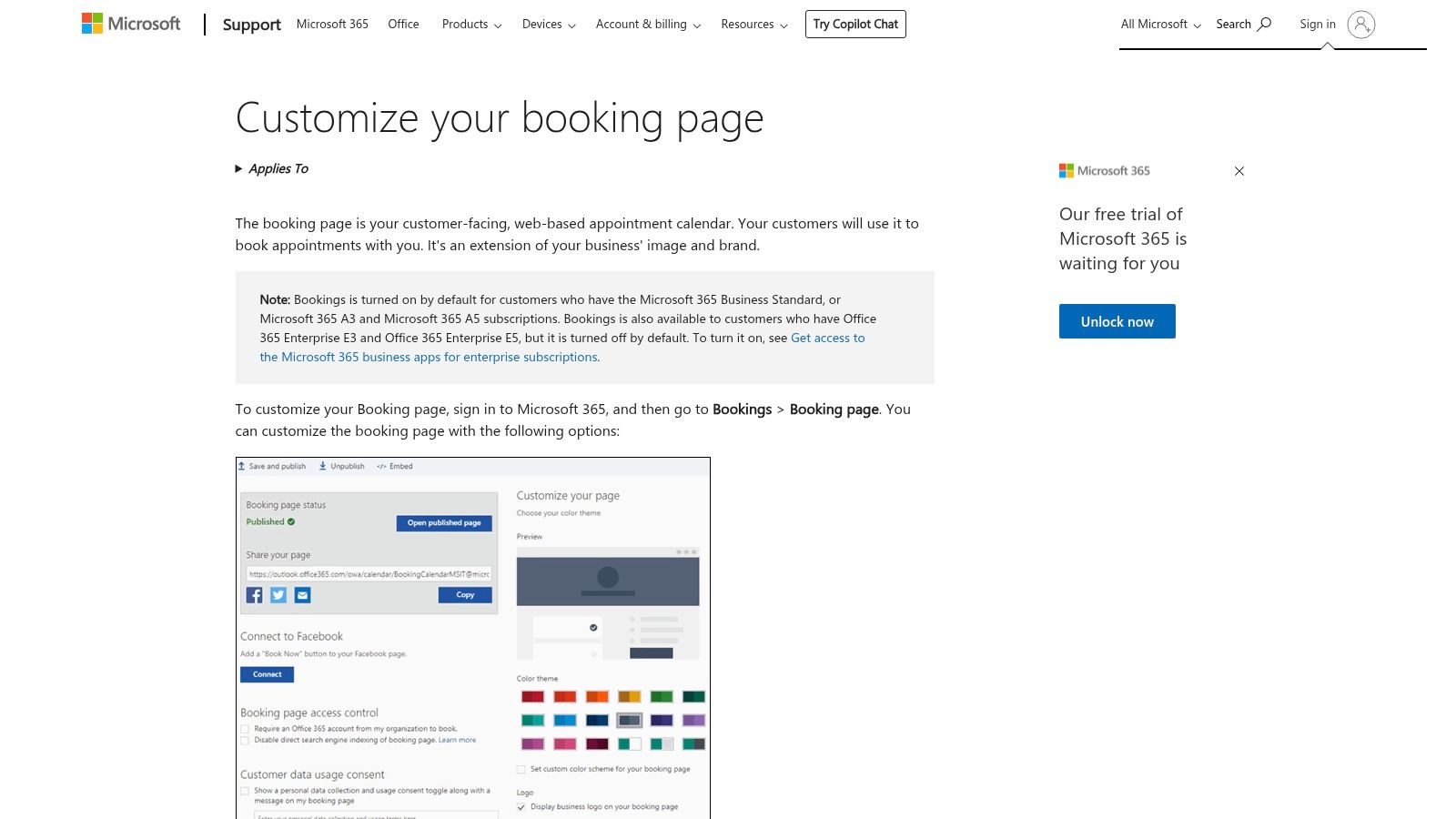
The primary advantage of Bookings is its native integration. Appointments scheduled by customers automatically appear in staff calendars, and virtual consultations can be set to generate a Microsoft Teams meeting link instantly. This streamlined process reduces manual data entry and minimizes the risk of double-booking, a critical concern during the busy moving season. The centralized administration via the Microsoft 365 admin center also provides enhanced security and control, which is a key benefit for companies managing sensitive customer information and multiple employee accounts.
Key Features & Pricing
- Pricing: Included at no extra cost with Microsoft 365 Business Standard, Business Premium, and various Enterprise plans. It is not available with Family or Personal plans.
- Native Integration: Syncs seamlessly with Outlook calendars and can automatically create Microsoft Teams meetings for virtual appointments.
- Customizable Booking Page: Create a public-facing page where customers can select services, view staff availability, and book appointments 24/7.
- Centralized Management: Manage staff schedules, services, and customer lists from a single dashboard within the familiar Microsoft 365 environment.
Pros and Cons
Pros:
- Cost-effective for businesses already subscribed to eligible Microsoft 365 plans.
- Excellent, deep integration with Outlook and Teams.
- Simplifies tech management by keeping scheduling within one ecosystem.
Cons:
- Lacks the advanced marketing features and broader third-party integrations of competitors.
- Interface is more functional than modern, which may affect customer experience.
9. HubSpot Meeting Scheduler (within HubSpot CRM/Sales Hub)
For small businesses already invested in improving their sales and marketing, HubSpot’s Meeting Scheduler is a natural fit. Instead of a standalone tool, it’s integrated directly into HubSpot's powerful free CRM, making it one of the best scheduling software options for businesses focused on lead management. For a moving company, this means when a potential customer books an in-home estimate via your embedded scheduler, a new contact record is automatically created and every interaction is logged, providing a full history of your relationship.
What makes HubSpot exceptional is how it centralizes customer data. The scheduler doesn’t just book an appointment; it kicks off an entire lead nurturing workflow within the CRM. You can track email opens, log follow-up calls, and see exactly where a lead is in your sales pipeline, all from one dashboard. This unified view is invaluable for moving companies, ensuring no lead falls through the cracks and that every customer receives timely follow-ups, which is critical for winning jobs in a competitive market.
Key Features & Pricing
- Pricing: The scheduler is available in the Free HubSpot CRM. Advanced features like automation and team routing are part of the paid Sales Hub, starting at $20/seat/month.
- CRM Integration: Seamlessly creates and updates contact records, logs meeting activity, and tracks the entire customer journey from booking to job completion.
- Payments: A built-in payment feature (U.S. only) allows for collecting deposits directly from your booking page.
- Automation & Reporting: Paid tiers unlock automated email sequences, lead rotation for sales teams, and in-depth reporting on booking performance.
Pros and Cons
Pros:
- Powerful free CRM and scheduler combination is perfect for getting started.
- Streamlines lead capture and follow-up by keeping all data in one place.
- Scales from basic booking to a full-fledged sales and marketing automation platform.
Cons:
- Removing HubSpot branding and accessing advanced features requires a paid Sales Hub subscription.
- Higher-tier plans can include mandatory onboarding fees, which may be a consideration for smaller teams.
Website: https://blog.hubspot.com/sales/hubspot-sales-hub-pricing
10. YouCanBook.me
YouCanBook.me is a strong contender for the best scheduling software for small businesses that prioritize a highly branded and customized booking experience. For a moving company, this tool allows you to create booking pages that perfectly match your website's colors and logo, reinforcing brand trust from the moment a customer decides to schedule an estimate. It offers a straightforward way to connect your calendar and let leads book available slots for in-home or virtual quotes.
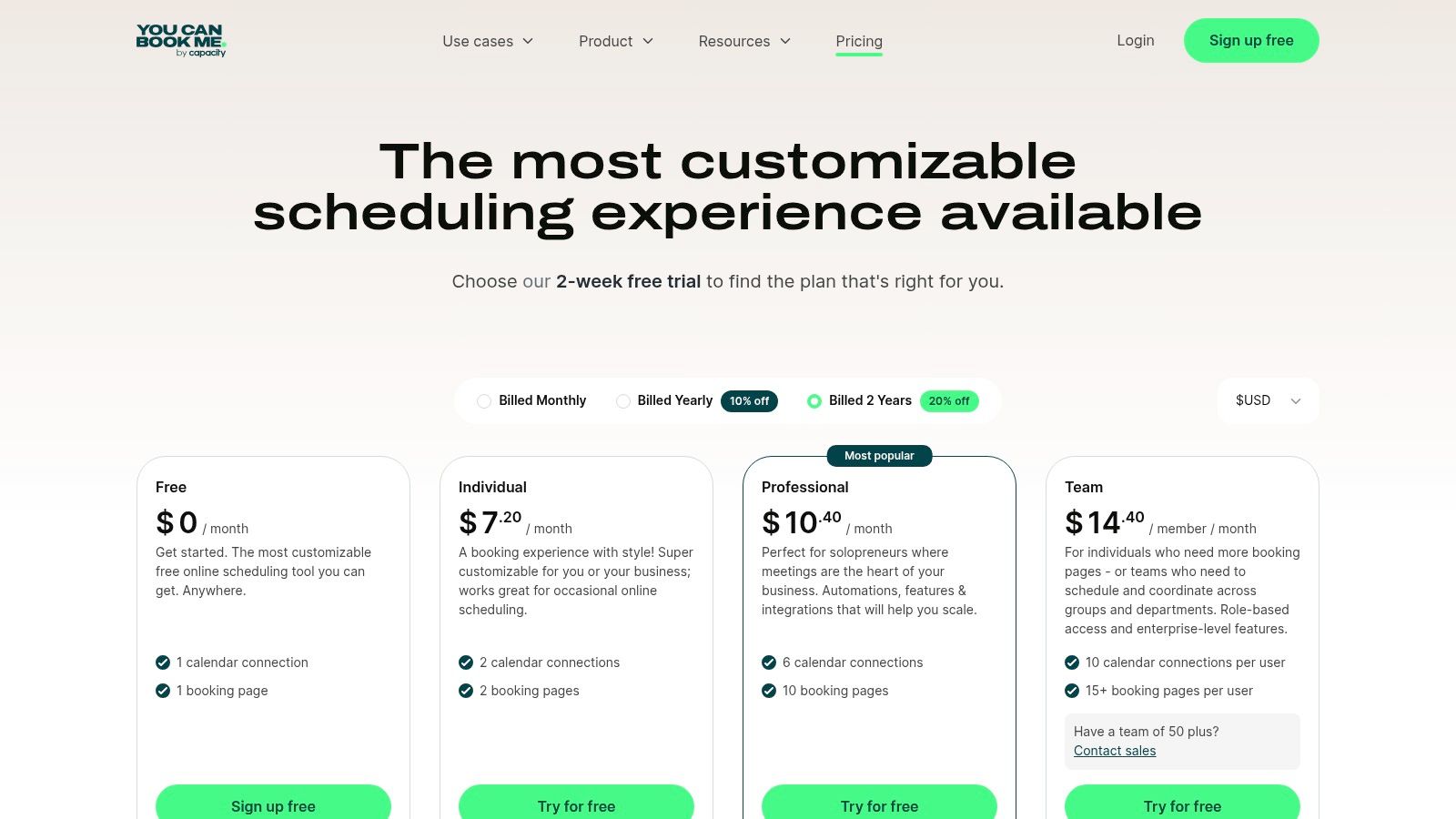
What sets YouCanBook.me apart is its powerful customization capabilities even on its affordable paid plan. You can tailor every aspect of the booking process, from the questions on the booking form to the content of confirmation and reminder emails. This allows you to collect crucial job details upfront, like move size and address, and send customized notifications that reduce no-shows. The platform also supports Stripe integration, making it easy to require a deposit to secure a booking, which helps filter out less serious inquiries.
Key Features & Pricing
- Pricing: A free forever plan is available for basic individual use. The paid plan is $12/calendar/month and unlocks full customization, Stripe payments, and multiple booking page types.
- Deep Customization: Control the branding, questions, and automated notifications to create a seamless customer experience.
- Integrations: Connects with Google, Microsoft, and Apple calendars, as well as video conferencing tools like Zoom and Google Meet.
- Flexible Booking Types: Supports group sessions for webinars or fixed-date events, in addition to standard one-on-one appointments.
Pros and Cons
Pros:
- Affordable per-calendar pricing model.
- Extensive customization of booking pages and notifications.
- Lightweight and easy to deploy for small teams or solo operators.
Cons:
- Fewer deep CRM integrations compared to larger platforms.
- Advanced team features may require a custom plan.
Website: https://youcanbook.me/pricing
11. Capterra – Appointment Scheduling category
Instead of being a single tool, Capterra is a comprehensive software marketplace that acts as a powerful research hub. For a moving company owner overwhelmed by options, it’s an ideal starting point to discover and compare the best scheduling software for small business needs. The platform allows you to filter hundreds of solutions by features, pricing models, and industry, helping you quickly narrow down the field to tools designed for service-based businesses like yours.
What makes Capterra particularly useful is its reliance on verified user reviews. You can see what other moving or field service companies are saying about a tool's ease of use, customer support, and true value for money. This peer-driven insight is invaluable for avoiding software that looks good on paper but fails in a real-world moving operation. Think of it as a digital due diligence tool that helps you create a shortlist of top contenders before committing to time-consuming demos or free trials.
Key Features & Pricing
- Pricing: Capterra itself is Free to use. It provides pricing snapshots and free trial links for listed vendors, but costs are determined by the individual software providers.
- Advanced Filtering: Sort scheduling tools by must-have features like route planning, online payments, or automated reminders to find a perfect fit.
- User Reviews: Access thousands of verified reviews, with ratings broken down by ease of use, features, customer support, and value.
- Comparison Tools: Directly compare up to four different software options side-by-side to evaluate their features and pricing structures.
Pros and Cons
Pros:
- Massive selection of software, making it great for discovering niche solutions.
- Transparent review system helps gauge real-world performance.
- Excellent filtering helps quickly identify tools relevant to the moving industry.
Cons:
- Sponsored placements can influence the order of listings; always scroll down.
- Vendor-provided information can sometimes be outdated, so always verify details on the official website.
Website: https://www.capterra.com/appointment-scheduling-software/s/small-businesses
12. G2 – Online Appointment Scheduling
Instead of being a scheduling tool itself, G2 is a B2B review and comparison platform that can be one of the most powerful resources for finding the best scheduling software for your small business. Think of it as a comprehensive research hub. For a moving company owner, this means you can directly compare your top two or three software choices head-to-head based on verified user reviews, feature ratings, and satisfaction scores from other service-based businesses.
What makes G2 invaluable is its granular detail and unbiased feedback. Instead of relying on marketing copy, you get access to rich qualitative data, including detailed pros and cons submitted by actual users. The platform's comparison grids allow you to see how different tools stack up on specific features like calendar integrations, payment processing, or mobile app usability. This helps you validate your shortlist and uncover potential dealbreakers before committing to a subscription, ensuring the tool you pick truly solves your operational bottlenecks.
Key Features & Pricing
- Pricing: Free to use for research and comparisons.
- Verified Reviews: Access thousands of in-depth reviews from real software users, often segmented by company size and industry.
- Comparison Grids: Create side-by-side comparisons of scheduling tools to analyze features, satisfaction ratings, and pricing snapshots.
- Feature Ratings: See how users rate specific software capabilities, helping you prioritize tools that excel in areas critical to your moving business.
Pros and Cons
Pros:
- Provides rich, unbiased feedback on what users genuinely like and dislike.
- Excellent for quickly comparing similar tools on a feature-by-feature basis.
- Broad coverage of scheduling software for all business sizes, from solo operators to large enterprises.
Cons:
- Pricing information is often vendor-provided and may not be fully up-to-date.
- Requires careful filtering to avoid irrelevant or adjacent software categories.
Website: https://www.g2.com/categories/online-appointment-scheduling
Top 12 Scheduling Tools for Moving Companies
| Product | Core features | ★ Quality | 💰 Price/value | 👥 Target audience | ✨ Unique selling points |
|---|---|---|---|---|---|
| MoveJoy 🏆 | AI front-office: answers calls 24/7, captures job details, auto-quotes & books into live calendars | ★★★★★ (~98% booking, ~2s response) | 💰 $149–$499/mo (starter→pro) + per‑min overages; ~12x ROI reported | 👥 Moving companies, home services & fleets (1-20 trucks) | ✨ Trained on mover conversations; instant setup; CRM integrations |
| Calendly | Automated scheduling, round‑robin routing, reminders, wide integrations | ★★★★ | 💰 Free → per-seat paid plans; can add up for teams | 👥 Solos → teams needing routing & integrations | ✨ Mature ecosystem with extensive 3rd‑party integrations |
| Squarespace Scheduling | Client self-scheduling, payments, packages, memberships, branding | ★★★★ | 💰 Paid tiers (trial only); integrated with Squarespace sites | 👥 Creatives, studios, multi-location service providers | ✨ Deep branding controls; packages, gift cards, memberships |
| Square Appointments | Staff calendars + integrated POS/payments, reminders, reporting | ★★★★ | 💰 Solo plan / per-location pricing; transaction fees apply | 👥 In‑person retail & service businesses | ✨ Native Square POS & payments integration |
| Setmore | Online booking page, mobile app, SMS/email reminders, payments | ★★★ | 💰 Free tier (up to 4 users); low-cost Pro | 👥 Small service businesses on a budget | ✨ Free multi-user tier; simple, no-frills booking |
| SimplyBook.me | Branded booking sites, client/admin apps, POS, many add‑ons | ★★★★ | 💰 Tiered pricing + add-on credits; extras may add fees | 👥 Salons, classes, multi-provider services | ✨ Very flexible add-on marketplace; branded client apps |
| Zoho Bookings | Team/resource bookings, workspaces, embeds, payments & automations | ★★★★ | 💰 Free plan + affordable per-user pricing | 👥 Zoho customers & SMBs wanting integrated tools | ✨ Native Zoho suite integrations and admin controls |
| Microsoft Bookings | Customer booking site, buffers/policies, Outlook & Teams sync | ★★★ | 💰 Included in select Microsoft 365 plans (no standalone fee) | 👥 Microsoft‑centric orgs using Outlook/Teams | ✨ Tight integration with Microsoft 365 security & SSO |
| HubSpot Meeting Scheduler | Personal/embedded booking links tied to HubSpot CRM & records | ★★★★ | 💰 Free basic; scales with HubSpot Sales Hub paid tiers | 👥 Sales teams using HubSpot CRM | ✨ Direct CRM capture, contact logging & automation |
| YouCanBook.me | Custom booking pages, calendar & video integrations, multi-language | ★★★ | 💰 Low-cost plans; 14‑day trial | 👥 Consultants, tutors, small teams | ✨ Strong page customization and video integrations |
| Capterra – Appointment Scheduling | Marketplace: category pages, filters, buyer guides, verified reviews | ★★★★ | 💰 Free to use; helps shortlist pricing & trials | 👥 Buyers researching scheduling software | ✨ Broad vendor coverage, industry filters & buyer guides |
| G2 – Online Appointment Scheduling | Review platform with verified reviews, feature ratings & comparisons | ★★★★ | 💰 Free to use; vendor pricing snapshots may vary | 👥 Buyers seeking recent user feedback & comparisons | ✨ Detailed pros/cons, satisfaction scores and comparison grids |
Choosing the Right Tool to Book More Moving Jobs
Selecting the right scheduling software is a pivotal decision for any moving company owner. As we’ve explored, the market offers a wide range of tools, from simple calendar connectors like Calendly to more integrated solutions. However, the unique, high-stakes nature of the moving industry demands more than just a tool that prevents double-booking. The best scheduling software for a small business in this field is one that actively helps you capture and convert every lead, especially when you're on a job or it's after hours.
The core challenge isn't just managing appointments; it's managing opportunities. Every missed call represents a potential job lost to a competitor who answered first. The modern customer expects immediate answers and instant booking capabilities. Relying on voicemail or manual callbacks creates a critical delay that can cost you thousands in lost revenue each month.
Key Takeaways for Moving Company Owners
As you evaluate your options, remember these crucial points that separate a basic scheduling tool from a true operational asset:
- Speed is Everything: In the moving industry, the first company to respond often wins the job. Your scheduling system must be built for immediate lead capture and engagement. A customer who reaches your voicemail is already searching for another mover.
- Automation is a Competitive Edge: Manually handling calls, gathering details for quotes, and following up consumes valuable time. Automation handles these repetitive tasks, freeing you to focus on crew management, customer service, and strategic growth.
- 24/7 Availability is the New Standard: Your business might close at 5 PM, but potential customers are looking for movers at all hours. A system that can answer calls, provide quotes, and book jobs around the clock gives you a significant advantage, especially during peak moving season.
- Integration Reduces Friction: The ideal software doesn't just add appointments to a calendar. It integrates with your entire workflow, from the initial phone call and quoting process to dispatching and customer communication. This seamless flow prevents leads from falling through the cracks.
Making Your Final Decision
Your choice should be guided by your company's specific stage of growth. If you are a solo operator just starting out, a free tool like HubSpot's scheduler might suffice for basic needs. However, for a growing company with multiple crews, the calculation changes. The true cost of a "free" or basic tool is the lost revenue from the calls it can't answer and the leads it can't automatically nurture.
Consider this: if an automated system helps you book just one additional moving job per month, it has likely already paid for itself. The return on investment isn't just about the monthly subscription fee; it's about the consistent, scalable revenue it unlocks. By implementing a solution designed for the moving industry’s unique demands, you are not just buying software. You are investing in a system that ensures no lead is ever missed and your business can grow without being limited by the number of hours you can personally spend on the phone.
Ready to stop missing calls and start booking more jobs automatically? MoveJoy is more than just scheduling software; it's an AI-powered receptionist designed specifically for moving companies to answer every call 24/7, provide instant quotes, and book jobs directly into your calendar. See how it works at MoveJoy.