Customer Service Automation Software to Grow Your Moving Business
Picture this: a front-office employee who never sleeps, never misses a call, and never has a bad day. That's not a fantasy; it's what customer service automation software really does. It’s not about flashy, complicated tech. It’s a dead-simple solution to the most expensive problem every moving company faces—missed calls that bleed revenue.
Why Movers Need Automation Now More Than Ever
If you run a moving company with a fleet of 1–20 trucks, you know the front office is the heart of your operation. But what happens when that heart skips a beat?
Your best salesperson is on another call. Your dispatcher is putting out a fire with a crew. Or it’s 7 PM on a Friday and a customer who’s ready to book goes straight to voicemail. In the moving business, voicemail is where good jobs go to die.
Let's be honest, today's customers don't wait for a callback. They just hang up and dial the next mover on their Google search. Every missed call isn't just a missed chance; it’s a job you just handed to your competitor down the street, the one who picked up the phone faster. This is the constant, slow leak that stops great moving businesses from growing. And it's exactly where customer service automation steps in—not as some tech gimmick, but as your most reliable employee.
A Digital Receptionist That Actually Works for Your Moving Company
Think of this software as a digital receptionist that works around the clock, 24/7. It’s built to handle the repetitive, urgent tasks that create bottlenecks in your office and cost you jobs. Instead of scrambling to hire more people for your busy season or to cover after-hours calls, you can have a system that just handles it.
This kind of software is designed to:
- Answer Every Single Call Instantly: No more sending high-intent customers to a voicemail they’ll never leave. An immediate, professional response grabs the lead the second they reach out.
- Capture the Right Lead Details: The system can ask the key qualifying questions you need—like move size, preferred date, and the to/from locations—without a human lifting a finger.
- Give Immediate Quotes or Schedule Follow-ups: Based on the info it gathers, the system can send an automated quote right then and there, or book a time on your calendar for a more detailed follow-up.
The whole point is to fix the daily operational headaches that drain your time and plug the revenue leaks holding your company back. To see just how much the entire customer care experience is changing, check out this article on AI Customer Support Software Revolutionising Your Customer Care Experience.
By handling these crucial first conversations, automation frees up your team to focus on what they do best: delivering fantastic moving services and closing warm, qualified leads. An AI receptionist could be the key to finally unlocking your company's growth.
The True Cost of a Missed Call in the Moving Industry
Every moving company owner knows that sinking feeling in their stomach when they see a missed call. It’s not just a number on a screen. It’s a potential job, a week's worth of revenue, maybe even the customer who would've told all their friends about you.
In our business, a call that goes to voicemail is a job you just handed to your competitor.
When a potential customer is ready to book, they're ready now. They don’t leave a message and patiently wait for a callback. They just hang up and dial the next mover on their Google search list. That single missed call is a direct, tangible financial loss.
And it stings even more when you think about how much you spent to make that phone ring in the first place. Whether it's Google Ads, local SEO, or good old-fashioned flyers, a portion of your marketing budget just went up in smoke. It’s like paying for a billboard and then covering it up the second a customer drives by. This vicious cycle of missed calls leading to lost revenue and zero growth is one of the biggest roadblocks for moving companies.
This is what that downward spiral looks like.
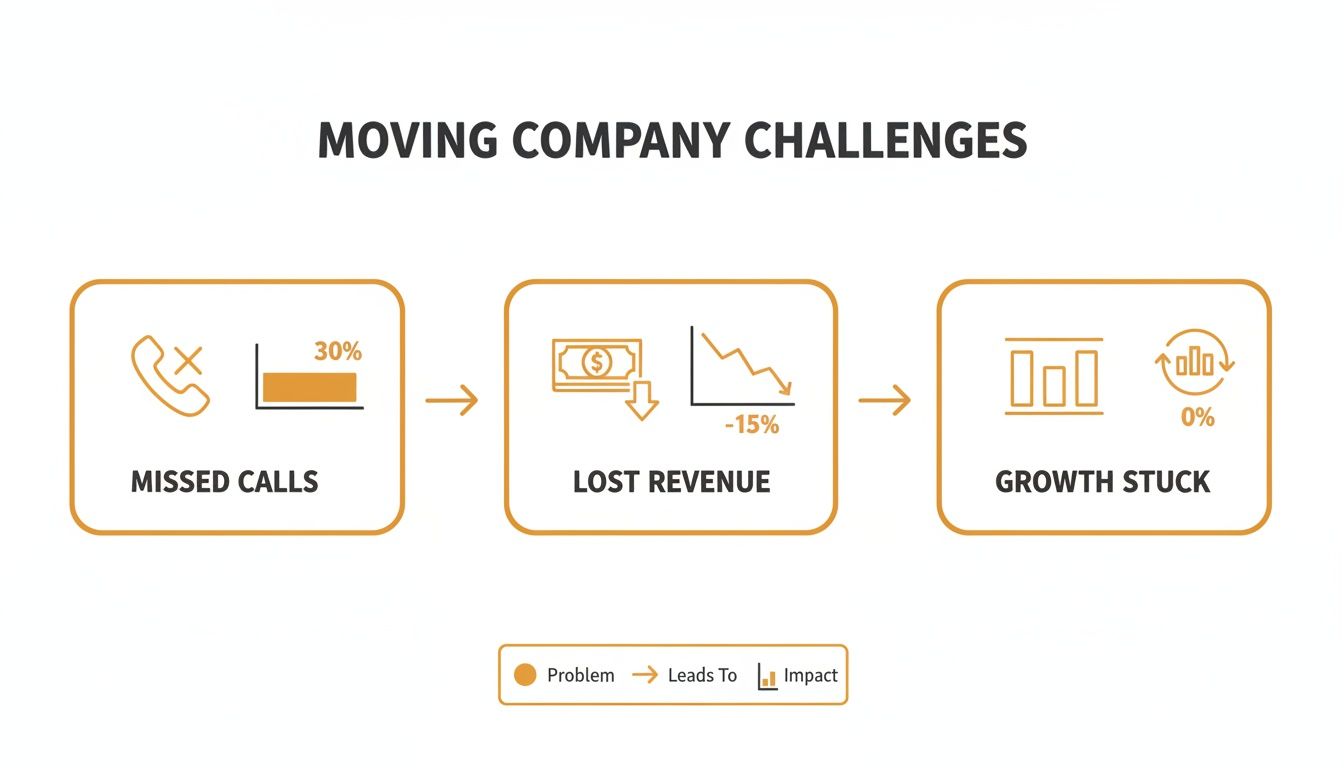
As you can see, the path from a missed call to stalled growth is a straight line. It's a bottleneck that chokes your ability to scale.
Let's Do the Math on Your Lost Revenue
Let's put some real-world numbers on this. The average local move brings in around $1,500. Now, imagine your team misses just three calls a week during your busy season—one in the evening, one during lunch, and one while on another line.
That's 12 missed opportunities a month.
Even if you assume you only would have booked a third of those leads, that’s still four lost jobs.
4 Lost Jobs x $1,500/Job = $6,000 in Lost Revenue Per Month
That's $72,000 a year vanishing into thin air. Gone. All because you couldn't pick up the phone at the exact moment a customer was ready to book. This simple math doesn’t even factor in bigger long-distance moves or the lifetime value of a customer who refers their network to you. Running these numbers makes it crystal clear how much money is slipping through the cracks with traditional call handling.
To really see the difference, let’s compare a typical front office to one that’s automated.
Manual vs Automated Lead Response: The Financial Impact
Here's a side-by-side look at how a few missed calls can drastically change your bottom line, comparing a standard manual setup to a 24/7 automated system.
| Metric | Manual Operations (Voicemail & Callbacks) | Automated System (24/7 AI Receptionist) |
|---|---|---|
| Weekly Missed Calls | 4 Calls | 0 Calls |
| Annual Missed Opportunities | 208 Calls | 0 Calls |
| Booking Rate (Industry Avg) | 30% | 30% |
| Annual Lost Jobs | 62 Jobs | 0 Jobs |
| Average Job Value | $1,500 | $1,500 |
| Annual Revenue Lost | $93,000 | $0 |
| Annual Revenue Recovered | $0 | $93,000 |
The numbers don't lie. An automated system doesn't just answer more calls—it directly recovers tens of thousands of dollars in revenue you were already paying to generate.
The First to Respond Wins the Job
This isn't just a moving industry problem, it's a fundamental rule of business today. It's also why the customer service automation software market is absolutely exploding, jumping from $7 billion in 2019 to a projected $24.9 billion by 2026.
Businesses everywhere are realizing that outdated phone systems and voicemail are costing them a fortune. They're moving to AI-powered tools that answer and qualify leads 24/7. It’s a simple concept: speed-to-lead. The first mover to respond with a quote is the one who, more often than not, wins the job. An automated system guarantees you are always first in line.
Beyond just the cost of a missed call, inefficient front-office operations create a lot of other problems. For more on this, check out this great breakdown of the hidden costs of not using scheduling software.
The Core Features That Actually Make You Money
Not all customer service automation is the same. A lot of platforms throw a long list of features at you, hoping something sticks. But most of it is just noise. Forget the tech jargon. Let's talk about the specific tools that actually stop revenue leaks and book more jobs for your moving company.
These aren’t just bells and whistles. They’re practical, money-making tools that let a smaller moving company punch way above its weight class, competing with bigger operations without the massive overhead.
24/7 Call Answering and Lead Capture
This is the absolute foundation. A potential customer doesn't care if it's 8 PM on a Tuesday or 10 AM on a Sunday. When they're ready to find a mover, they want answers now. Sending them to voicemail is the fastest way to lose the job to the next company on the Google search results.
An AI receptionist answers every single call, instantly and professionally, no matter when it comes in.
- How it works for you: A customer finds you on Google after work and calls for a quote. Instead of hitting your voicemail, they get a friendly, immediate response that captures their name, phone number, and basic move details.
- The business impact: You grab that lead in the moment they’re most interested, while your competitors' phones are silent. This one feature alone can pull back 3–7 jobs per month that would’ve otherwise vanished into your voicemail abyss.
AI-Powered Lead Qualification
Your team's time is your most valuable asset. Wasting it on tire-kickers or leads who aren't a good fit is a massive productivity killer. This is where AI qualification changes the game, acting as a smart filter for your sales process.
You can program the system to ask the crucial questions you need answered before a human ever gets involved.
It automatically separates the "just browsing" callers from the "ready to book" customers. This frees up your sales team to focus their energy on serious, high-quality leads, which dramatically boosts their close rate.
For instance, the AI can ask:
- "So, what's the size of your move? Are we talking a few items, a one-bedroom apartment, or a larger home?"
- "Is this a local move or are you heading long-distance?"
- "Do you have any flexibility with your moving date?"
Based on their answers, the system flags the hottest leads for immediate follow-up. This kind of intelligent sorting means your team always knows which lead to call back first.
Automated Quoting and Follow-Up
Speed wins in the moving business. The first company to get a professional quote into a customer's hands often gets the job. The problem is, building and sending quotes is a manual, time-sucking task that gets pushed aside when the office gets slammed.
Automation completely removes that bottleneck.
Once a lead is qualified, the system can instantly generate and text or email a preliminary quote. More importantly, it handles the polite, persistent follow-up that’s so critical for closing deals. If a customer doesn't respond after 24 hours, the system sends a friendly nudge. No lead ever goes cold because someone got busy and forgot.
The market for these tools is exploding because they deliver real results. The global customer service software market is expected to hit $15.9 billion by 2025, a huge leap from $7.7 billion in 2021. This growth is being driven by service companies, especially in North America, who are tired of losing money to missed calls and slow follow-up. You can dig into more of the data on this market expansion from Cognitive Market Research.
Calendar Integration and Automated Booking
The final piece of the puzzle is turning that qualified lead into a confirmed job on your dispatch calendar. The best customer service automation software plugs directly into the scheduling system you already use, whether that's Google Calendar or a dedicated moving CRM.
This integration allows the system to:
- Check your crew and truck availability in real-time.
- Offer the customer specific time slots during the initial call.
- Book the job directly onto your calendar the moment the customer says "yes."
This turns a clunky, multi-step process into one seamless conversation. A call that comes in at 9 PM can end with a fully booked and confirmed job for next month—without a single person in your office lifting a finger. This is how you scale your operations efficiently and fill your calendar, especially during the chaos of peak season.
Putting Automation Into Action with Real Mover Scenarios
Feature lists and sales pitches are one thing. But seeing how this stuff actually works when the phone rings is what really matters.
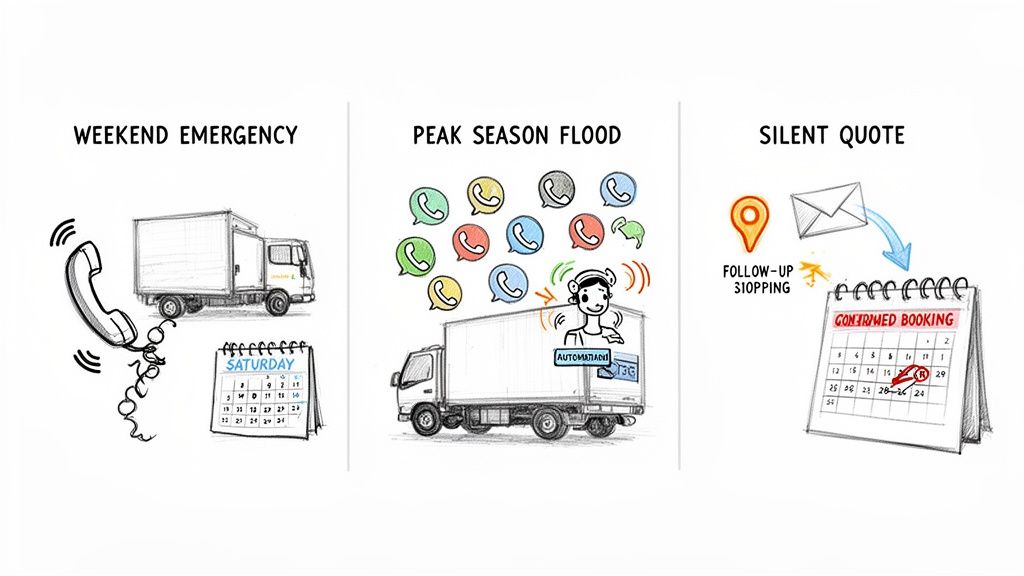
Let’s walk through three situations every moving company owner knows all too well. These aren't wild, once-in-a-blue-moon problems. This is the daily grind that costs you money and creates chaos. We’ll look at how automation turns a potential lost lead into a booked job.
Scenario 1: The Weekend Emergency
It’s 6 PM on a Saturday. Your office is closed. A frantic customer calls because their lease is up Monday and they need to move, now. They start dialing local movers, but every call goes straight to voicemail.
Without Automation: That urgent, high-value lead is gone forever. By the time your team sifts through voicemails on Monday morning, that customer has already found someone—anyone—who picked up the phone.
With Automation: The customer’s call is answered instantly by your AI receptionist. The system gets that it's urgent, asks the key questions (apartment size, addresses), and checks your calendar for an open crew on Sunday. It delivers a quote and books the job on the spot. While your competition is sleeping, you just landed a profitable last-minute job.
Scenario 2: The Peak Season Flood
It’s the middle of May, and your phone is ringing off the hook. Your front office is completely slammed, juggling new leads, questions from current customers, and dispatch fires all at once. Calls get missed. Leads get stuck on hold. Your team is about to burn out.
Without Automation: You’re forced to choose: answer the new lead or help the customer whose move is happening right now? Leads fall through the cracks, service suffers, and you bleed thousands in potential revenue during your most profitable months.
With Automation: Your system acts as the perfect relief pitcher. It answers every call your human team can't get to, so no lead ever hits voicemail or a busy signal. It qualifies new callers, texts them a preliminary quote, and schedules a follow-up, freeing up your team to focus on closing the hottest leads and managing active jobs.
This isn't just about handling more calls; it's about scaling your business without hiring a bunch of temporary staff. Automation lets you soak up that seasonal demand and maximize revenue when it counts the most.
The insane growth in this space proves it works. In 2024, the customer service software market hit $14.9 billion, and it's projected to explode to $68.19 billion by 2032. Why? Because service businesses are tired of voicemail hell and want 24/7 coverage that captures every lead. You can dig into these market trends by checking out insights from Verified Market Research.
Scenario 3: The Silent Quote
Your salesperson sent a quote to a great lead three days ago. Now? Crickets. Did they find another mover? Was your price too high? Your team is way too busy to chase down every single quote that goes quiet, so this one gets buried.
Without Automation: The lead goes cold. Another solid job is lost simply because nobody had the time to follow up. It’s a slow, quiet leak that costs you thousands.
With Automation: The system is built for this. It automatically sends a polite, non-pushy text or email 48 hours after the quote went out. Something simple like, "Hi [Customer Name], just wanted to see if you had any questions about the quote we sent. Are you still looking to book your move for [Move Date]?" This tiny, automated nudge brings your company right back to the top of their mind and very often turns a dead lead into a booked job.
How to Choose the Right Automation Software for Your Fleet
Let's be honest, diving into customer service automation software can feel like a massive headache, especially when you're already juggling crews, dispatch, and a phone that won't stop ringing. The market is jammed with options, but most of them are built for tech startups or massive call centers, not a local mover with a fleet of 1–20 trucks.
You don't need a hundred confusing features. You need a simple, powerful tool that solves your two biggest problems: missed calls and lost revenue.
The goal here isn't to buy some complex piece of technology that requires a dedicated IT guy to manage. Think of it more like hiring your most reliable employee—one who never calls in sick and works 24/7. Your decision should be based on a clear operational fit and how fast you'll see a return on your investment, not on a bunch of tech jargon designed to confuse you.
Your No-Nonsense Evaluation Checklist
Before you sign on the dotted line for any platform, run it through this checklist. These questions are designed to cut right through the marketing fluff and get to what actually matters for your moving business. A "no" to any of these should be a major red flag.
Is It Built for Service Businesses Like Moving?
This is the big one. Generic software doesn’t speak our language. It has no idea how to tell the difference between a local apartment move and a long-distance haul that needs full packing services.
- Why it matters: A system that's been trained for service businesses knows to ask the right qualifying questions, like "What floor are you on?" or "Do you need our crew to handle the packing?" This means the info it gathers is actually useful for putting together an accurate quote, not just a bunch of random data points.
Does It Integrate With Your Existing Calendar?
Your dispatch calendar is the heartbeat of your entire operation. Any new tool you bring in absolutely must plug into it without a fuss, whether you’re using Google Calendar, a simple spreadsheet, or specialized moving company software.
- Why it matters: If it doesn't sync with your calendar, you’re just creating more work for yourself. The system has to see your real-time availability to offer customers accurate booking slots. Otherwise, you're headed for a world of double-bookings and scheduling nightmares.
How Fast Is the Setup Process?
As a moving company owner, you don't have weeks to waste on a complicated setup. The right tool should be up and running in under an hour—not something that requires endless calls with a support team just to get started.
- Why it matters: Simplicity is everything. If the setup is a nightmare, you can bet that managing the system day-to-day will be even worse. You want something that's "plug-and-play," where you can connect your phone number, link your calendar, and just let it run.
To help you get a clearer picture of what a full-fledged system looks like, we've put together a guide on the best moving company software that covers everything from lead management to dispatch.
Key Questions to Ask During a Demo
Once you've got a couple of options, get someone on a demo call and hit them with these direct questions. Their answers will tell you everything you need to know about whether their software is a good fit for a real-world moving company.
- Can it handle after-hours and weekend calls? You need to confirm it provides true 24/7 coverage. That's how you capture those valuable leads your competitors are missing when their office is closed.
- How does it handle follow-ups? Find out if it automatically texts or emails leads who got a quote but haven't booked yet. This is a massive revenue-driver that most movers overlook.
- Can I see call transcripts? You need the ability to review conversations. This is critical for making sure the system is representing your company professionally and gathering the right job details.
- What happens if a customer wants to speak to a human? There has to be a simple, seamless way to transfer a call to you or your office manager for those complex or urgent situations.
The bottom line is this: The right tool should feel like an extension of your team, not another piece of tech you have to wrestle with. It should solve more problems than it creates, freeing you up to focus on running your business and keeping your crews busy.
Essential Automation Software Checklist for Movers
To make this even easier, use this table during your research and demo calls. It's designed to help you methodically evaluate each option against the specific needs of a moving company. Fill out the "Your Notes" column for each platform you look at to keep your thoughts organized.
| Feature/Question | Why It Matters for Your Moving Company | Your Notes |
|---|---|---|
| Is it built for the moving industry? | Generic tools don't understand job-specific questions (e.g., stairs, long carry, packing). This leads to bad quotes and wasted time. | |
| Does it integrate with my calendar? | Without a direct link to your schedule, you can't offer real-time booking and risk double-booking jobs. It must work with what you already use. | |
| Can it quote jobs using my rates? | A system that can't provide accurate quotes is useless. It needs to calculate job costs based on your specific pricing for labor, trucks, and materials. | |
| How fast is the setup? (Under 1 hour?) | Your time is money. A complicated, multi-week setup means lost focus on your operations. You need a tool that starts working for you on day one. | |
| Does it provide true 24/7 coverage? | Many of your best leads call after hours and on weekends. If your system isn't live 24/7, you're leaving money on the table for your competitors to grab. | |
| Can I review call transcripts and recordings? | You need to see what's being said to customers. This is crucial for quality control and ensuring your brand is represented correctly. | |
| How does it handle follow-ups with unbooked leads? | Automating follow-ups is like having a tireless salesperson. It can turn "maybes" into booked jobs without any manual effort from your team. | |
| Is there a simple way to transfer calls to a human? | Automation is great, but some customers just need to talk to a person. A smooth transfer process is non-negotiable for handling complex issues or closing high-value jobs. |
This checklist isn't about finding a tool with the most features; it's about finding the right tool that solves your most expensive problems. Keep it simple, focus on what drives revenue, and you'll make a decision that pays for itself in no time.
Your Simple Roadmap to Getting Automation Up and Running
Bringing in new tech can feel like a huge undertaking, but the right customer service automation software isn't a massive, complicated overhaul. Think of it as adding a sharp new tool to your toolbox—one that starts paying for itself the minute you turn it on.
You don't need to be a tech wizard or hire an IT guy. This is a straightforward plan to get started and see results, fast.
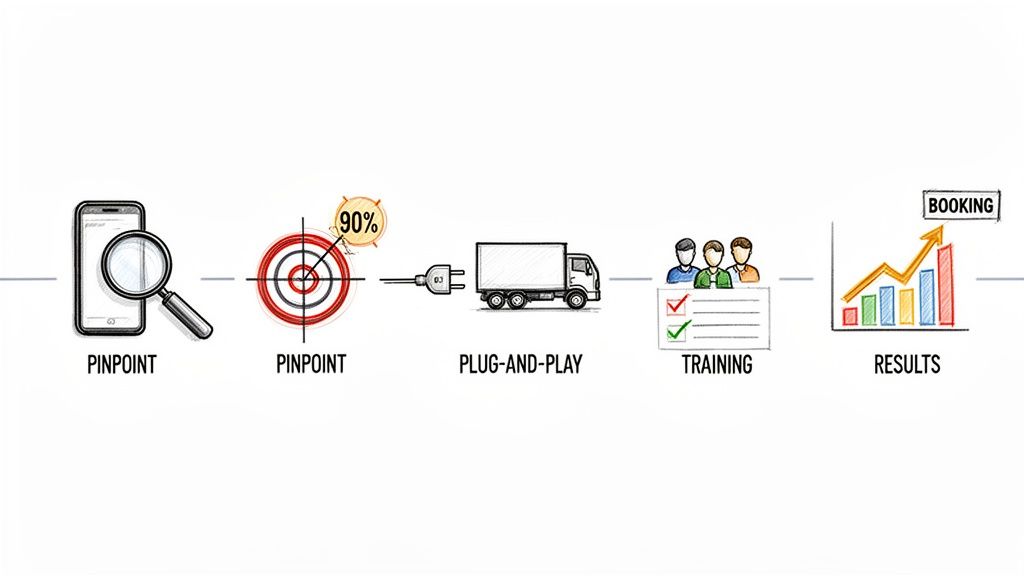
Step 1: Pinpoint Your Biggest Leak
First things first: where are you bleeding money? For most movers, the answer is painfully obvious. Are you missing calls after 5 PM and on weekends? Are the leads you paid good money for going cold because your team is just too slammed to follow up?
Don't guess. Pull up your call logs. The answer is usually sitting right there in a long list of missed calls you never had a chance to get back to.
Step 2: Set a Clear, Simple Goal
Don’t overthink this. Your goal needs to be direct and something you can actually measure. The best place to start is with a specific outcome that puts money back in your pocket.
A powerful goal is something like: "Reduce missed calls by 90% within the first 30 days." It’s clear, aggressive, and easy to track. It also focuses all your energy on plugging the single biggest hole in your revenue bucket.
Step 3: Choose a Plug-and-Play Solution
This is the most important step. You need a tool built specifically for the moving industry, not some generic chatbot that will get confused by your business. Look for a solution that "just works" right out of the box.
That means it needs to have:
- A fast, no-code setup you can complete in under an hour.
- Direct integration with the calendar system you already use every day.
- Pre-trained AI that already understands moving-specific questions about packing services, storage, and different apartment sizes.
Your goal here is to find a system that cuts down your workload, not one that adds another complicated piece of software you have to manage.
Step 4: Show Your Team the New, Easier Workflow
Getting your crew on board is all about making their lives simpler. Show them how this new system takes work off their plate.
Instead of nagging them to call back a long list of missed numbers, you can show them a dashboard of warm, qualified leads the system has already vetted. The process becomes dead simple: the AI handles the first touch, and your team just focuses on closing the deals.
Step 5: Watch the Right Numbers Improve
The results will speak for themselves. Start keeping a close eye on the metrics that actually matter to your moving company.
You'll want to track:
- Lead Response Time: Watch this drop from hours (or never) to just a few seconds.
- Booking Rate: See how many more of your quotes are turning into actual, paying jobs.
- After-Hours Leads Captured: Start counting all the new opportunities you’re getting while the office is dark.
This isn’t about a long, drawn-out project. It's about taking quick, decisive action to plug a major revenue leak and give your moving company an immediate edge over the competition.
Got Questions About Automation? You’re Not Alone.
When moving company owners first hear about AI receptionists, they usually have the same handful of questions. Let's tackle them head-on.
“Will an AI Receptionist Sound Robotic and Scare Off Customers?”
Honestly, this is the biggest fear, and it’s a valid one. We’ve all been trapped in a terrible phone menu.
But modern AI isn't like that anymore. The good ones use natural, friendly language and are often trained specifically on moving industry calls. It understands when a customer asks about a “2-bedroom walkup” or needs to know if you can handle a piano.
The goal isn't to trick anyone. It’s about giving them an immediate, helpful answer so they don't hang up and call the next mover on their list. Let’s face it: a friendly, intelligent AI is a far better first impression than a ringing phone that goes to a full voicemail box.
“Is This Stuff Too Expensive for a Small Moving Company?”
Think of it as hiring your most efficient employee for a fraction of the cost. The monthly fee for a solid automation platform is a tiny piece of what you’d pay a full-time receptionist or what you’re already losing to missed calls.
In most cases, booking just one extra move a month—a job you would have otherwise missed—pays for the software. Easily.
When you do the math on the real cost of lost revenue from unanswered calls, you quickly realize automation isn't an expense. It's one of the most effective growth tools you can get your hands on.
“My Team Isn't Super Tech-Savvy. Is This Going to Be a Headache to Set Up?”
The best customer service automation software is built for busy owners, not IT wizards. You don't need to know how to code or configure complex systems. The setup is usually dead simple and takes less than an hour.
You just connect your business phone number, link your calendar, and the system handles the rest. This technology is designed to take work off your plate, not add another complicated tool you have to manage. It’s built to just work, so you can get back to running your crews.
Ready to stop missing calls and start booking more jobs? See how MoveJoy can act as your 24/7 front-office assistant, capturing and qualifying every lead so you never lose another customer to voicemail. Explore MoveJoy today.