Every moving company owner knows the feeling. You're on a call quoting a job, your crew is on the other line needing directions, and a third call comes in—straight to voicemail. That’s not just a missed call. That’s a lost job and a few thousand dollars in revenue slipping right through your fingers. If this daily chaos sounds familiar, your process for handling new leads is costing you money.
Why Your Moving Company Is Losing Jobs Without a Lead System

For a moving business running anywhere from 1 to 20 trucks, managing incoming calls isn’t a side task. It's the entire game. But most owners are juggling calls, emails, and web forms with a chaotic mix of sticky notes, messy phone logs, and hoping they remember to call someone back. This isn't just inefficient; it's a direct leak in your revenue.
When a customer needs to move, they move fast. They call a handful of companies, and the first one to give a professional, quick answer usually wins the job. If your phone rings unanswered while you're on-site or driving, that customer has already dialed your competitor. That single missed call can easily represent a $1,500 to $3,000 loss, and most small movers lose 3 to 7 jobs a month this way.
The Real Cost of a Messy Process
A messy, inconsistent lead process creates problems you can set your watch to—and they hit your bottom line directly. Without a real system, you're probably facing:
- Voicemail Black Holes: Let's be honest, customers don't leave voicemails anymore. And when they do, you're already playing catch-up against the companies that answered the phone right away.
- Forgotten Follow-Ups: You send a quote, get slammed with a dozen other tasks, and completely forget to follow up. The lead goes cold, and the job vanishes.
- Scattered Customer Info: Details are everywhere—an email here, a text message there, a note scribbled on a receipt. It's impossible to keep track of conversations and give customers the seamless experience that wins their trust.
This isn't just a moving industry problem, either. It’s a huge revenue killer for any service business that relies on phone calls, as this real-world guide to lead generation for contractors points out.
The hard truth is that your company’s growth isn't being held back by a lack of leads. It's being held back by your ability to actually handle them. Every dropped call is a job you worked hard to attract, only to lose it at the one-yard line.
This problem is everywhere. Studies show that a staggering 85% of small businesses are losing leads simply because of poor call handling. The fix, however, is just as clear: tools that get your response time under five minutes can boost your bookings by up to 30%. You can dig into similar findings on lead management tracking here.
At the end of the day, lead management software for small business isn’t about adding complicated tech. It’s about putting a simple, reliable system in place to stop losing money and start booking the jobs you're already earning.
What Is Lead Management Software Really?
Let's cut through the jargon. Lead management software for a small business isn't some complicated tech you need an IT degree to figure out.
Think of it as the most organized, reliable office manager you could ever hire—one who works 24/7, never misses a call, and never, ever forgets to follow up. It’s not about adding more software to your plate. It’s about finally bringing order to the chaos of booking jobs.
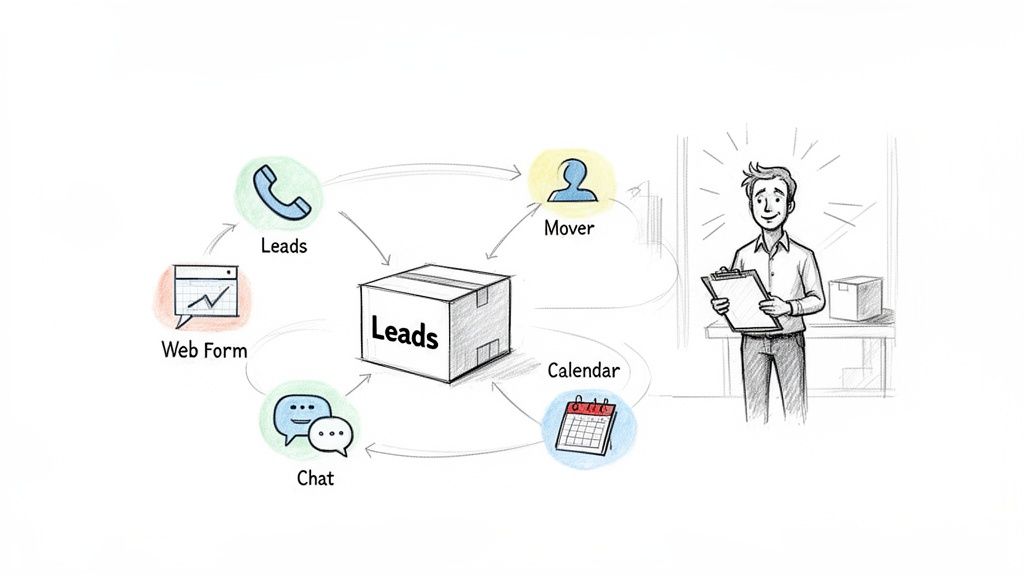
For a busy moving company owner, this system takes the repetitive, easy-to-forget tasks off your shoulders. Its job boils down to four critical functions that turn phone calls and form fills into booked moves.
Capture Every Single Lead
Every potential job starts with an inquiry—a phone call, a website form, a message from Yelp. Without a system, these leads end up scattered across voicemails, personal inboxes, and scribbled notes on your truck’s dashboard. This is where jobs are lost.
Lead management software acts as a central, digital net that catches every single one. It makes sure that whether a customer calls at 2 AM on a Sunday or fills out your web form during peak season, their info is immediately and safely stored in one place. Nothing falls through the cracks.
Organize All Customer Details
Once a lead is captured, what's next? A good system organizes all the crucial information into a single, clean record. No more hunting through text messages for a customer’s address or trying to remember if they mentioned needing packing services. It's all right there.
Key Takeaway: A centralized system moves you from a state of "I think I remember" to "I know exactly what this customer needs." This immediate access to information helps you sound professional and prepared every time you talk to a customer.
This isn’t just about being neat; it’s about being fast and efficient. When all the details are in one hub, anyone on your team—from you to an office manager—can see the full history of a lead and provide seamless service.
Nurture Inquiries to Keep Them Warm
You sent a quote an hour ago, but the customer hasn't replied. Are they shopping around? Did they get busy? Most moving company owners don't have the time to chase down every single quote they send.
This is where a little automation becomes your secret weapon. Lead management tools can automatically send a friendly, professional follow-up text or email a few hours later. It’s a simple touch, but it keeps your company top-of-mind while your competitors are still trying to return their missed calls. This consistent nurturing dramatically increases the chance that your quote turns into a booked job.
Convert Leads into Booked Jobs
Finally, the whole point is to get the job on the calendar. The best lead management software for small business makes this final step almost effortless.
It can plug directly into your schedule, letting a qualified customer see your availability and book their move right from a link you send them. This completely cuts out the frustrating phone tag of trying to coordinate dates and times. You turn a hot lead into a confirmed, scheduled job—often without any manual work at all.
Core Features Every Moving Company Needs
When you start looking at lead management software, it’s easy to get buried in options. Most of these tools are built for corporate sales teams in glass towers, not for a moving company owner trying to book the next job while managing a crew on-site.
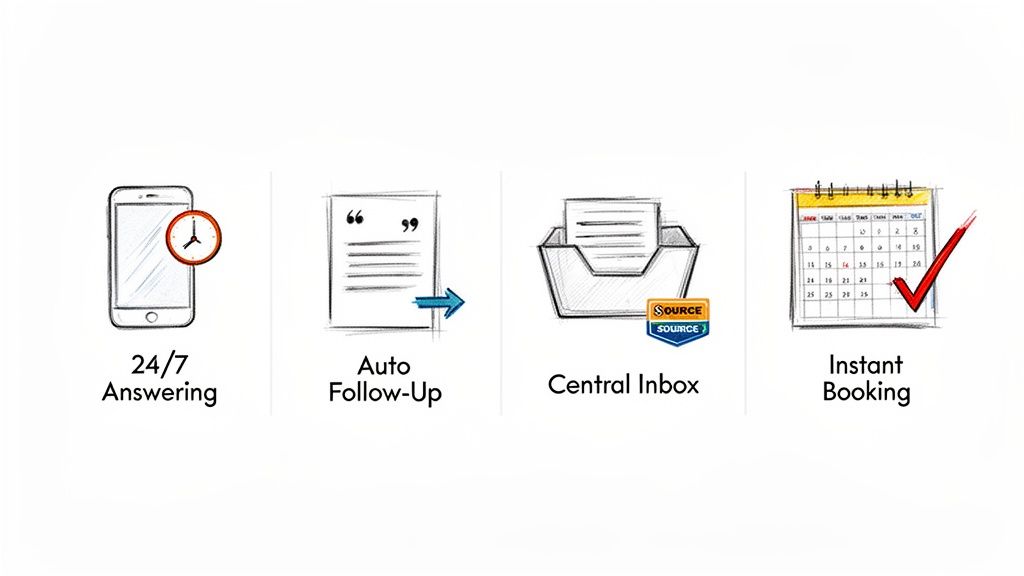
You don't need a hundred confusing features. You need a few specific tools that solve your biggest, most expensive problems—the ones that are actively costing you money every single day. Forget the fancy jargon. If a platform doesn't do these four things, it’s not built for your moving business.
24/7 Automated Answering
This one isn't a "nice-to-have." It's everything. Your customers are planning their moves at night and on weekends, right when your office is closed. If their call hits your voicemail, they aren't waiting around for a callback on Monday. They’re dialing the next mover on their Google search.
The hard truth is this: Every missed call isn't just a missed conversation. It's a lost job worth thousands of dollars.
A solid system acts as your 24/7 receptionist, professionally answering every call, any time of day. It can grab the essential details—name, where they’re moving, the size of their home—making sure you never lose a lead just because you were sleeping or on another job. This one feature turns your biggest weakness into your sharpest competitive edge.
Centralized Lead Inbox
Let’s be honest. Where are your leads right now? Some are in your email inbox, a few are in your text messages, another is scribbled on a notebook in your truck, and one is on a sticky note that fell behind your desk. This chaos is where good leads go to die.
A centralized lead inbox fixes this mess for good. It pulls every single inquiry—from phone calls, website forms, Yelp, Google—into one clean, organized dashboard.
- No More Lost Leads: Every prospect is automatically logged. No exceptions.
- See the Whole Story: Every call, text, and email with a customer is in one place.
- Keep Your Team Synced: Your office manager or partner can see exactly what’s happening without having to hunt you down for an update.
This isn’t about being tidy. It's about taking back control of your sales pipeline.
Automated Quote Follow-Up
You spend 15 minutes putting together a perfect quote, send it off, and then… nothing. You mean to follow up, but then a crew calls with a problem, another lead comes in, and that quote gets buried in your outbox. A week later you remember, but by then, the customer has already booked with someone else.
This is such a common and costly problem. Automated follow-up is the simple fix. A good system lets you set up simple, timed messages that go out on their own. For example, if a customer hasn’t replied to your quote in four hours, the system can send a quick text: "Hi [Customer Name], just wanted to make sure you received the quote from [Your Company Name]. Let me know if you have any questions!"
That simple, automated nudge keeps your company top-of-mind and dramatically increases your booking rate. All without you lifting a finger.
Calendar Integration for Instant Booking
How much time do you waste playing phone tag just to schedule a move? The back-and-forth of "Are you free Tuesday?" "No, how about Thursday morning?" is a massive time sink. For a motivated customer, that friction is all it takes to make them call a competitor who makes booking easy.
Modern lead management tools solve this by connecting directly to your calendar. You just set your availability, and the system can send a booking link to qualified leads. The customer picks a time that works for them, and the job is instantly, automatically added to your schedule.
This does two powerful things at once: it makes you look incredibly professional, and it turns a hot lead into a booked job with zero effort from you.
How Automation Turns More Calls Into Booked Jobs
It's one thing to talk about automation in theory. It's another to see what it actually does for you during your busiest season.
Let’s paint a picture. It’s a Saturday in June, and you’re completely swamped. A new customer, Sarah, finds your number and calls, ready to book a move for her three-bedroom house. But your team is out on jobs, so she gets your voicemail.
What does Sarah do? She doesn't wait. She hangs up and immediately calls your biggest competitor. They answer. You just lost a $2,500 job and you never even knew it happened.
Now, let's run that back, but this time with lead management software for small business fighting in your corner.
Speed, Consistency, and Scale: The Automation Advantage
When Sarah calls this time, she doesn’t hit a voicemail. An AI-powered assistant answers instantly and professionally.
It greets her, asks the right questions ("Great, a three-bedroom house. Are you moving across town or to a new city?"), and gets her details. Seconds later, a text hits her phone with a direct link to your booking calendar. You haven't done a thing, but you've already delivered a faster, better experience than the other guys.
The core idea is simple: speed to lead wins jobs. Automation makes sure you are always the first to respond, even when you're physically tied up. It's the ultimate leg up in a market where customers make a decision in minutes.
A few hours go by. Sarah got distracted and hasn't booked. Your system sees this and sends a quick, pre-written text: "Hi Sarah, just wanted to check in and see if you had any questions about booking your move. We have a few slots left for your desired date." That one text puts you right back at the top of her list and nudges her to lock it in.
This entire flow runs on three powerful pillars:
- Speed to Lead: Your system answers in seconds, not hours. That immediate contact is everything when a lead is actively shopping for movers.
- Perfect Consistency: Every caller gets the same professional, organized treatment. It doesn’t matter if it’s the first call of the day or the tenth call in the last hour.
- Effortless Scalability: The system can handle one call or twenty calls at the same time without a single hiccup. You can finally manage those seasonal rushes without burning out your team or hiring temps.
Automation Handles the Grunt Work So You Can Focus on Service
The biggest fear I hear from moving company owners is that automation will feel robotic or replace their human touch. The truth is, it does the exact opposite. Automation isn't here to replace you; it’s here to free you from the repetitive busywork that keeps you from giving great service.
Modern lead management tools use smart AI to handle all the initial lead capture and qualification. Some can even create leads automatically in the CRMs you already use. For example, there are AI actions that create leads directly in HubSpot so your team doesn't have to do manual data entry. The whole point is to let the tech do the boring stuff.
Instead of spending your day chasing down missed calls and sending quotes, you can focus on the things that actually grow your business—talking to high-value clients, training your crews, and making sure every move is flawless. An AI receptionist for small business doesn't take away your expertise. It just makes sure you get the chance to use it by turning more of those ringing phones into paying customers.
Choosing the Right Software for Your Moving Business
Picking a lead management software for your small business can feel like a trap. Most platforms are built for big corporate sales teams, not a moving company owner who’s trying to run a business from his truck. They’re bloated with a hundred features you’ll never touch and somehow miss the few you actually need.
Forget the technical jargon and endless feature lists. Instead, ask yourself a few brutally simple questions. This will cut through the noise and help you find a tool that puts money in your pocket, not just more work on your plate.
Is It Built for the Moving Industry?
This is the first and most important question. Was this thing made for a service business like mine? A generic CRM designed for software sales or enterprise deals will never get your world. It's like trying to use a city sedan to haul furniture—it just doesn't fit.
You need a solution that speaks your language from day one.
- Does it solve my biggest money-loser—missed calls? If the software doesn't have a way to automatically answer your phone 24/7, it wasn't built for a business that loses jobs the second the office closes.
- Will it actually get jobs on the calendar? The whole point is to stop playing phone tag. Look for simple calendar integrations and automated booking links that let customers book a move without a back-and-forth conversation.
- Can my crew and I use it on a phone? You’re not sitting at a desk all day. The software has to be dead simple to use on a phone or tablet, letting you manage everything on the go.
The right tool should feel like an extension of how you already work, not a whole new job you have to learn. Ditch anything that looks like it needs a full-time IT guy to run.
Can It Grow with My Business?
The software you pick today needs to handle your business tomorrow. It should work just as well when you’re running two trucks as it does when you’re aiming for ten. A system that crashes during your busy season is worse than no system at all.
Ask yourself, "Can this thing scale with me?" A good platform will help you grow without forcing you to migrate everything to a bigger, more complicated tool in a year. It's about thinking ahead, which is a big part of picking the best moving company software.
The right system maps out a simple, automated path from the first call to a booked job, without you having to manually push things along.
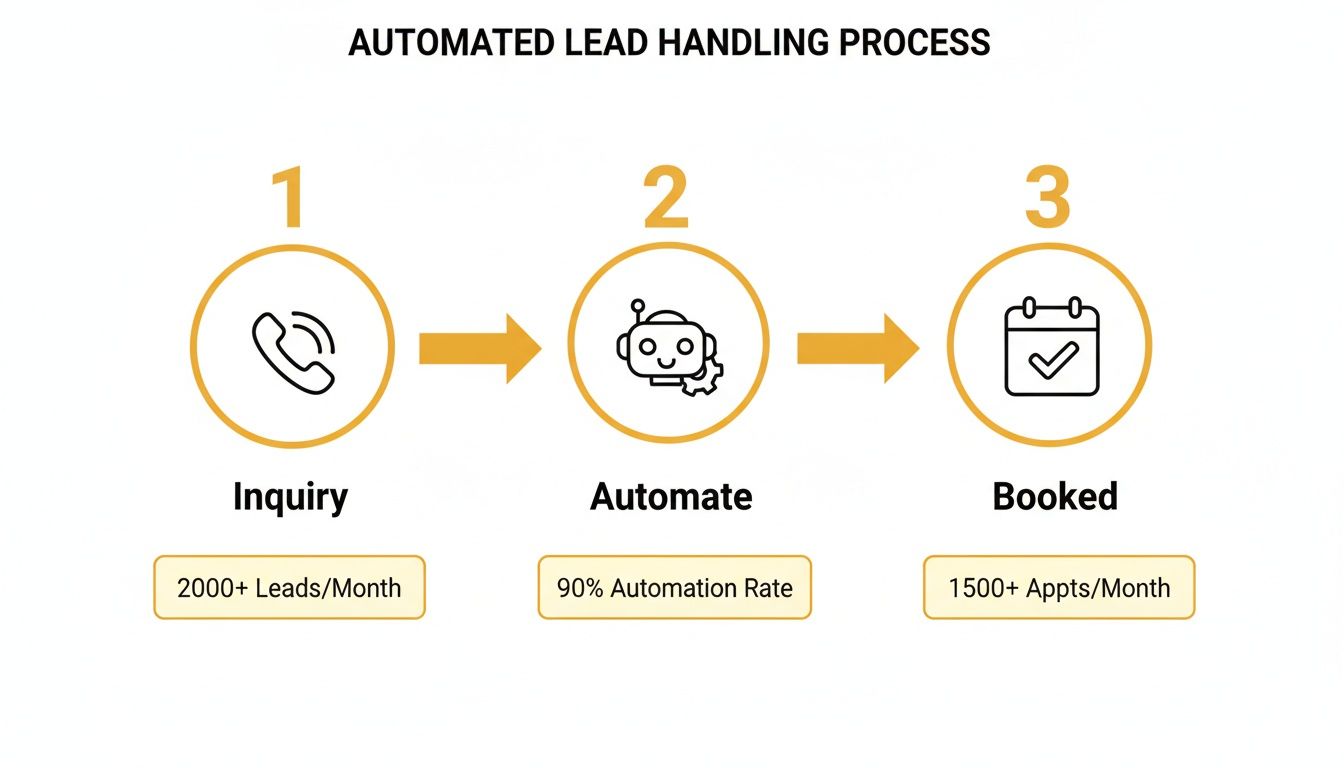
This is what it should look like: an inquiry comes in, automation takes over, and a booked job lands on your calendar. Simple.
Will It Actually Make Me Money?
This is the bottom line. Stop thinking about software as a cost. It’s an investment, and you need to know the return. The right lead management tool isn’t another bill to pay—it’s a machine that generates revenue.
Think about it this way: what’s the value of one good move that you would have otherwise missed? For most movers, that's easily over $1,000. If the software costs a couple hundred bucks a month but books just one extra job for you, it’s already paid for itself.
Every move it books after that is pure profit, turning missed calls and lost leads into real cash flow.
Your First 30 Days With Lead Management Automation
Switching to an automated system can sound like a massive headache. But it doesn't have to be. You can get this done in a month, and you'll see a return on your investment almost immediately if you do it right.
Here’s a simple week-by-week plan to get your new system running. We're not trying to do everything at once. The only goal here is to tackle your biggest revenue leak first: missed calls and lost leads.
Week 1: Connect and Capture
The first job is to stop the bleeding. In your first week, your only goal is to connect all your lead sources to the new system. That means your main business phone number and any "Get a Quote" forms on your website.
This step alone guarantees that every single person who tries to contact your business gets captured. No more calls rolling to voicemail. No more web leads getting buried in a spam folder. You’ll have a single inbox where every opportunity is logged and waiting for you.
Week 2: Customize Your Voice
Now that you're catching every lead, it's time to make sure your automated responses actually sound like you. Your company has a voice, and your automation should match it.
Take an hour to go through the automated text and email messages. Swap out the generic stuff for your company's actual tone—whether you're friendly and casual or more formal. A simple change like, "Thanks for reaching out to [Your Company Name]! We're on it," feels way more personal and builds trust from the first second.
Week 3: Integrate Your Calendar
This is where you kill the endless back-and-forth of scheduling. In week three, connect your lead management software to your Google or Outlook calendar. You'll set your availability and put in rules, like how much time you need between jobs.
Once that’s done, you can start sending qualified leads a booking link. They see your real-time availability and can book their move right then and there. This turns your system from a simple lead catcher into a booking machine. It saves you hours and impresses customers, which is always a good thing. A key part of managing your leads is understanding how much they cost you, which you can learn more about by calculating your cost per lead.
Week 4: Train and Review
The final step is getting your team on board with the new, simpler workflow. Since you picked a system built for movers, training should take minutes, not days. Just show them the mobile app and the one central inbox.
The new process is dead simple: "Instead of checking voicemails and emails, just look at the dashboard." This is your new single source of truth for every customer conversation.
By the end of the month, you’ll have a system that not only stops you from losing money but actively books jobs for you. This isn't just another piece of software; it's a real investment in a more efficient, profitable, and scalable moving company.
Frequently Asked Questions
I get it. Bringing new software into your business feels like a big step. You've probably got a few questions running through your head. Here are the straight-up answers to the things moving company owners ask me all the time.
Is This Kind of Software Hard to Set Up and Use?
No, and I mean that. The days of needing an IT degree to install software are long gone. Modern systems built for movers are designed for you—the owner—not a tech department.
You should be looking for a simple, guided setup that gets you running in minutes, not weeks. The best lead management software for small business feels intuitive. It should have a mobile app that’s easy enough for you and your crew to use on the road, with zero heavy training required.
How Is This Different From a Standard CRM?
That’s a great question, and the difference is everything. They might sound similar, but they’re built for completely different jobs.
A standard CRM is like a massive, clunky filing cabinet designed for big corporate sales teams. They’re built to track deals that take months to close, loaded with features that are total overkill for a moving company.
Lead management software for movers is different. It’s a tool built for one thing: speed.
- It's built for right now: The whole point is to grab a lead and respond in seconds before they call someone else.
- It's built for booking: It’s focused on getting quotes out and getting jobs on the calendar, automatically.
- It's built for simplicity: The goal is to book more jobs, not to create more data-entry work for you.
Think of it this way: a CRM is a database to store contacts. A lead management system is an engine to book jobs.
Key Insight: You don’t need another complicated program to manage. You need a simple tool that answers your phone, follows up on leads, and puts jobs on the schedule without you having to chase them.
Can I Afford This as a Small Moving Company?
This is the most important question, but it’s a mindset shift. You shouldn’t see this as a cost. You should see it as an investment that makes you money.
The real question is, "How much money am I losing right now from missed calls and slow follow-ups?" Most owners I talk to are shocked when they realize they’re losing 3 to 7 jobs every month this way.
If a system costs a few hundred dollars but books just one extra move you would’ve lost to voicemail, it’s already paid for itself. Every single job it books after that is pure profit you rescued from a lead that was about to disappear. You'll usually see the ROI in the first 30 days.
Ready to stop missing calls and start booking more jobs automatically? Discover how MoveJoy acts as your 24/7 AI receptionist, turning every call into a scheduled move. Learn more and see how it works.